94
6. Operation
6.1
Getting Started
➊
Channel Selection
You can use to navigate between channels until you find the channel you want.
▣ If you know the channel number, you can enter it with the NUMERIC buttons and wait 2
seconds until the channel is changed.
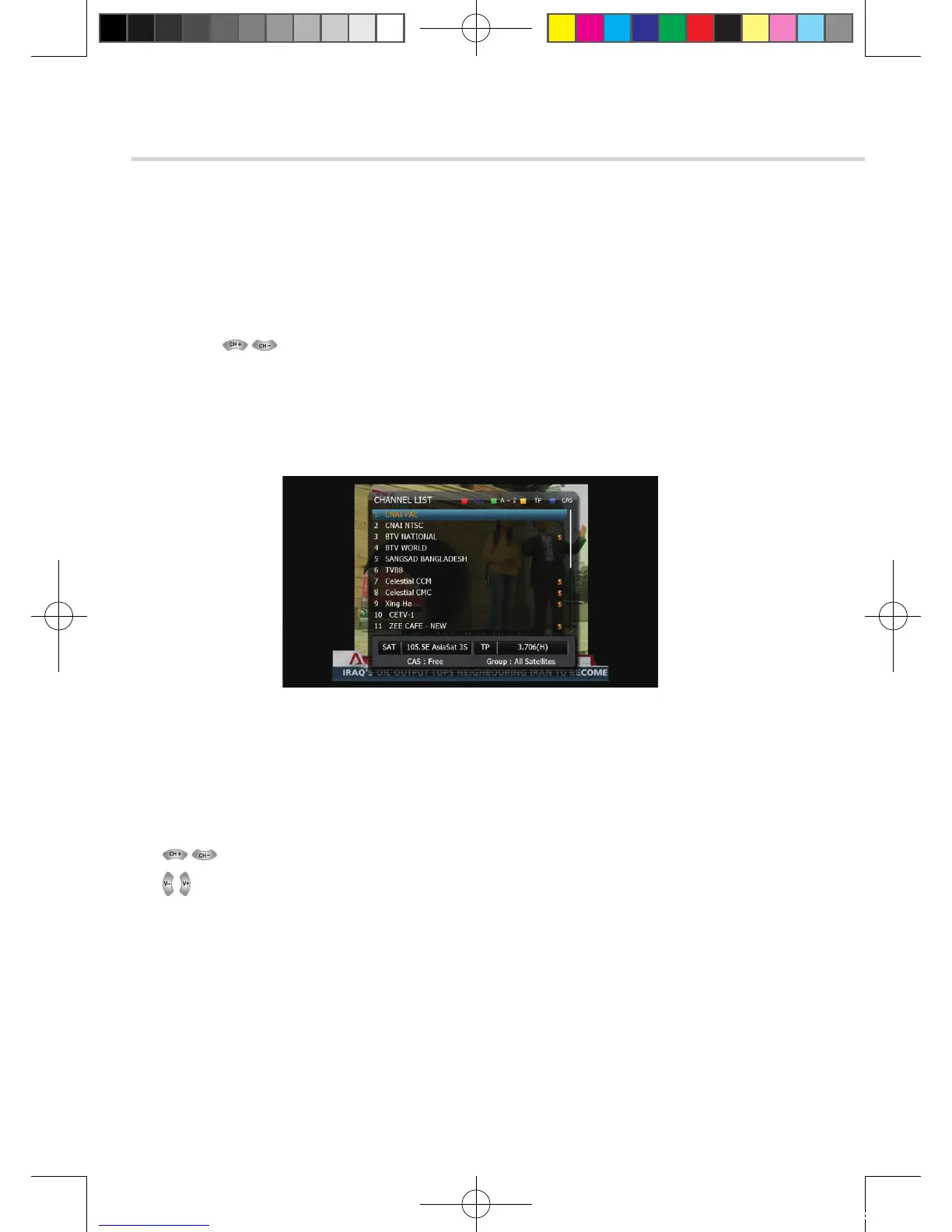
▣ If you know the channel name or transponder or CAS, you can press OK to display the
channel list <Figure 6.1.11>
Figure 6.1.11
1. detailed information about the selected channel will be displayed.
(Satellite Name, Frequency(Polar) and Channel Name)
2. You can use the following buttons to navigate between channels:
▪ : Moves one channel up/ down.
▪ : Moves one page up / one page down.
▪ RED: Press RED button on the remote to use channel sorting.
▪ ALL: Shows all channels in the current group.
▫ A~Z: Shows all channels sorted alphabetically.
▫ TP: Shows all channels sorted by Transponder.
▫ CAS: Shows all channels sorted by CAS system.
3. Press OK when the selection bar is positioned on the desired channel.
2. To View Program
[2012.10.12]D15+F15_russian+english.indd 94 2012-10-12 11:23:08



 To Next Page