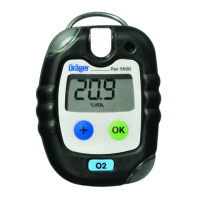
15
Calling the Info Mode
In measuring mode, press the key for approx. 3 seconds.
If any warning or fault messages exist, the corresponding information or error codes
are displayed (page 28 to page 35).
Press the key successively for the next display.
The peak values and the exposition values TWA
1)
and STEL
1)
are displayed.
— If no key is pressed for 10 seconds, the instrument returns automatically to
measuring mode.
Calling the Info-Off Mode
When the instrument is in a deactivated state, press the key.
The name of the gas, measuring unit and measuring range limit value are displayed for
all channels.
Pressing the key again exits the Info Off mode (or via timeout).
1) Only when activated in the instrument configuration. Delivery status: not activated.
Warning messages are displayed. Numerical codes of warning messages:
see page 28.
key
Fault messages are displayed. Numerical codes of fault messages:
see page 32.
key
The peak values = the maximum measured values in the case of, e.g., CO,
H
2
S, ... or the minimum measured values in the case of O
2
within the storage
interval are displayed
key
The average values of the exposures based on a shift of, e.g., 8 hours (TWA)
of all the active sensors for the exposure evaluation are displayed
key
The short-term values (STEL) = average values of the concentrations over
the average value duration of all the active sensors for the exposure
evaluation are displayed
key
The instrument is in measuring mode again
OK



 To Next Page
 Loading...