18
Calling the Calibration Menu
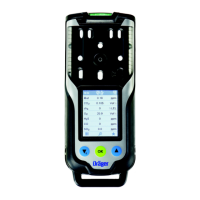
— The calibration menu can only be accessed by entering a password.
Password on delivery: »001«
— The default password on delivery can be changed using the PC software Dräger
CCVision.
In measuring mode, press the key for at least 4 seconds.
— The function for entering the password is selected.
— The special symbol » « (for the "enter password" function) is displayed.
Calibration menu functions
Press the key to cancel the active function.
— If no key is pressed for 10 minutes, the instrument automatically returns to
measuring mode.
______________________________________________
1) Fresh air calibration / zero-point calibration is not supported by the DrägerSensor DUAL IR CO
2
,
the DrägerSensor IR CO
2
or the DrägerSensor XXS O
3
. A zero-point calibration / adjustment of
these sensors can be conducted using the Dräger CC-Vision PC software. To do so, a suitable
zero gas that is free of carbondioxide and ozone (e.g. N
2
) should be used.
— The display shows »000«, with the
first digit flashing.
Use the key to set the flashing digit.
Press the key, the second digit
starts flashing.
Use the key to set the flashing digit.
Press the key, the third digit starts
flashing.
Use the key to set the flashing digit.
Press the key to confirm the
password once it has been set
completely.
— The calibration menu functions can
now be selected by pressing the
key.
Press the key to call the selected
function.
Fresh air calibration, refer to page 48.
1)
1-button calibration/adjustment, refer to page 50.
Single gas calibration/adjustment, refer to page 53.
OK
OK
OK
OK



 To Next Page
 Loading...