Vigor2750 Series User’s Guide
124
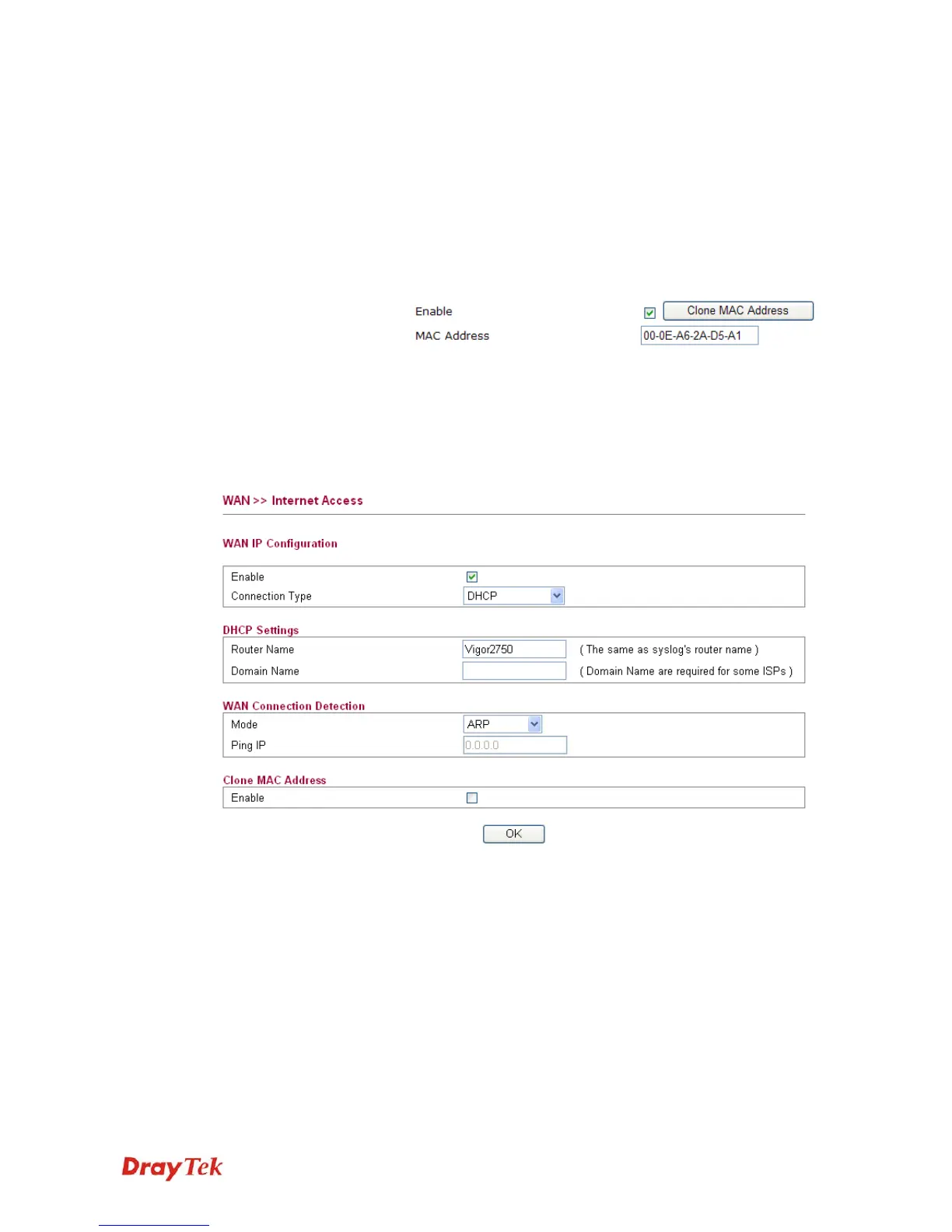
Mode Such function allows you to verify whether network connection
is alive or not through ARP Detect or Ping Detect. Choose ARP
Detect or Ping Detect for the system to execute for WAN
detection.
Ping IP If you choose Ping Detect as detection mode, you have to type
IP address in this field for pinging.
Clone MAC Address It is available when the box of Enable is checked. Click Clone
MAC Address. The result will be displayed in the field of
MAC Address.
After finishing all the settings here, please click OK to activate them.
D
D
H
H
C
C
P
P
DHCP allows a user to obtain an IP address automatically from a DHCP server on the Internet.
If you choose DHCP mode, the DHCP server of your ISP will assign a dynamic IP address for
your router automatically. It is not necessary for you to assign any setting,
Router Name Type in a name for the router (e.g., Vigor2750). It must be the
same as the name used in Syslog.
Domain Name Type the domain name (e.g., draytek) to fit the request of some
ISPs.
Mode Such function allows you to verify whether network connection
is alive or not through ARP Detect or Ping Detect. Choose ARP
Detect or Ping Detect for the system to execute for WAN
detection.
Ping IP If you choose Ping Detect as detection mode, you have to type
IP address in this field for pinging.














 To Next Page