Vigor2750 Series User’s Guide
59
3
3
.
.
5
5
B
B
a
a
n
n
d
d
w
w
i
i
d
d
t
t
h
h
M
M
a
a
n
n
a
a
g
g
e
e
m
m
e
e
n
n
t
t
Below shows the menu items for Bandwidth Management.
3
3
.
.
5
5
.
.
1
1
S
S
e
e
s
s
s
s
i
i
o
o
n
n
L
L
i
i
m
m
i
i
t
t
A PC with private IP address can access to the Internet via NAT router. The router will
generate the records of NAT sessions for such connection. The P2P (Peer to Peer) applications
(e.g., BitTorrent) always need many sessions for procession and also they will occupy over
resources which might result in important accesses impacted. To solve the problem, you can
use limit session to limit the session procession for specified Hosts.
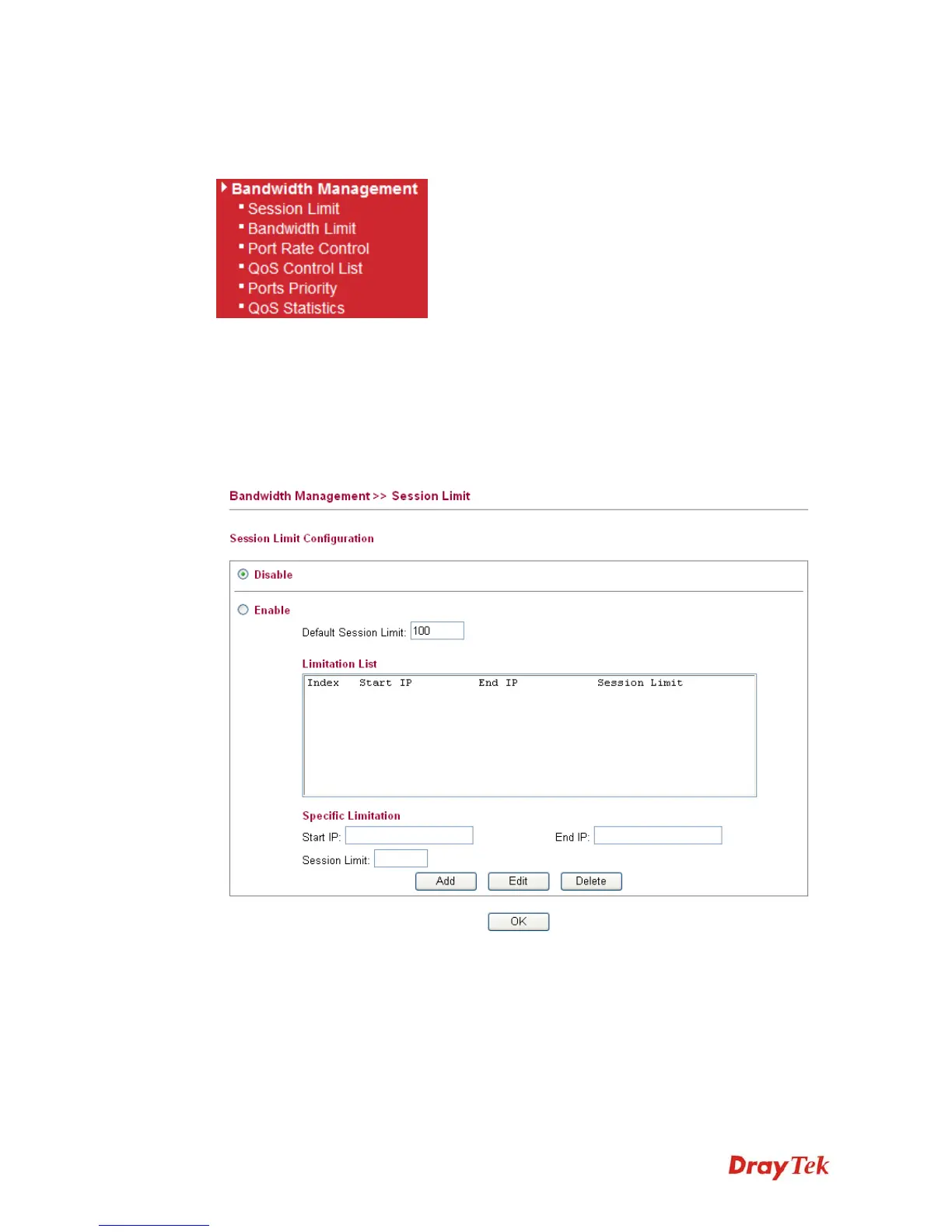
In the Bandwidth Management menu, click Sessions Limit to open the web page.
To activate the function of limit session, simply click Enable and set the default session limit.
Disable Click this button to close the function of limit session.
Enable Click this button to activate the function of limit session.
Default Session Limit Defines the default session number used for each computer in
LAN.
Limitation List Displays a list of specific limitations that you set on this web
page.














 To Next Page