Vigor2750 Series User’s Guide
245
5
5
.
.
2
2
H
H
o
o
w
w
t
t
o
o
u
u
s
s
e
e
Q
Q
o
o
S
S
f
f
u
u
n
n
c
c
t
t
i
i
o
o
n
n
i
i
n
n
V
V
i
i
g
g
o
o
r
r
2
2
7
7
5
5
0
0
?
?
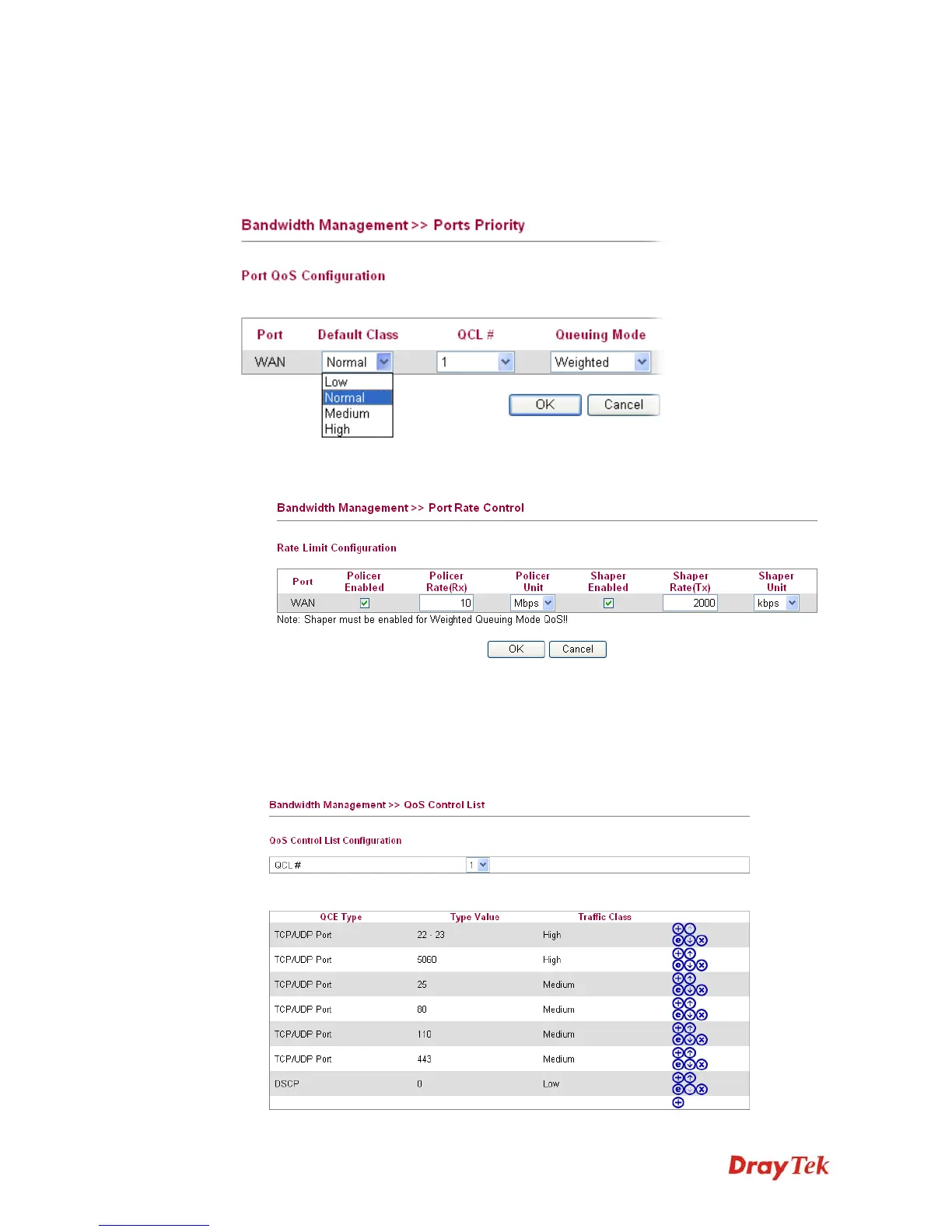
Like other Vigor Routers, Vigor2750 provides 4 traffic classes: High, Medium, Normal
and Low. The non-matching packets will be categorized to the default class (default is
Normal).
1. The first step to enable QoS is to set the correct WAN TX/RX Rate in Port Rate
Control page.
Policer Enabled option means to enable QoS for the RX/ Incoming direction.
Shaper Enabled option means to enable QoS for the TX/ Outgoing direction.
2. Then, configure the ports or protocols with specific traffic class value. Open
Bandwidth Management >>QoS Control List. The default QoS configuration is like
below.














 To Next Page