Vigor2750 Series User’s Guide
150
4
4
.
.
5
5
.
.
3
3
A
A
c
c
c
c
e
e
s
s
s
s
C
C
o
o
n
n
t
t
r
r
o
o
l
l
L
L
i
i
s
s
t
t
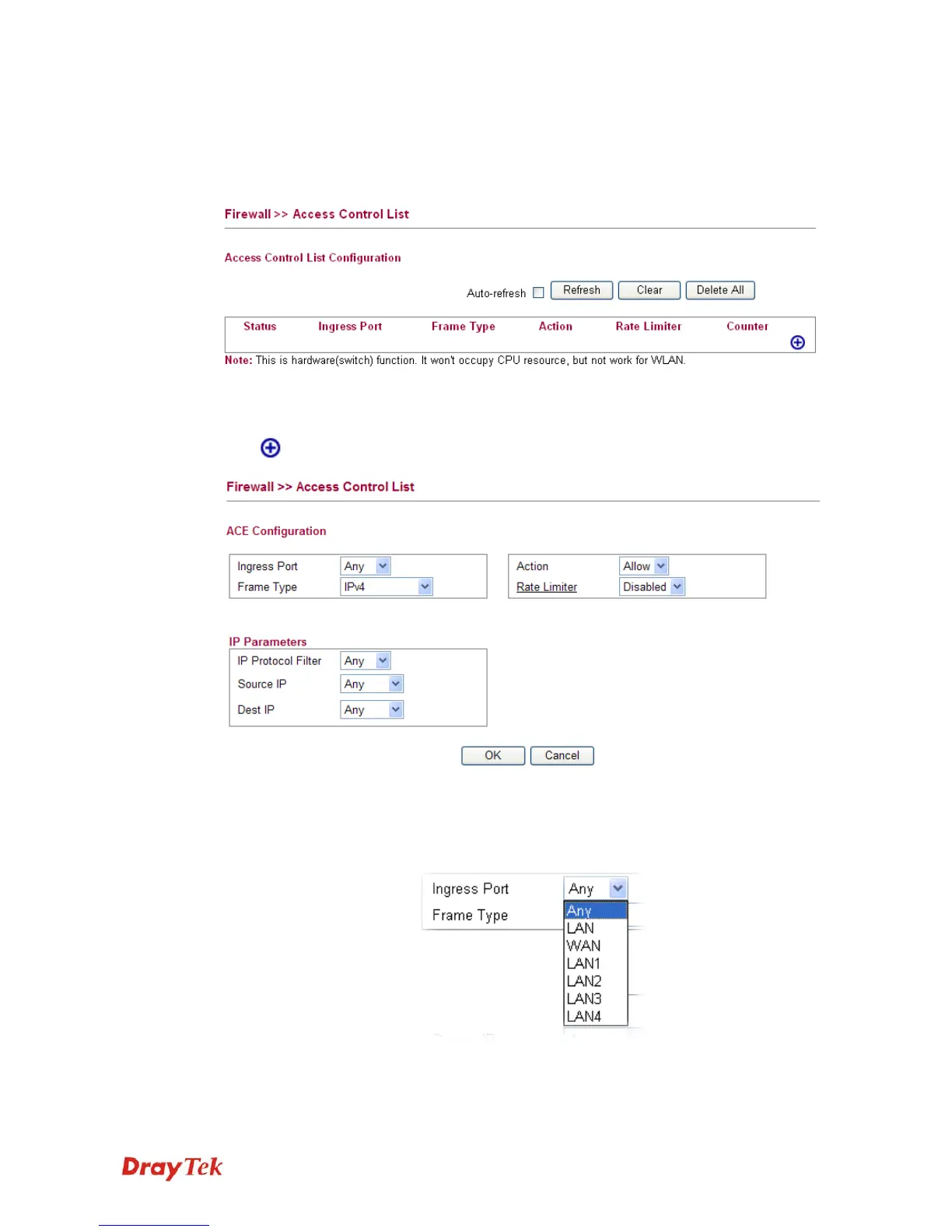
This page can define which kind of packet can access the router. The packet can be defined
with input port, Frame type, Rate, MAC type, VLAN ID, tag and etc.. For IPv4, we can also
define the protocol type, source IP and destination IP.
A
A
d
d
d
d
i
i
n
n
g
g
a
a
N
N
e
e
w
w
A
A
c
c
c
c
e
e
s
s
s
s
C
C
o
o
n
n
t
t
r
r
o
o
l
l
P
P
r
r
o
o
f
f
i
i
l
l
e
e
Click to add a new specific session limitation onto the list.
Define which port the packet from.
ACE Configuration Ingress Port – define which port the packet coming from. The
policy IDs are defined in Firewall>>Port Configuration. Each
Policy ID might have more than one port grouped.
Frame Type - Such option differs according to the selection
you choose, we will explain it in detailed later.
Action – it means the session limitation for this access control














 To Next Page