Vigor2750 Series User’s Guide
233
4
4
.
.
1
1
4
4
.
.
2
2
R
R
o
o
u
u
t
t
i
i
n
n
g
g
T
T
a
a
b
b
l
l
e
e
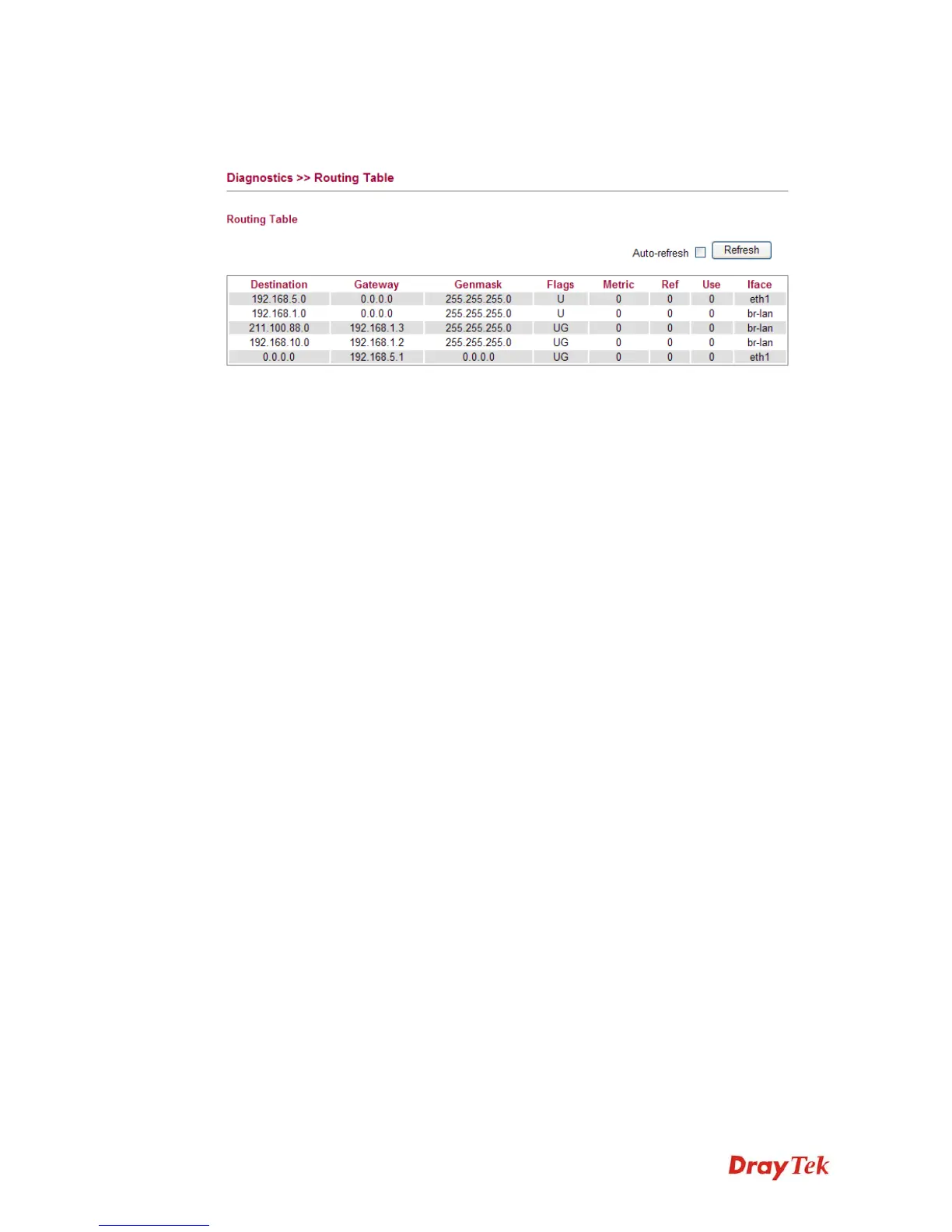
Click Diagnostics and click Routing Table to open the web page.
Destination Display the IP address for destination network or
destination host.
Gateway Display the gateway address or “*” if none set.
Genmask Display the netmask for the destination net;
'255.255.255.255' is for a host destination and '0.0.0.0' is
for the default route.
Flags Different codes represent different routing status.
U - route is up.
H - target is a host
G - use gateway
R - reinstate route for dynamic routing
D - dynamically installed by daemon or redirect
M - modified from routing daemon or redirect
A - installed by addrconf
C - cache entry
! - reject route
Metric Display the distance to the target (usually counted in hops).
Ref Display number of references to this route. (Not used in the
Linux kernel.)
Use Display count of lookups for the route. Depending on the
use of -F and –C, this will be either route cache misses (-F)
or hits (-C).
Iface Display interface to which packets for this route will be
sent.
Refresh Click it to reload the page.














 To Next Page