Vigor2750 Series User’s Guide
186
A
A
d
d
d
d
i
i
n
n
g
g
a
a
V
V
P
P
N
N
T
T
u
u
n
n
n
n
e
e
l
l
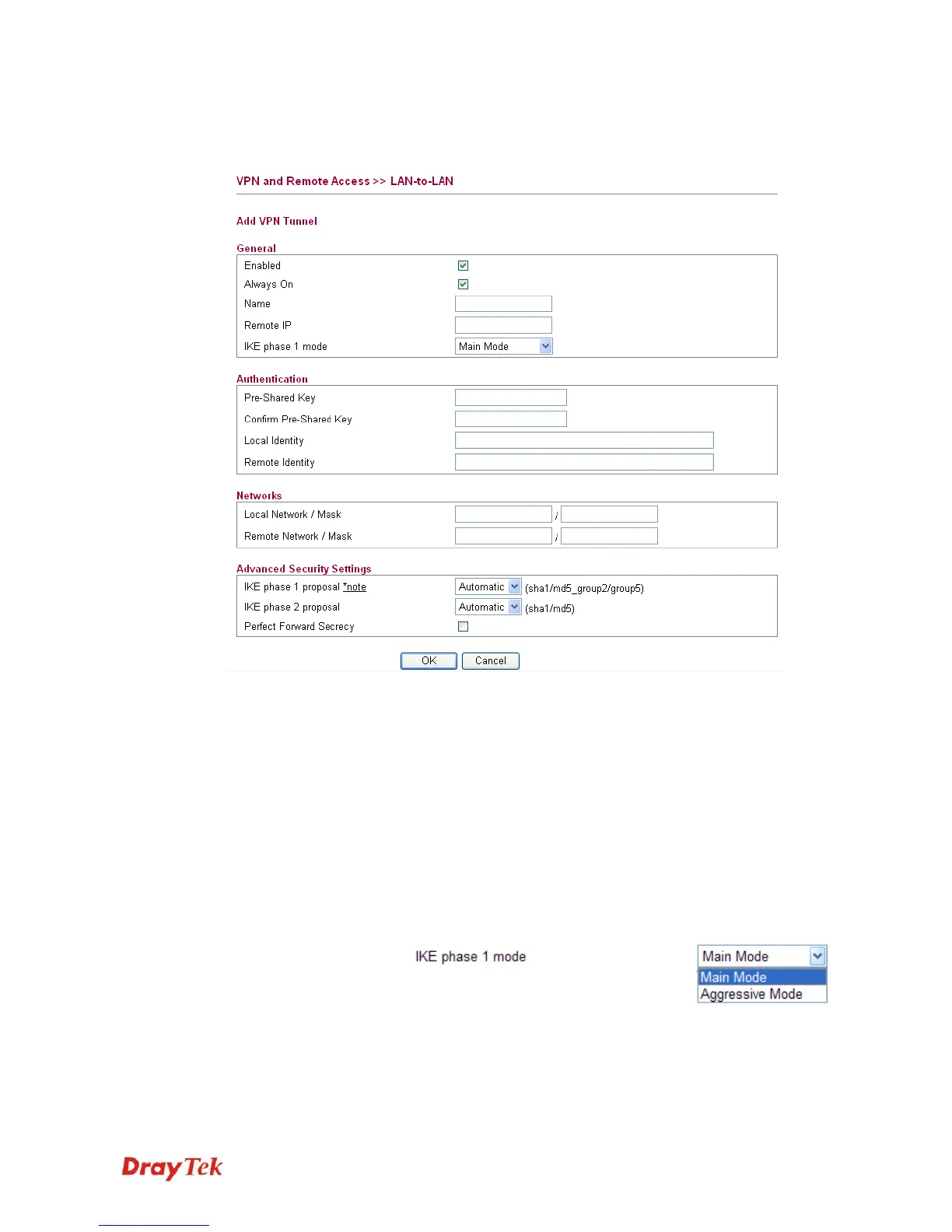
Click Add Tunnel to open the following page.
Enabled Check here to activate this tunnel.
Always On Check this box to make the WAN connection being activated
always.
Name Specify a name for this tunnel.
Remote IP Enter the IP address of the remote host that located at the
other-end of the VPN tunnel.
IKE phase 1 mode Select from Main mode and Aggressive mode. The ultimate
outcome is to exchange security proposals to create a protected
secure channel. Main mode is more secure than Aggressive
mode since more exchanges are done in a secure channel to set
up the IPSec session. However, the Aggressive mode is faster.
The default value in Vigor router is Main mode.
Pre-Shared Key Such field will be applicable when Pre-shared key is selected as
the Type for the authentication. Input 1-63 characters as
pre-shared key.














 To Next Page