Vigor2960 Series User’s Guide
14
I
I
f
f
P
P
P
P
T
T
P
P
i
i
s
s
s
s
e
e
l
l
e
e
c
c
t
t
e
e
d
d
This mode lets user get the IP group information by a DSL modem with PPTP service from
ISP. Your service provider will give you user name, password, and authentication mode for a
PPTP setting. Click PPTP as the protocol. Type in all the information that your ISP provides
for this protocol.
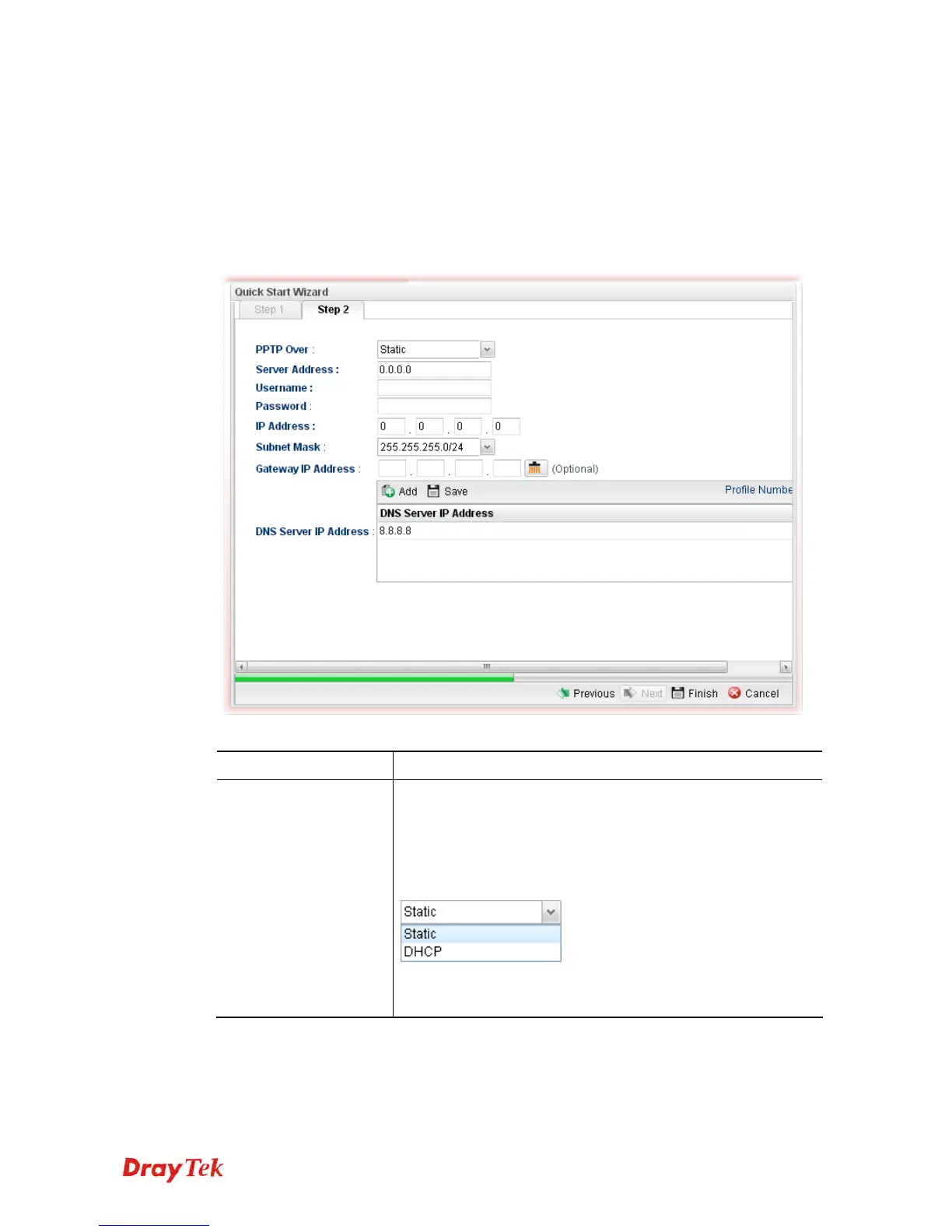
If your ISP offers you PPTP (Point-to-Point Tunneling Protocol) mode, please select PPTP
for this router. Next, enter the settings provided by your ISP on the web page.
Available parameters are listed as follows:
Item Description
PPTP Over
Usually ISP dynamically assigns IP address to you each time
you connect to it and request. In some case, your ISP provides
service to always assign you the same IP address whenever you
request. In this case, you can fill in this IP address in the Fixed
IP field. Please contact your ISP before you want to use this
function.
Static – specify the IP address.
DHCP - obtain the IP address automatically.














 To Next Page