Vigor2960 Series User’s Guide
358
4
4
.
.
1
1
2
2
.
.
1
1
G
G
e
e
n
n
e
e
r
r
a
a
l
l
S
S
e
e
t
t
u
u
p
p
4
4
.
.
1
1
2
2
.
.
1
1
.
.
1
1
G
G
e
e
n
n
e
e
r
r
a
a
l
l
S
S
e
e
t
t
u
u
p
p
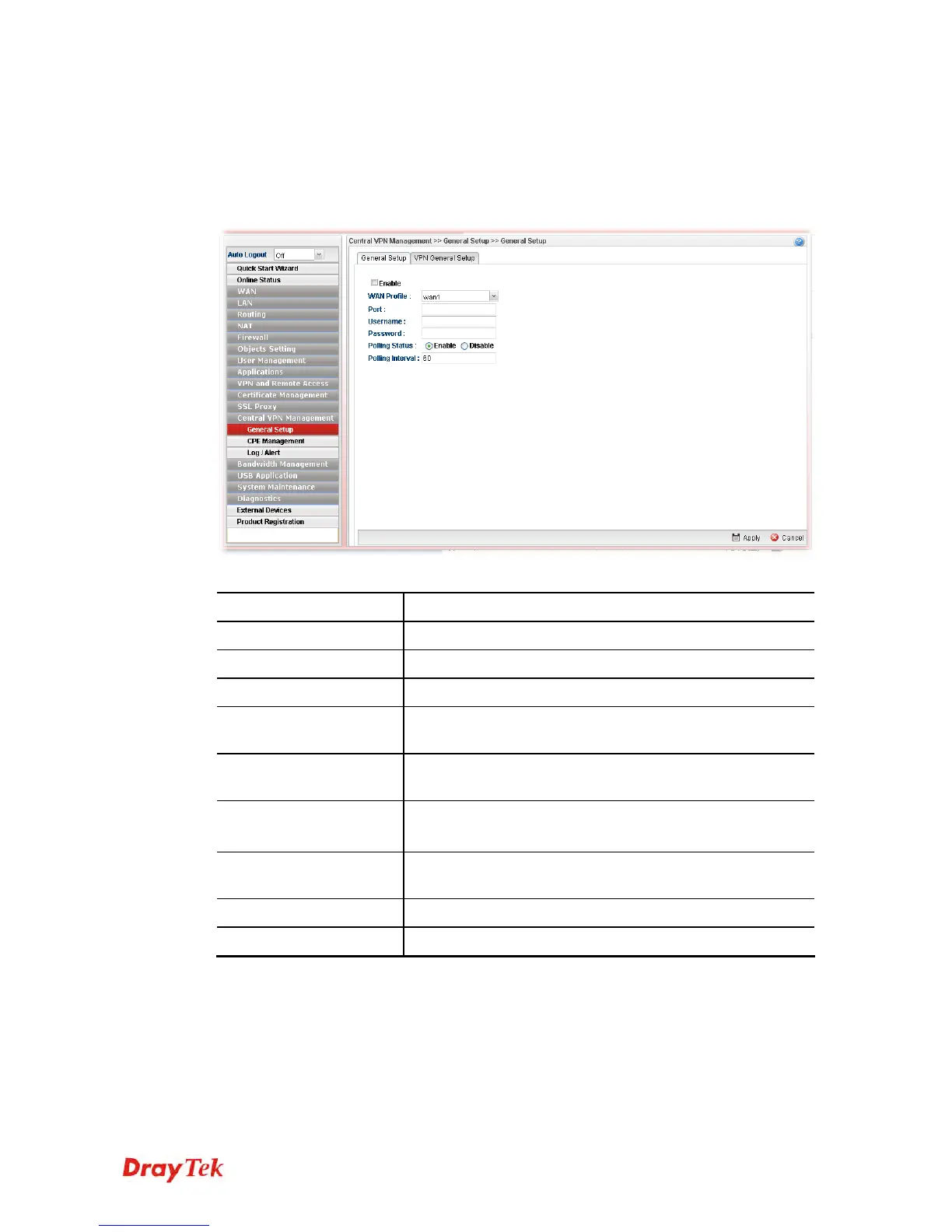
This page is used to configure settings which will be used by the clients to register to such
Vigor router.
Available parameters are listed as follows:
Item Description
Enable
Check it to enable the settings.
WAN Profile
Specify an interface for VPN management.
Port
Type a port number for Vigor2960.
Username
Type a username which will be used by any CPE tried to
connect to Vigor router.
Password
Type a password which will be used by any CPE tried to
connect to Vigor router.
Polling Status
Enable – Click it to enable the polling function.
Disable – Click it to disable the polling function.
Polling Interval
Type the time value (unit is second). The range is from 60 ~
86400.
Apply
Click it to save the configuration.
Cancel
Click it to discard the settings configured in this page.














 To Next Page