Vigor2960 Series User’s Guide
47
3
3
.
.
6
6
.
.
2
2
S
S
e
e
t
t
a
a
n
n
e
e
w
w
f
f
i
i
r
r
m
m
w
w
a
a
r
r
e
e
u
u
p
p
g
g
r
r
a
a
d
d
e
e
p
p
r
r
o
o
f
f
i
i
l
l
e
e
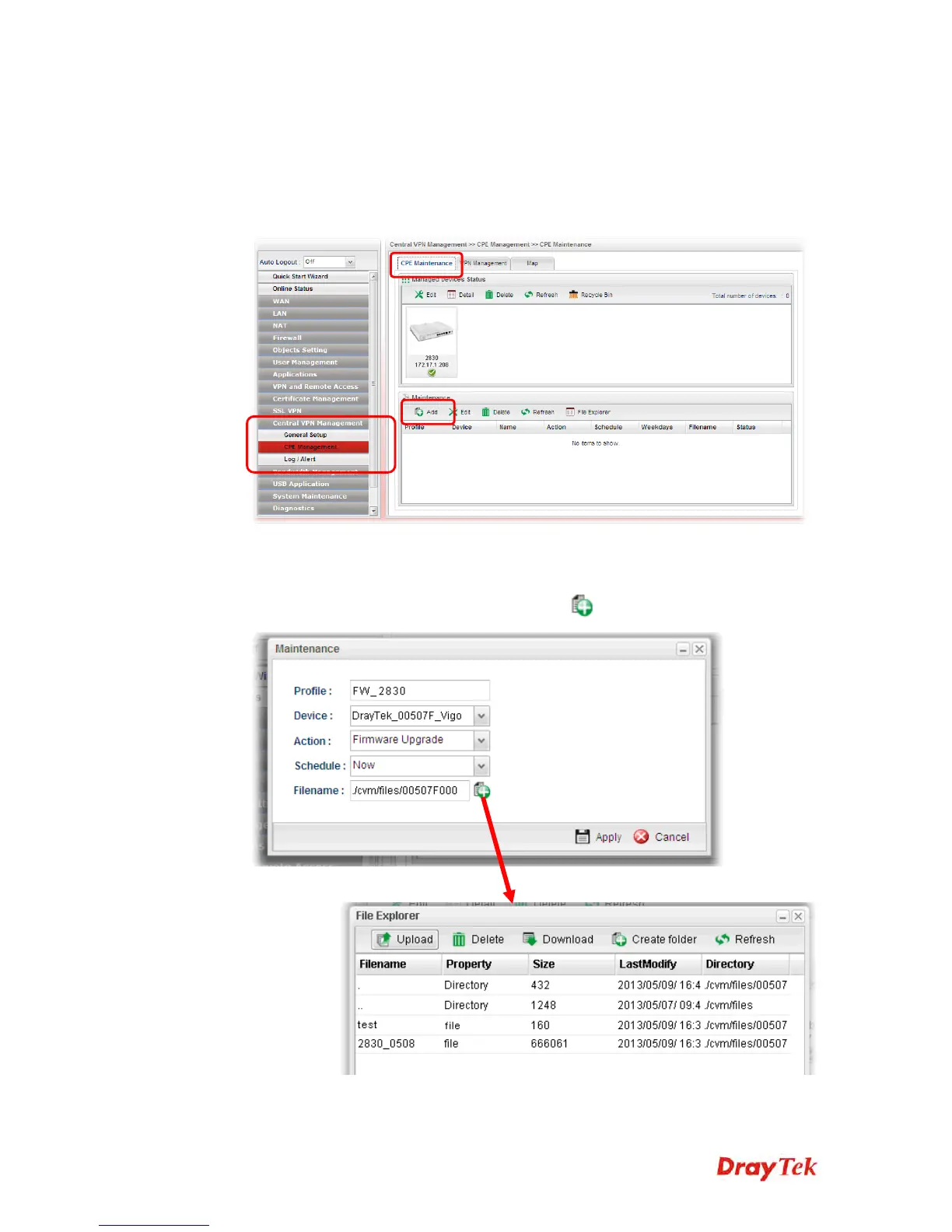
To create a new firmware upgrade profile, one CPE (e.g., 2830 in this case) must be
managed by Vigor2960 at least. Otherwise, the profile cannot be created successfully.
1. Open Central VPN Management>>CPE Management. Click CPE Maintenance. In
the Maintenance area, click Add.
2. In the following dialog, type the name for the new profile; specify the vigor router the
file will be applied to; choose Firmware Upgrade as the Action, choose Now as the
Schedule (it means the firmware upgrade will be performed after clicking Apply); and
type the string of the firmware filename or click
to choose a correct one.














 To Next Page