VigorAP 910C User’s Guide
80
3
3
.
.
6
6
.
.
2
2
S
S
i
i
t
t
e
e
S
S
u
u
r
r
v
v
e
e
y
y
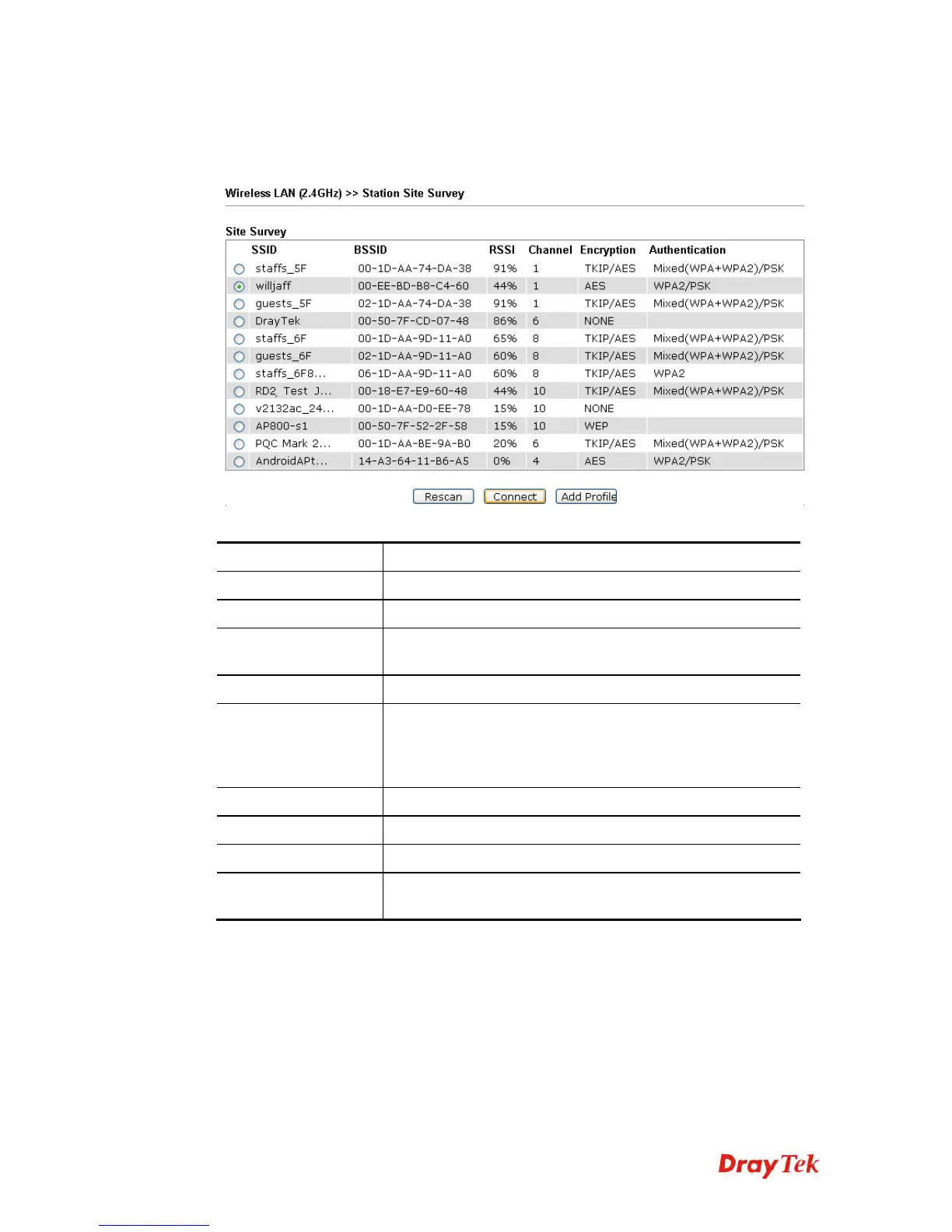
The page will list the access points nearby as VigorAP 910C is set to Station mode. You can
select one of the access points to associate.
Available settings are explained as follows:
Item Description
SSID
Display the SSID name of the access point.
BSSID
Display the BSSID (MAC Address) of the access point.
RSSI
Display the signal strength of the access point. RSSI is the
abbreviation of Receive Signal Strength Indication.
Channel
Display the channel number of the access point.
Encryption
Display the encryption setting of the access points. If you have
selected the access point with security setting, you have to go
to 2-7 Wireless Security to set the same security with the
access point you want to associate.
Authentication
Display the authentication type of the access point.
Scan/Rescan
Search the stations connected to such access point.
Connect
Connect to the wireless AP that you choose.
Add Profile
The system will add a profile automatically for you to connect
with the wireless AP that you choose.













 To Next Page