Front Panel Configuration
36
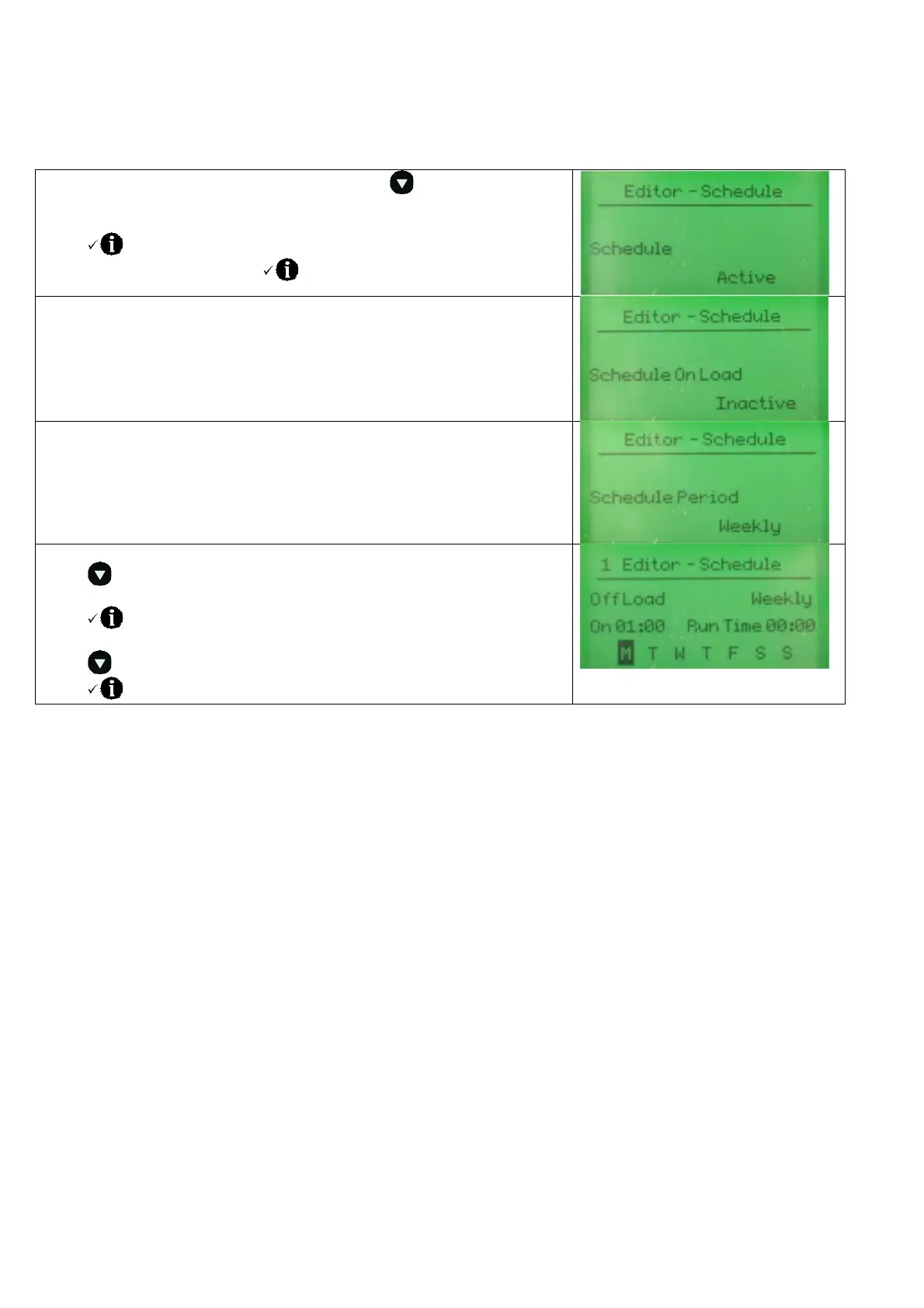
8.2.1 SCHEDULER SETTING
Enter the editor as described above and press the button to access the
Scheduler page.
Press
to enter edit mode and use the + / i buttons to make the
Schedule function active. Press to save your change.
Press + to move to the next item.
Review the current setting and choose if the Scheduler is to perform an ‘on
load’ test (active) or ‘off load’ test (inactive)
Press + to move to the next item.
Review the current setting and choose if the Scheduler is to perform a
weekly schedule (repeats every 7 days) or monthly (repeats every 28 days)
Press + to move to the next item.
Press to select which schedule entry to edit (there are up to 16 entries
indicated by the number in the tope left corner)
Press to edit the schedule. The item being edited flashes.
Press + / - to change the flashing item.
Press to move to the next editable value. (On, Day, Run Time etc)
Press to save your change


 To Next Page