Page 39
Pulmonary Function Test • Publication 014181-001 Rev 02 • www.datasci.com ©2023 Data Sciences International
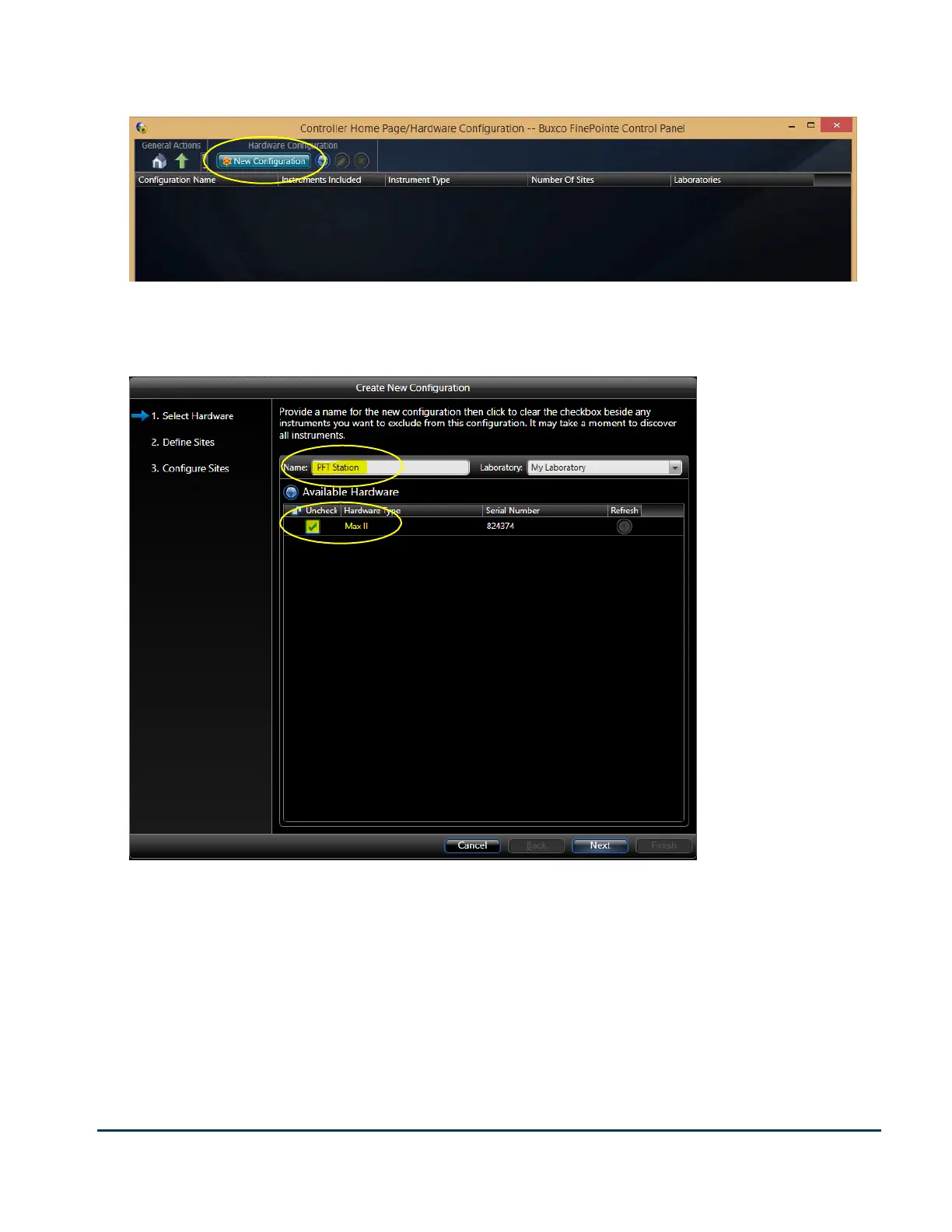
Click the Hardware Configuration button to add the hardware configuration.
The upper portion of the Hardware Configuration Page. Shown here, no Hardware Configurations have been created yet (so the list
is empty).
Click the New Configuration button to start the Create New Configuration wizard.
The first page of the Create New Configuration wizard.
The first page of the Create New Configuration looks similar to the one pictured above. Typically, you will only see
the instruments you have connected to the PC listed here. Since the PFT Pressure Panel has a Max II amplifier built
in, it appears as a Max II.
Make sure only the Pressure Panel is checked here and give the configuration a descriptive name. If you intend to
share your Pressure Panel with a mouse and a rat chamber, then be sure to indicate the species in the name. For
example: “Mouse PFT Station”, “Rat PFT Station”.
When you are satisfied click Next. Keep in mind also that you can change all these settings later if you feel you did
not do it correctly.


 To Next Page