Page 40
Pulmonary Function Test • Publication 014181-001 Rev 02 • www.datasci.com ©2023 Data Sciences International
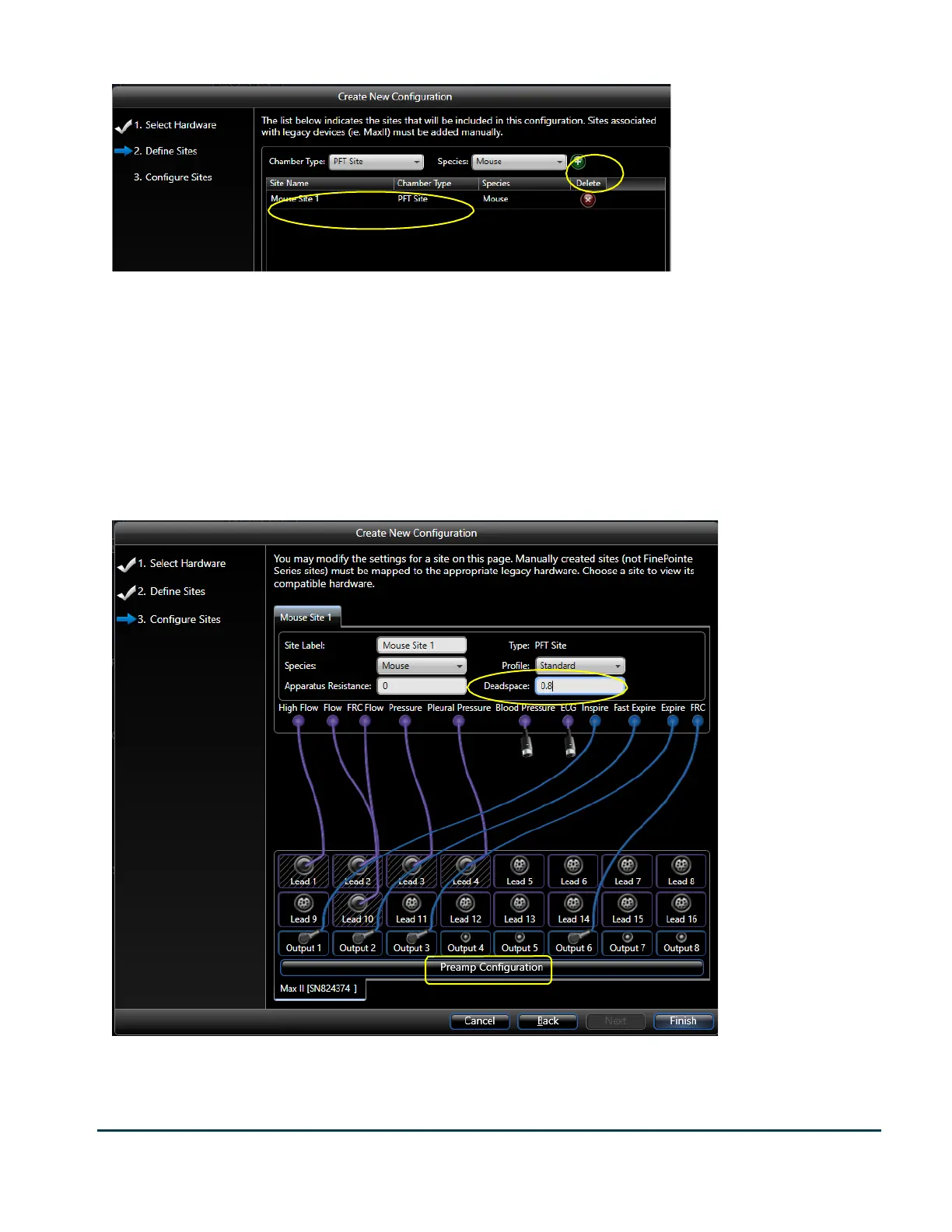
On this page you define the Site for your new PFT station.
Site is a term used throughout the software which refers to all the collection apparatus associated with the data
collection of a single subject.
A Pressure Panel can be associated with no more than one PFT site. So here you will only put down as many sites
as you have Pressure Panels (typically 1).
In the selection by Chamber Type, select “PFT Site” as shown. Next select the correct Species by the species
selection. Finally, click the Green + button to add the site to the list. The Green + is circled. Your new site is listed
in the list below those selection controls. Click Next.
This page is where you need to indicate how each signal on the built-in Max II is configured. You do this by
dragging connectors from the Site above to the jacks on the Max II instrument below. Make the same connections
as you see here. Every Pressure Panel is built the same way, so it should be connected the same way here.


 To Next Page