21
<When connecting 1:1 with PC (ad hoc mode)>
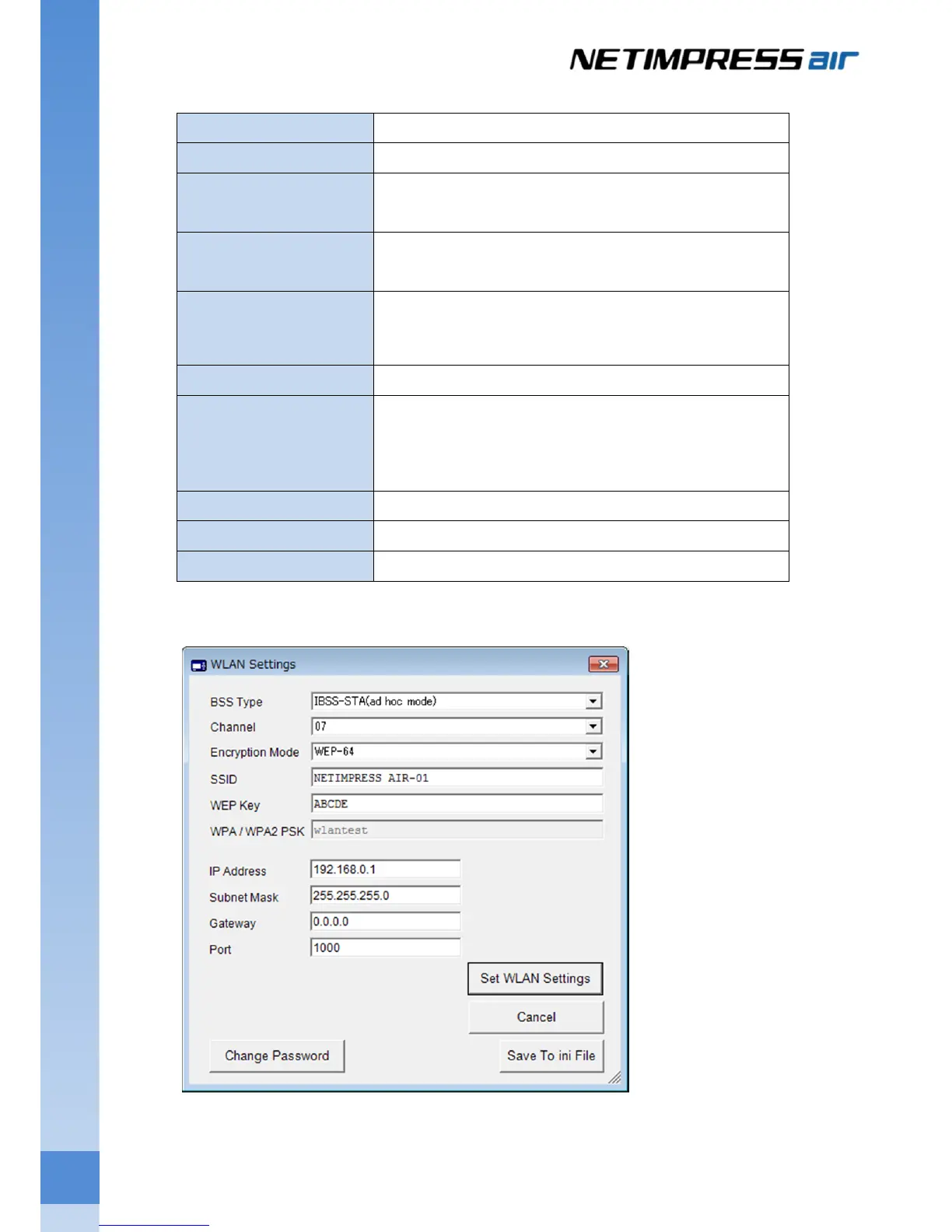
BSS Type Select “IBBS-STA (ad hoc mode)”
Channel Set a value not used by peripheral AP.
Encryption Mode Select the encryption mode. (Option)
Select one of the NONE, WEP-64, or WEP-128.
SSID Enter any SSID.
Do not set a name used by peripheral AP.
WEP Key Enter an encryption key for WEP-64/WEP-128. For WEP64,
enter 5 alphanumeric characters. For WEP128, enter 13
alphanumeric characters.
WPA / WPA2 PSK Do not change
IP Address Normally, make the upper 24 bits of the IP address as same
value of PC.
Example: air 192.168.0.1
PC 192.168.0.2
Subnet Mask Set 255.255.255.0 normally.
Gateway Set 0.0.0.0 normally.
Port Set 1000 normally.
Example:
It will wait for ad hoc connection when you click “Set WLAN Settings”.


 To Next Page