SLICE User’s Manual support@dtsweb.com
Version 1.0 - May 2010 22 ©DTS, Inc. - All Rights Reserved
Notes:
! Although this shows a SLICE MICRO, connections with a SLICE NANO are
similar.
! The SLICE System Interface is a shock rated item.
! The AUX Terminal can be used for easy connection to a battery, start record,
trigger, and status signal.
! Voltage input through the SLICE System Interface can be provided via the
included power supply a battery, or any voltage source between 9 and 20 VDC.
Warning: Do not exceed the 20 VDC input voltage range as damage may result.
! The SLICE System Interface has a recessed ON switch. Alternately the ON
signal can be connected to the GND on the EOC Terminal.
! If you connect an LED between the STS and GND terminals on the EOC
Terminal you will get a Status light when the system is armed.
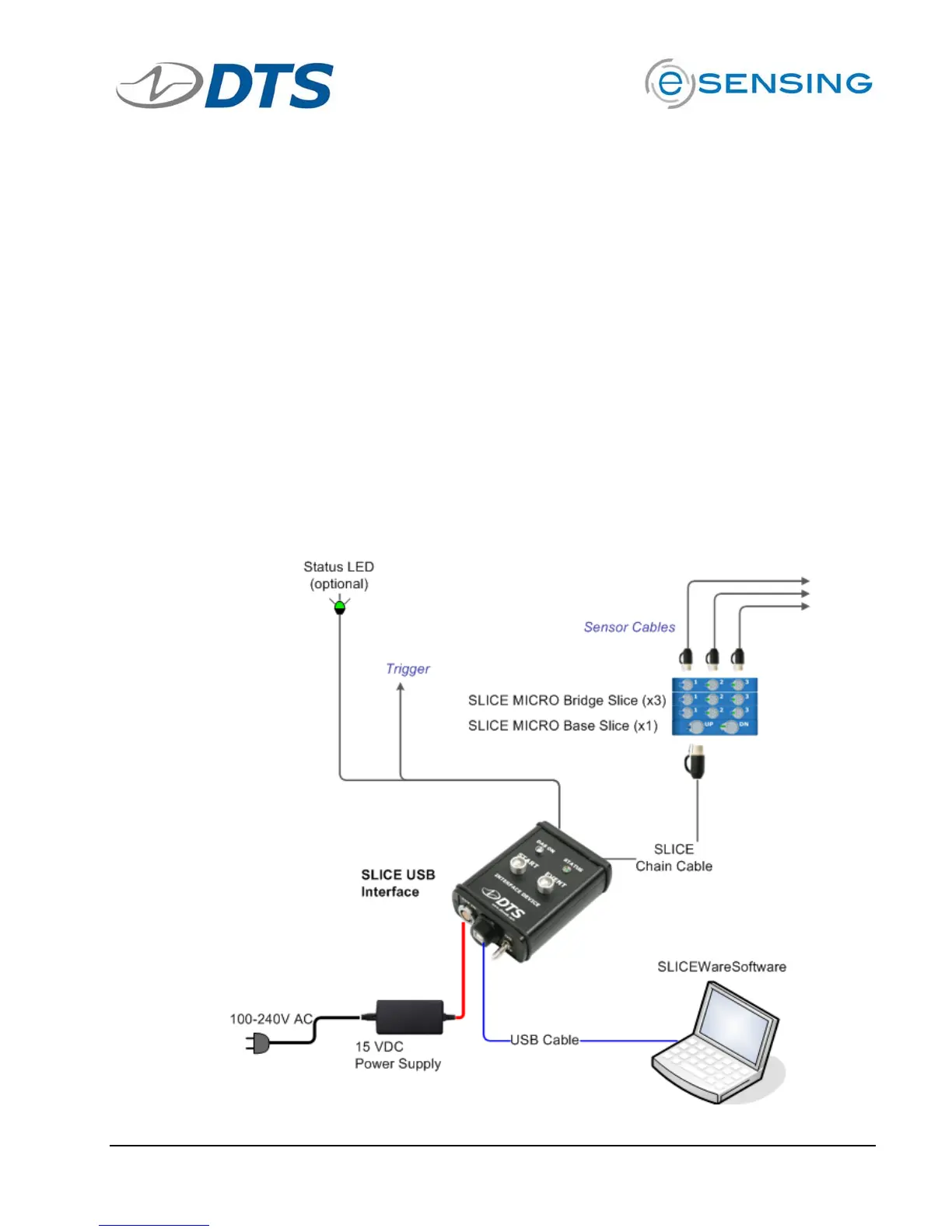
3.7. Using the SLICE USB Interface
The SLICE USB Interface is similar to the SLICE System Interface. The main
difference is that the SLICE USB Interface is designed for bench-top, non-rugged use.
See the example diagram below.



 To Next Page