SLICE User’s Manual support@dtsweb.com
Version 1.0 - May 2010 43 ©DTS, Inc. - All Rights Reserved
6. Powering Up SLICE
This section covers what to expect when powering up a SLICE system and running a test.
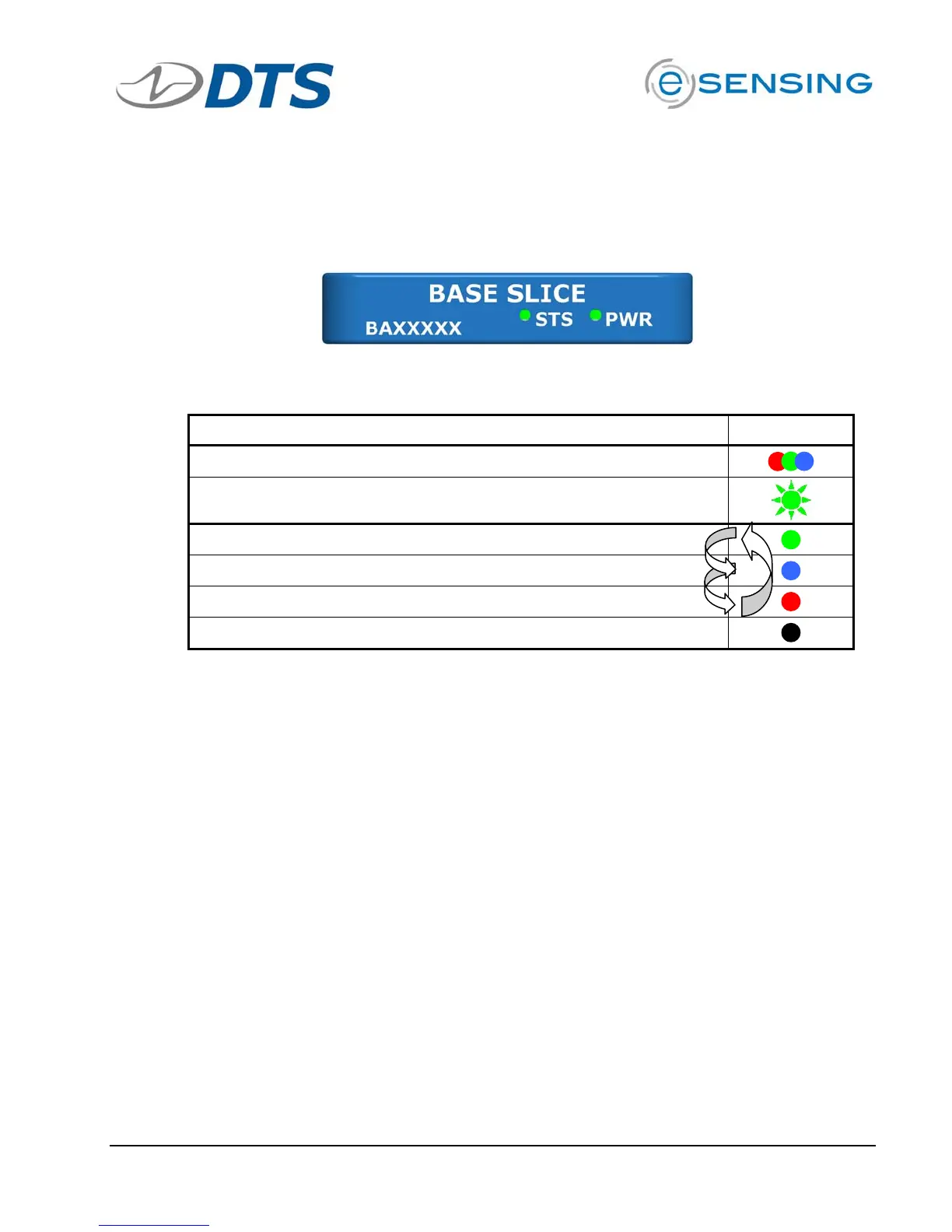
The LEDs on the Base SLICE indicate the status of the system.
6.1. Status (STS) LED
Action Result
Power up
Communicating with PC
Recording Data (Recorder Mode) -or- Armed (Circular Buffer)
Armed in Recorder Mode
Unit received Event
Idle
The status LED is red, green or blue. At system power up, the LED cycles from red to
green to blue followed immediately by the power LED boot-up sequence.
The status LED indicates communication and arm status.
! When the unit is not armed, the status LED will blink green when handling a
command from the PC.
! For Recorder Mode
o When the unit is first armed, the LED will go solid blue to indicate that it
is waiting for the START RECORD signal but not taking data.
o When it receives the START RECORD signal, the LED will turn green to
indicate that it is actively recording data.
o The LED will turn off when data collection has completed.
o If an EVENT signal is received while the unit is recording data, the LED
will turn red and then turn off when data collection has completed.
! For Circular Buffer Mode
o When the unit is armed, the LED will go solid green to indicate that it is
collecting data and waiting for the EVENT signal.
o When an EVENT signal is received the LED will turn red and then turn off
when data collection has completed.


 To Next Page