Installation and Operation of Flexible Batch Broiler – Electric
10
III. OPERATION INSTRUCTIONS
Theinformationinthissectionisintendedfortheuse
ofqualiedoperatingpersonnel.QualiedOperating
Personnel are those individuals who have carefully
read the information contained in this manual, are
familiarwiththefunctionofthebroilerand/orhavehad
experiencewith operatingtheequipmentdescribed.
Werecommendfollowingtheseinstructionstoinsure
optimumperformance,longlifeandtrouble-freeservice
from your broiler.
The controller is pre-programmed at the factory for
knownrecipesatthetimeofmanufacture.Theproduct
keysmustbeprogrammedwithanapprovedrecipeand
thebroilerproperlycalibratedpriortouse.
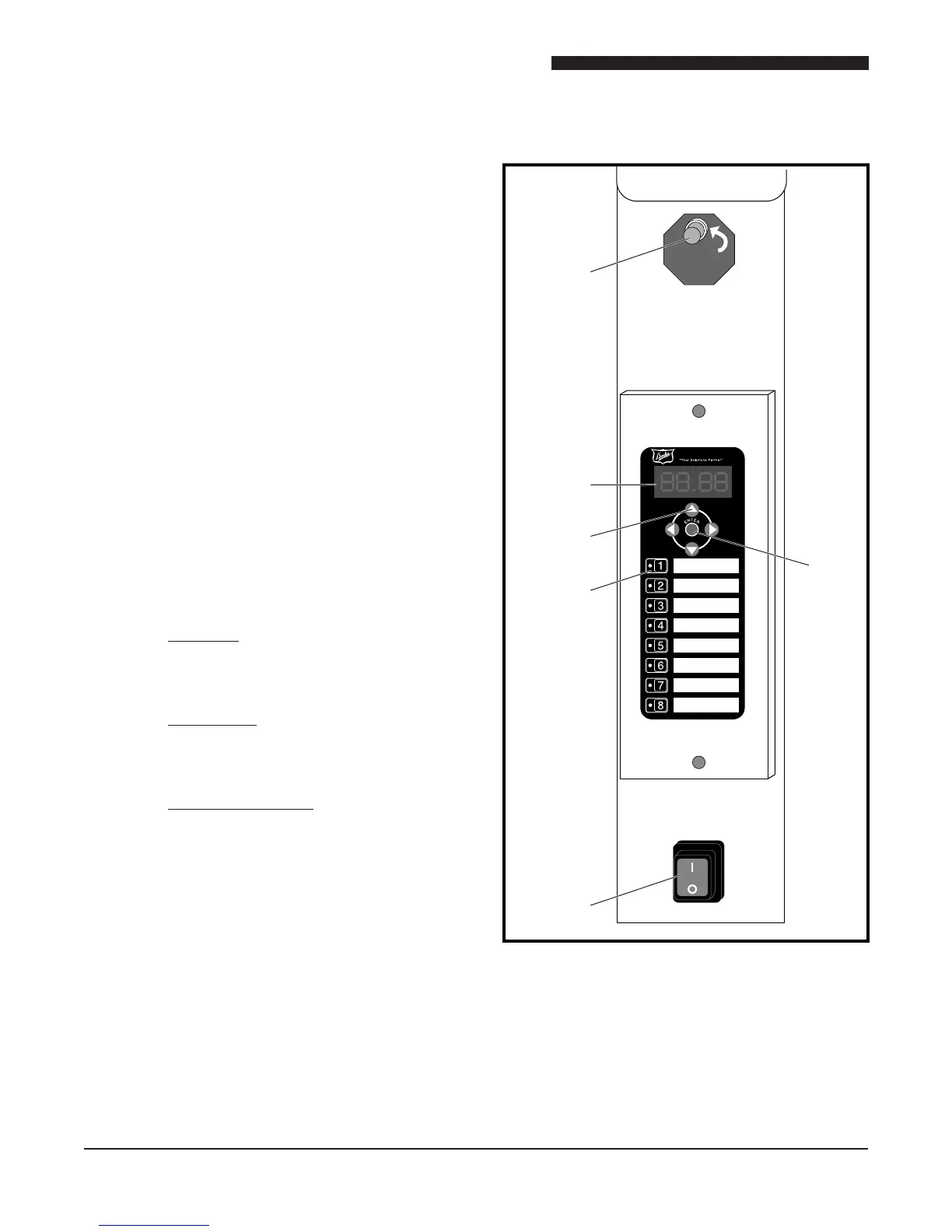
A. BROILER CONTROLS
1. Power Switch –Turnsthe broiler ON
or OFF.
2. Product Selection Keys – Selects the
productrecipetorun.Alsofunctionsas
numberkeys1-8inprogrammingmode.
3. Arrow Keys
Up-Arrow: Displays the current broiler
temperaturewhenpressedinrunmode.
Scrolls backward through parameters
whenpressedinprogrammode.
Down-Arrow:Displaysthebroilerset-point
temperaturewhenpressedinrunmode.
Scrolls backward through parameters
whenpressedinprogrammode.
Left-Right Arrows: Moves between
characters or parameters in program
mode. Also used as numerals 0 and 9
keys.
4. Display
5. Enter Key–Pressandholdfor5seconds
to enter program mode. Also used to
move though and enter parameters in
programming mode.
6. Cook Light–Thislightislitduringpreheat
andtheentirecook.Theoperatorshould
notloadthebroilerwhilethelightislit.
1
2
3
5
4
6
DO NOT
LOAD
IF LIGHT ON



 To Next Page