Installation and Operation of Flexible Batch Broiler – Electric
20
D. PROGRAMMING THE CONTROL
D-1.0 Entering Program Mode
TherearetwolevelsofcontrolProgramming.
Level1:Reciperelatedprogramming.
Level2:Broilerfunctionalityprogramming.
PressandholdtheENTERbuttonfor5seconds.
ThecontrolwillthendisplayCodE.Enterapassword
thatisspecictothelevelofprogramming.
D-2.0 Navigating the Programming Screens
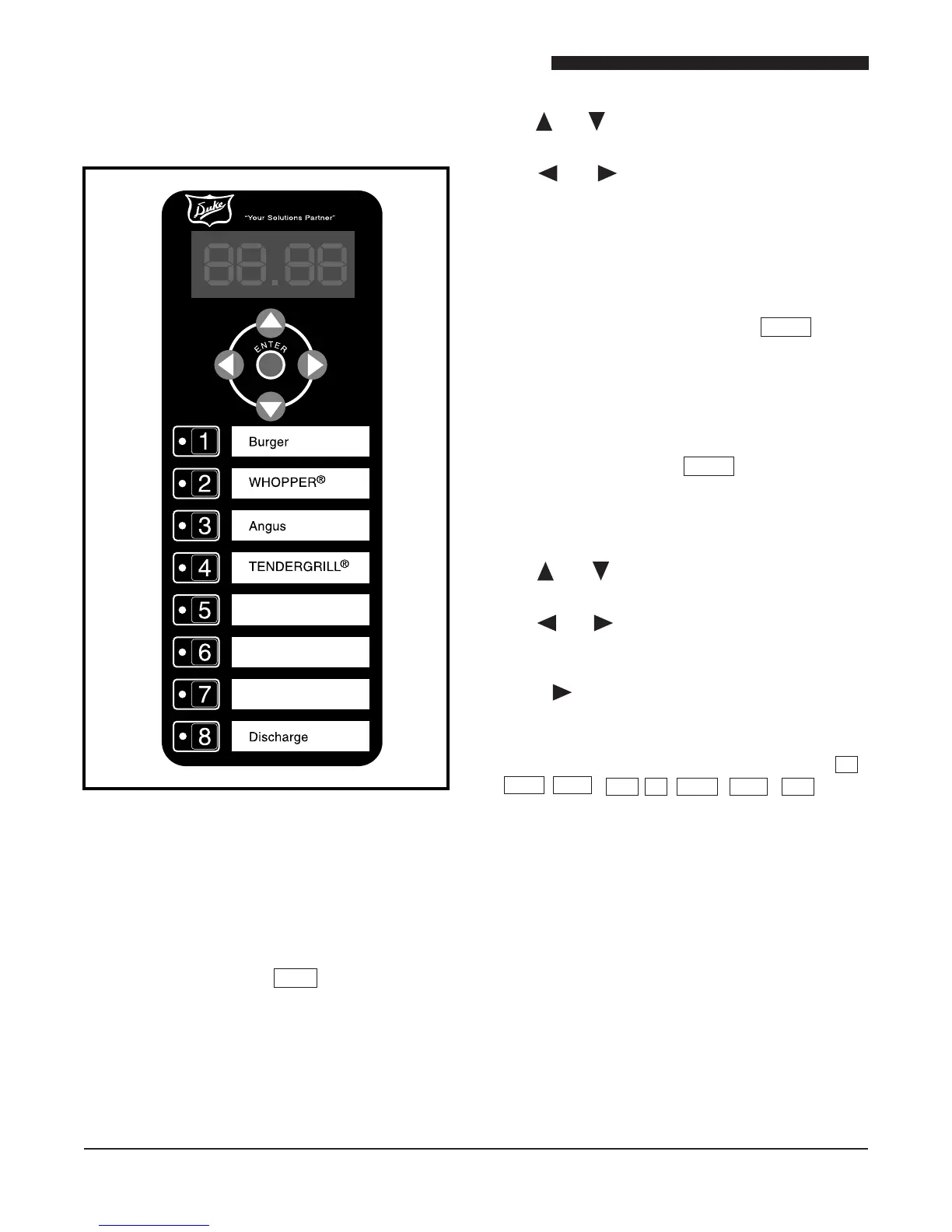
TheENTERkeyisusedtomoveforwardthoughthe
listofparameters.TherstpressoftheENTERkey
bringsuptheparameternameandthenextpressbring
uptheeditableparametersetting.
The and keyswillmovebackwardthroughthe
parameters.
The and keys will scroll through parameter
settingsandalsofunctionasnumbers0and9.
Productkeys1-8alsofunctionasnumberkeys1-8.
D-3.0 Level 1 Programming
Enterthepassword1-8-2-7andpresstheENTERkey.
Atthispointthe control will display PRODandall
ProductLED’swillturngreen.
Select a product key for a product that you wish to
change.TheLEDnexttotheselectedproductwillturn
green.AllotherproductLEDwillbeblank.
D-3.1 Product Identier AbCd
Thisparameterallowstheusertodeneafourdigit
alphanumeric product name to associate with each
product button.
The and keys are used to move through the
characterset.
The and keysareusedtomovetothenext
orpreviouscharacter.Thecharacterthatisactive
willash.
Hitting afterthelastcharacterwilltakeyoutothe
next parameter.
D-3.2 Cooking Temperature Cooking Prole ti1 ,
SEt1 , PL 1 , bH1 , ti2 , SEt2 , PL 2 , bH2 …
Denesthecyclingparametersfortheupperinfrared
elements,dischargeheatingelementandtheoverall
cook time.
Theseparameterscanhaveupto6segments.Each
segmentconsistsof(1)timercycle,(1)temperature
setting and (1) power level setting, and (1) bottom
heatsetting.
The bottom heat setting bH1-6 controls the lower
discharge heating elements. Changing this setting
to off turns the lower discharge element off for this
segmentofthecook
Thetimercyclesettingwillcomerst.



 To Next Page