33
1
2
Program JOB for DC-645 Via Computer (JOB Creator)
Uninstall and Update JOB Creator
○○○○○○○○○○○○○○○○○○○○○○○○○
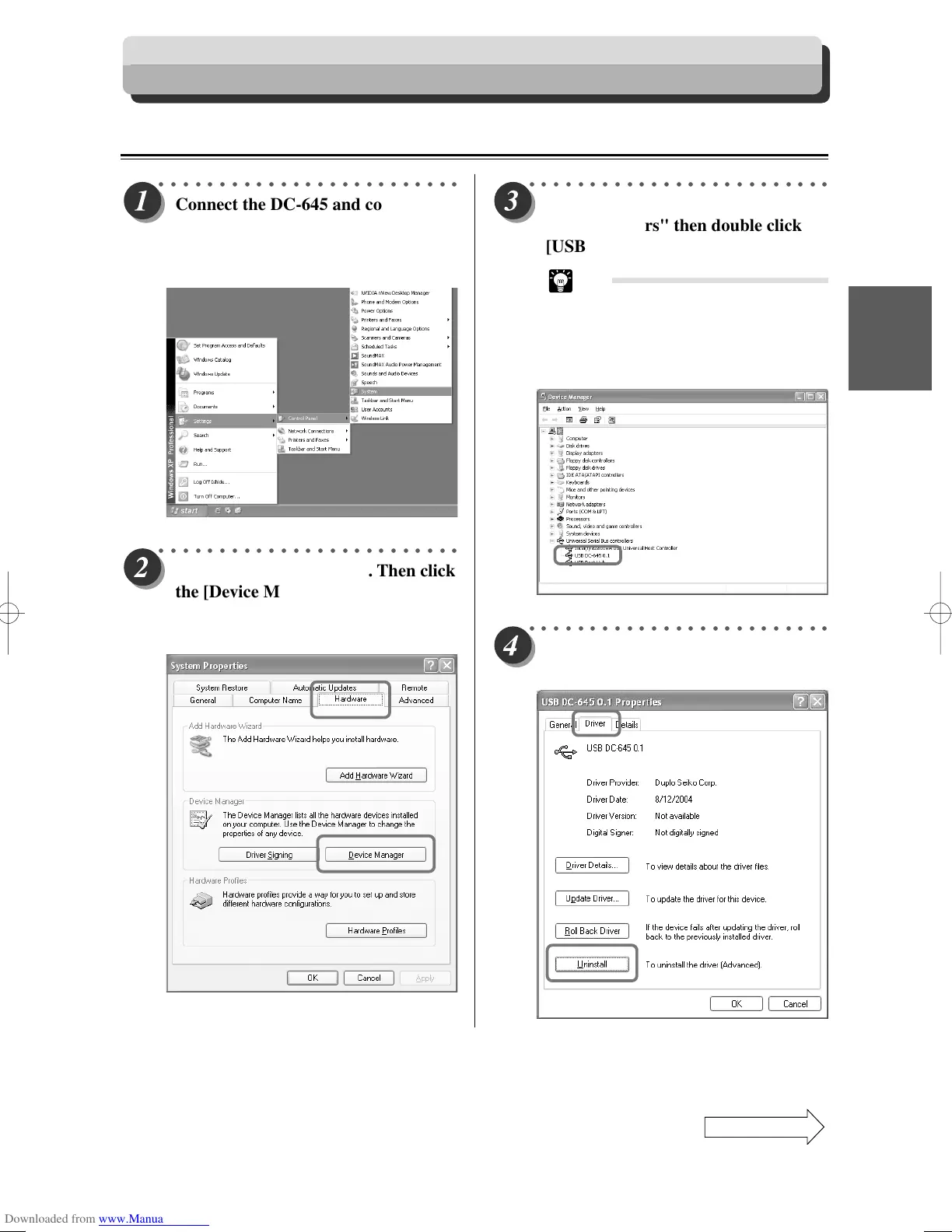
Connect the DC-645 and computer.
Select [Start] – [Settings] – [Control
Panel] – [System], then open the
[System Properties] dialog.
Uninstalling Procedures (Windows)
○○○○○○○○○○○○○○○○○○○○○○○○○
Select the [Hardware] tab. Then click
the [Device Manager] button.
The [Device Manager] dialog
appears.
○○○○○○○○○○○○○○○○○○○○○○○○○
Go to list and find "Universal Serial
Bus controllers" then double click
[USB DC-645 *.*].
Tip
• Note that the [USB DC-645 *.*] will
not appear in the “Universal Serial
Bus controllers” list unless the DC-
645 is connected to the computer
with a USB cable.
○○○○○○○○○○○○○○○○○○○○○○○○○
Select the [Driver] tab. Then click the
[Uninstall] button.
Continue Page
•••



 To Next Page