75
1
Basic Operations
4
Clean Feed Rollers
As DC-645 process digital colour outputs, toner etc. on the documents may adhere to the surface of feed rollers of DC-
645. When the accumulation of such toner becomes excessive, it may effect the performance of DC-645. In this case,
clean the rollers in following procedures.
○○○○○○○○○○○○○○○○○○○○○○○○○○○○○○○○
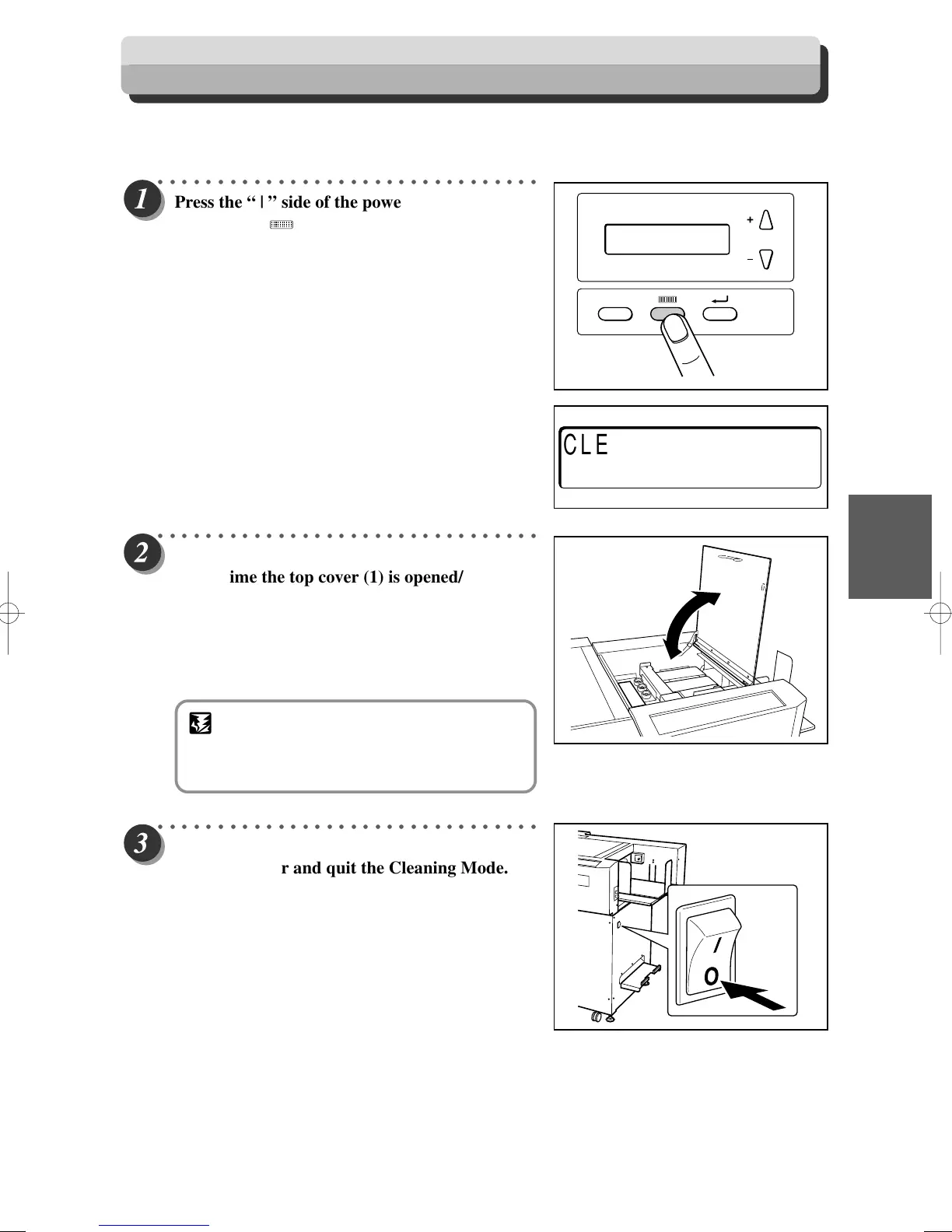
Press the “ | ” side of the power switch, while
pressing the <MODE> key, to turn ON the
machine.
The machine is started up with the Cleaning
Mode.
○○○○○○○○○○○○○○○○○○○○○○○○○○○○○○○○
Open / Close Top Cover 1.
Every time the top cover (1) is opened/closed,
the feed rollers turn 60 degrees. Wipe-off the
toner, debris on the rollers using a tightly
wrung cloth. The entire roll is cleaned around
its circumference by opening/closing the top
cover 6 times.
○○○○○○○○○○○○○○○○○○○○○○○○○○○○○○○○
Press the power switch of the “
KK
KK
K ” side to turn
OFF the power and quit the Cleaning Mode.
CLEANING MODE
STOP–
>
POWER OFF
F
IMPORTANT
• Do not wipe the rollers with anything other
than that designated above. Use of anything
else may result in mechanical malfunction.



 To Next Page