EN-204 User and Installation Guide
68
5.4.4.6 FTP
The File Transfer Protocol (FTP) can be used for uploading captured pictures and sending them via
the FTP server.
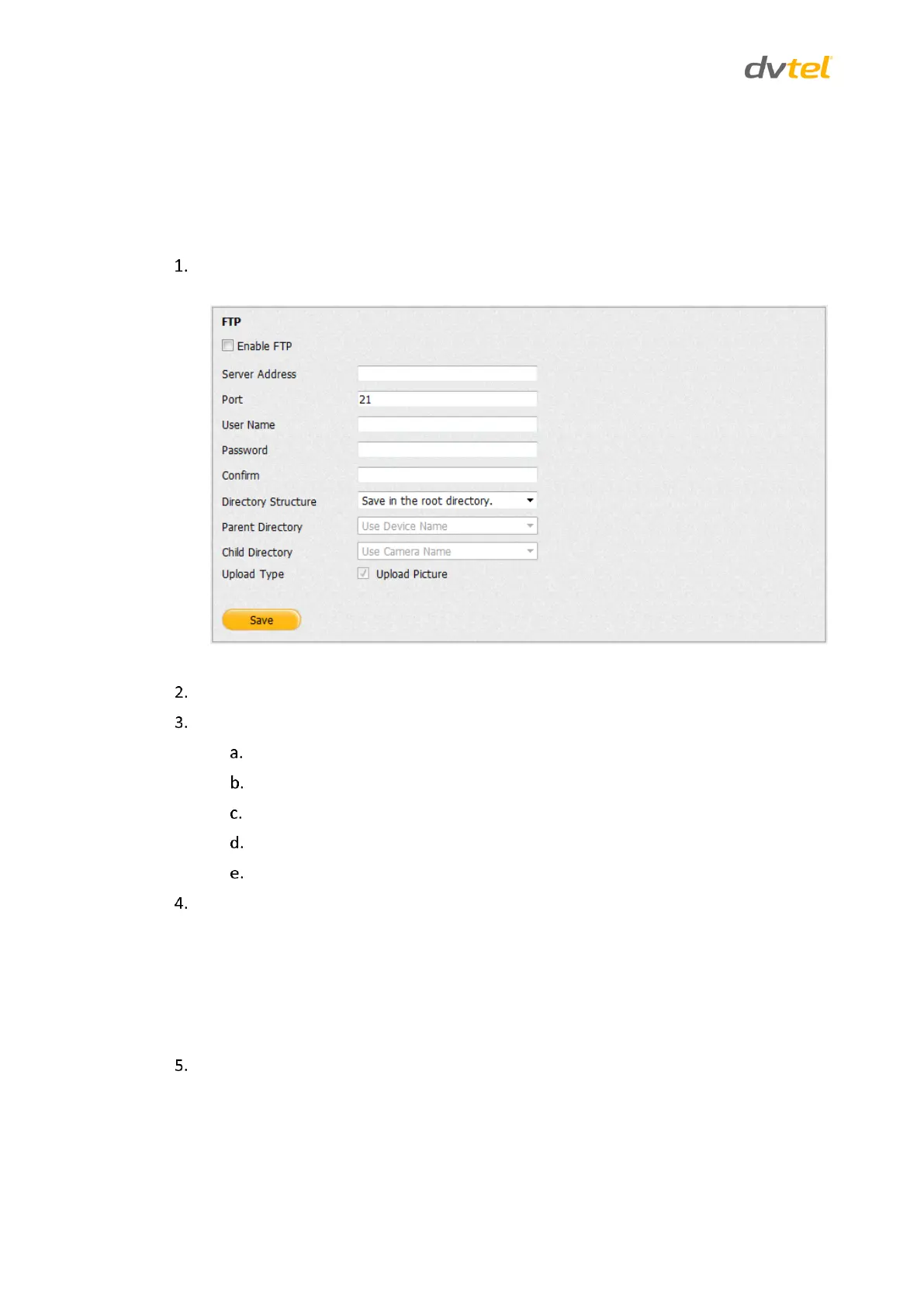
To enter FTP settings
From the Configuration sidebar menu, select Network Settings > FTP. The FTP screen
opens.
Figure 66: FTP Screen
Select Enable FTP to send pictures via the FTP server.
Configure the following settings:
In the Server Address text box, enter the FTP server’s IP address.
In the Port text box, enter the port number used by the FTP server (default: 21).
In the User Name text box, enter the user name assigned in the FTP server.
In the Password text box, enter the password assigned in the FTP server.
In the Confirm text box, re-enter the password.
From the Directory Structure drop-down list, select one of the following options:
Save in the root directory – If this option is selected, the Parent Directory and
Child Directory fields are disabled.
Save in the parent directory – If this option is selected, the Child Directory field is
disabled.
Save in the child directory.
From the Parent Directory drop-down list, select one of the following options:
Use Device Name
Use Device Number
Use Device IP Address



 To Next Page