1
XTL
™
500
User Guide
About Your New Label Maker
With the DYMO
®
XTL
™
500 electronic label maker, you can design and print
multiple label types, including barcode labels, panel labels, and heat shrink tubes.
The label maker uses DYMO XTL
™
label cartridges in label widths of 1/4”, 3/8”,
1/2”, 3/4”, 1”, 1 1/2”, or 2” (6 mm, 9 mm, 12 mm, 19 mm, or 24 mm, 41 mm, or
54 mm). Labels are available in a full range of temperature, chemical, and UV-
resistant materials, including continuous tape and pre-sized labels.
Visit www.dymo.com for information on obtaining labels and accessories for your
label maker.
Registering Your Label Maker
Visit www.dymo.com/register to register your label maker online. During the
registration process you will need the serial number, which is located under the
label compartment cover.
Register your label maker to receive these benefits:
Notification of software upgrades by email
Special offers and new product announcements
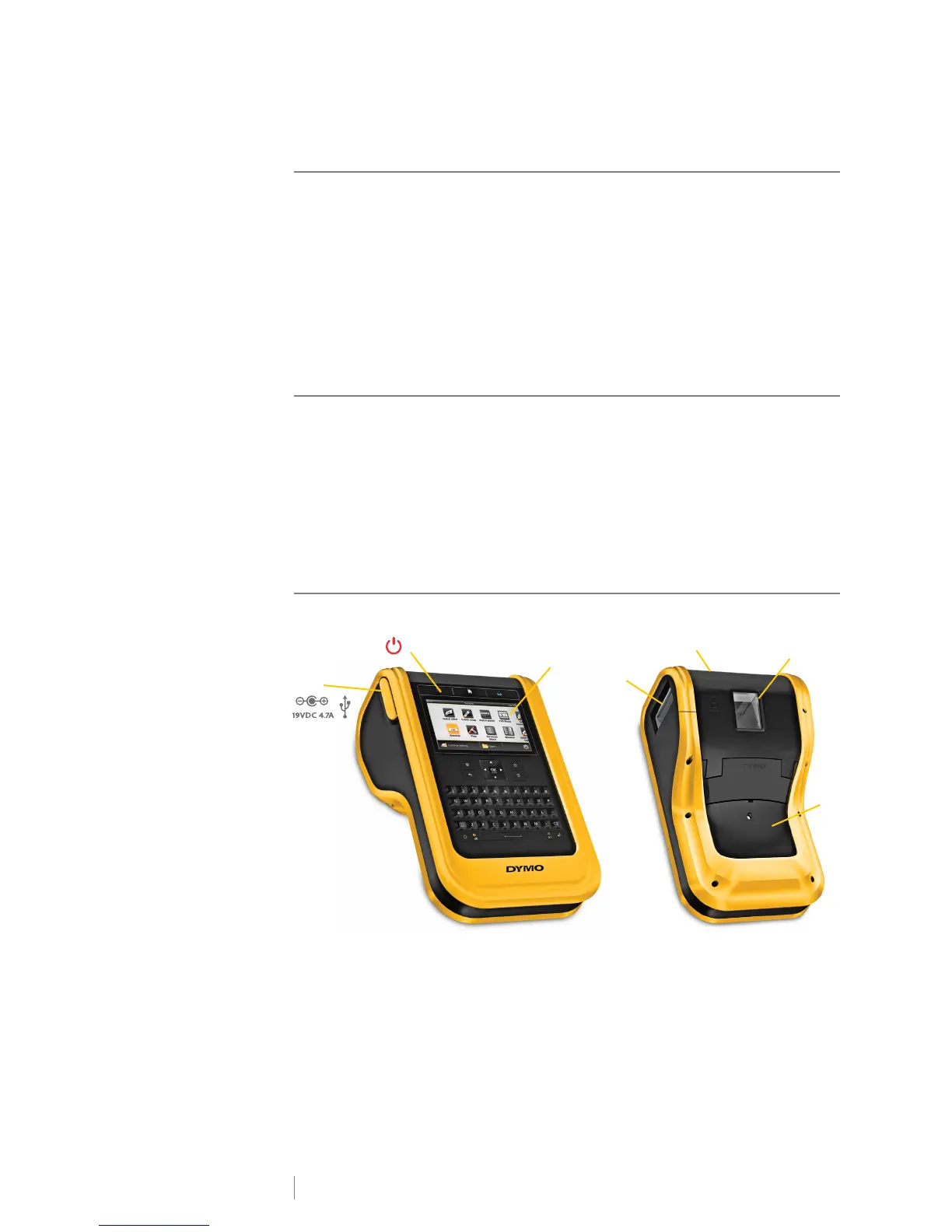
Getting to Know Your Label Maker
Become familiar with the parts of your label maker.
1 Power and USB connectors 5 Label compartment cover release
2 On/Off (Cancel printing) 6 Label compartment
3 Touch screen display 7 Battery compartment
4 Label exit slot












 To Next Page