6
XTL
™
500
User Guide
Using Your Label Maker
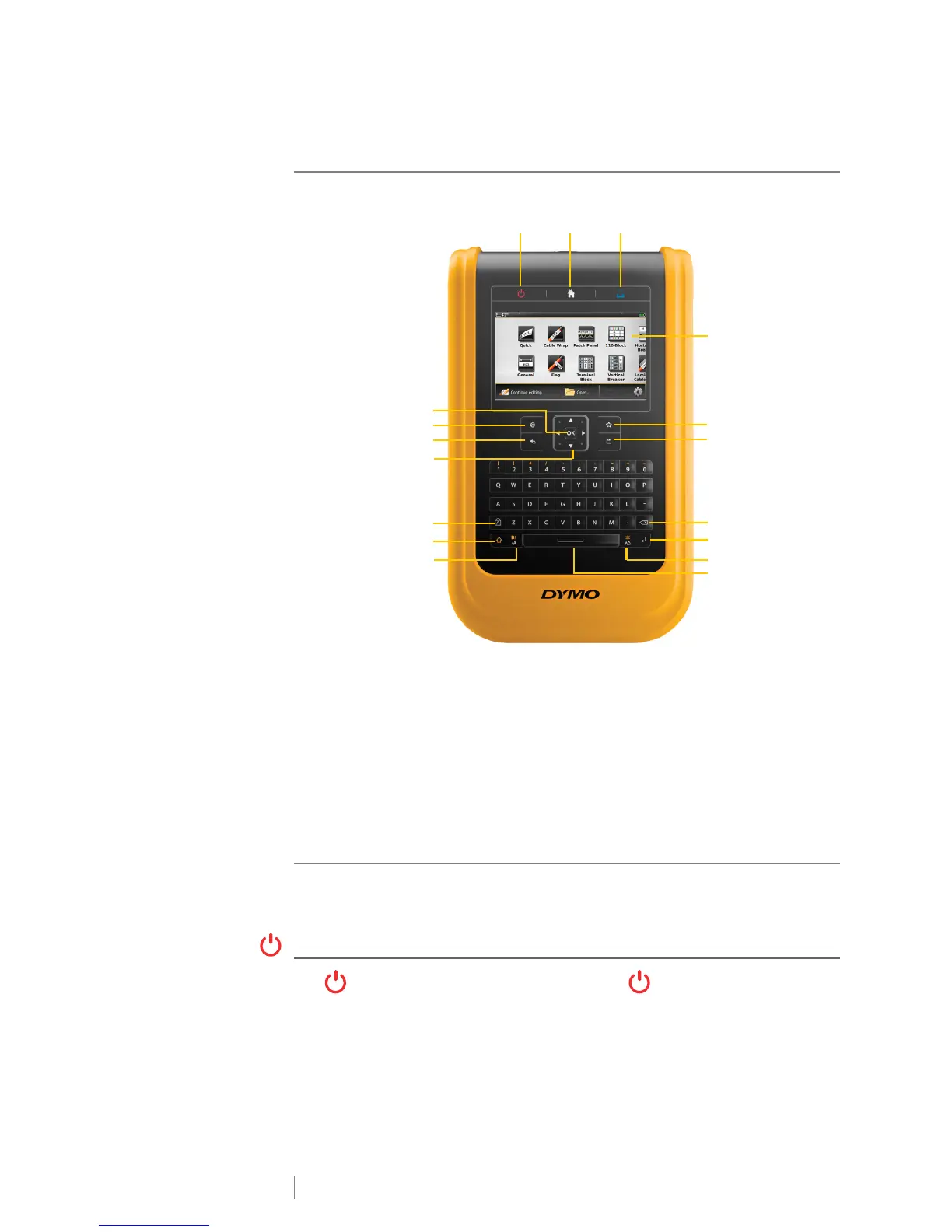
Become familiar with the features and function keys on your label maker.
Keypad
In addition to the alphanumeric keys, a number of function keys give you quick
access to the features of your label maker.
Power
The key turns the power on and off. Pressing also cancels printing.
To conserve power, the screen dims after thirty seconds of inactivity and the label
maker enters standby mode after three minutes of inactivity. After approximately
ten more minutes of inactivity, the label maker automatically shuts off.
1 On/Off (Cancel printing) 7 Backspace/Delete 13 Caps lock
2 Home 8 Return 14 Navigation
3 Print/Print options 9 Rotate/Align 15 Back
4 Touch screen display 10 Space bar 16 New label/Clear
5 Favorites 11 Text size/Text style 17 OK
6 Save 12 Shift
12
4
6
5
8
11
12
13
15
16
7
14
17
9
3
10
Figure 10












 To Next Page