2
XTL
™
500
User Guide
Connecting the Power
The label maker is powered by a rechargeable, lithium-polymer (LiPo) battery.
The battery installed in your label maker ships partially charged. For best results,
fully charge the battery before using the label maker for the first time.
See Power Status on page 10 for information about visually determining the
battery charging status.
Charging the Battery
Fully charging a discharged battery will
take approximately three and a half hours.
You can continue to work as long as the
power adapter is connected.
Make sure to read the LiPo Safety
Precautions found on page 56.
To charge the battery
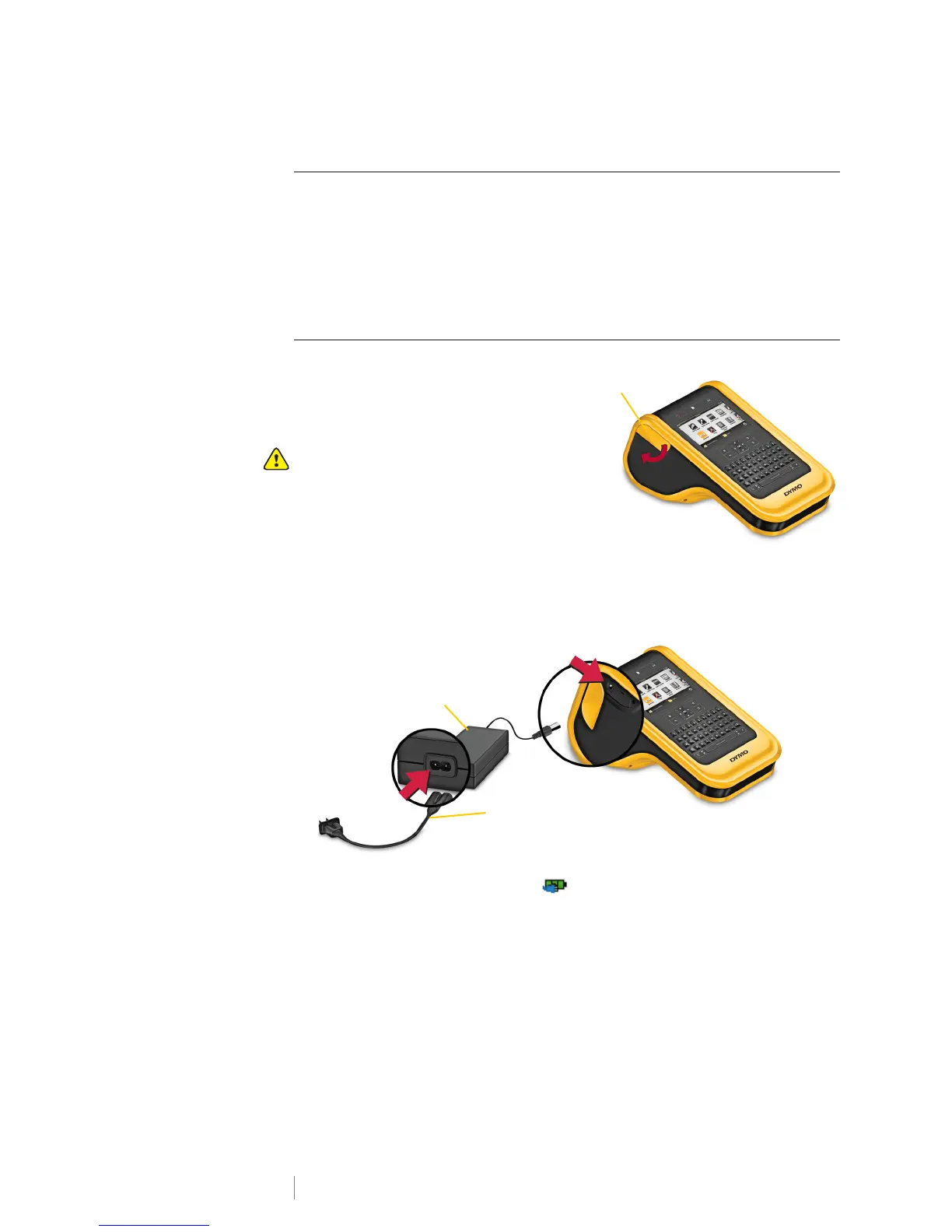
1 On the left side of the label maker,
gently lift and turn the connector
cover to expose the power
connector. See Figure 2.
2 Plug the power cord into the power adapter. See Figure 3.
3 Plug the barrel end of the power adapter into the power connector.
4 Plug the power cord into a power outlet.
The power status will show charging in the upper right corner of the
label maker’s display.
Power adapter
Power cord
Figure 3
Power connector












 To Next Page