EasyManua.ls Logo

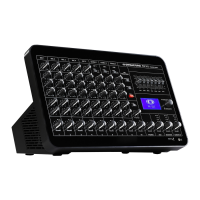
Dynacord PM 502 - User Manual

Dynacord PM 502
48 pages
Print Icon
To Next Page IconTo Next Page
Loading...
PM 502
en | User manual

Other manuals for Dynacord PM 502

Question and Answer IconNeed help?

Do you have a question about the Dynacord PM 502 and is the answer not in the manual?

Summary

Safety

Safety Symbols and Warnings

Explains the meaning of danger, warning, and caution symbols used in the manual.

Operating and Service Precautions

Details essential safety measures for operating, servicing, and handling the device.

Appliance Disposal Guidelines

Provides instructions for the environmentally compatible recycling of old electrical equipment.

Quick Overview

Shipping Contents and Warranty

Lists the items included in the package and provides information on the product warranty.

System Overview

Front View Overview

Details the controls, connectors, and indicators on the front panel of the PM 502 mixer.

Rear View Overview

Describes the various inputs, outputs, and connection ports located on the rear panel.

Installation

Placement and Airflow

Guidelines for correctly positioning the device to ensure adequate ventilation and prevent overheating.

Protection Foil Removal

Instructions for safely removing the protective film from the front panel before initial use.

Mains Supply Check

Ensures the device voltage and frequency match the local mains supply before connection.

Rack Mount Kit Installation

Procedures for securely installing the PM 502 into a 19-inch rack using the RMK 502 kit.

Screw Usage Caution

Warning regarding the use of correct screw length to prevent internal damage to the device.

Connection

Mains Input

Details on connecting the device to the power supply using the provided power cord.

Audio Inputs (Mono and Stereo)

Instructions for connecting microphones, instruments, and other audio sources via XLR, jack, and RCA inputs.

Audio Outputs (Speakers, Line, USB, Phones)

Guidance on connecting speakers (low-Z/high-Z), line-level devices, USB audio, and headphones.

Other Connections (USB Storage, FX Switch)

Information on connecting USB drives for playback and footswitches for effect control.

Configuration

Phantom Power

Activates +48V DC for MIC/LINE inputs to power condenser microphones.

100 V Direct Drive and Speaker Processing

Configures high-impedance speaker outputs and applies Low-Pass-Notch filters for optimized sound.

Amplifier and AUX Routing

Assigns audio signals to output channels (MASTER A/B, AUX) and selects AUX output modes.

Device Locking and Microphone Processing

Sets up PIN protection for parameters and configures the TALK OVER ducker feature.

Operation

Input Channel Operation (Mono & Stereo)

Adjusting input sensitivity, equalization, effects, auxiliary sends, and channel volume for all inputs.

Effects and Output Control

Managing effects, routing FX to AUX, controlling master volume and monitoring output levels.

Microphone Processing Features

Using built-in compressor, TALK OVER ducking, and mute functions for microphone inputs.

Equalizer and Menu System

Shaping sound with the graphic equalizer and navigating device settings via the menu interface.

Front Panel Indicators and Headphone Volume

Understanding front panel indicators and adjusting headphone output level for monitoring.

Maintenance

Technical Data

Power and Audio Performance Specs

Detailed specifications for output power, distortion, and frequency response under various conditions.

Input;Output, Noise, and Impedance Specs

Technical details on signal crosstalk, input sensitivity, noise floor, and input/output impedances.

System Configuration and Component Specs

Specifications for equalization, filters, effects processor, display, and USB audio interface.

Physical, Environmental, and Electrical Specs

Details on power supply, cooling, physical dimensions, weight, and operating temperature.

Dimensional Drawings and Circuit Diagram

Visual representations of device dimensions and the internal circuit schematic.

Appendices

System Application Examples

Illustrative setup diagrams for various environments like bistro, live music, church, mosque, and shops.

Connector Pin Assignments

Diagrams detailing pin assignments for various connectors like XLR, jacks, and speakON.

Summary

Safety

Safety Symbols and Warnings

Explains the meaning of danger, warning, and caution symbols used in the manual.

Operating and Service Precautions

Details essential safety measures for operating, servicing, and handling the device.

Appliance Disposal Guidelines

Provides instructions for the environmentally compatible recycling of old electrical equipment.

Quick Overview

Shipping Contents and Warranty

Lists the items included in the package and provides information on the product warranty.

System Overview

Front View Overview

Details the controls, connectors, and indicators on the front panel of the PM 502 mixer.

Rear View Overview

Describes the various inputs, outputs, and connection ports located on the rear panel.

Installation

Placement and Airflow

Guidelines for correctly positioning the device to ensure adequate ventilation and prevent overheating.

Protection Foil Removal

Instructions for safely removing the protective film from the front panel before initial use.

Mains Supply Check

Ensures the device voltage and frequency match the local mains supply before connection.

Rack Mount Kit Installation

Procedures for securely installing the PM 502 into a 19-inch rack using the RMK 502 kit.

Screw Usage Caution

Warning regarding the use of correct screw length to prevent internal damage to the device.

Connection

Mains Input

Details on connecting the device to the power supply using the provided power cord.

Audio Inputs (Mono and Stereo)

Instructions for connecting microphones, instruments, and other audio sources via XLR, jack, and RCA inputs.

Audio Outputs (Speakers, Line, USB, Phones)

Guidance on connecting speakers (low-Z/high-Z), line-level devices, USB audio, and headphones.

Other Connections (USB Storage, FX Switch)

Information on connecting USB drives for playback and footswitches for effect control.

Configuration

Phantom Power

Activates +48V DC for MIC/LINE inputs to power condenser microphones.

100 V Direct Drive and Speaker Processing

Configures high-impedance speaker outputs and applies Low-Pass-Notch filters for optimized sound.

Amplifier and AUX Routing

Assigns audio signals to output channels (MASTER A/B, AUX) and selects AUX output modes.

Device Locking and Microphone Processing

Sets up PIN protection for parameters and configures the TALK OVER ducker feature.

Operation

Input Channel Operation (Mono & Stereo)

Adjusting input sensitivity, equalization, effects, auxiliary sends, and channel volume for all inputs.

Effects and Output Control

Managing effects, routing FX to AUX, controlling master volume and monitoring output levels.

Microphone Processing Features

Using built-in compressor, TALK OVER ducking, and mute functions for microphone inputs.

Equalizer and Menu System

Shaping sound with the graphic equalizer and navigating device settings via the menu interface.

Front Panel Indicators and Headphone Volume

Understanding front panel indicators and adjusting headphone output level for monitoring.

Maintenance

Technical Data

Power and Audio Performance Specs

Detailed specifications for output power, distortion, and frequency response under various conditions.

Input;Output, Noise, and Impedance Specs

Technical details on signal crosstalk, input sensitivity, noise floor, and input/output impedances.

System Configuration and Component Specs

Specifications for equalization, filters, effects processor, display, and USB audio interface.

Physical, Environmental, and Electrical Specs

Details on power supply, cooling, physical dimensions, weight, and operating temperature.

Dimensional Drawings and Circuit Diagram

Visual representations of device dimensions and the internal circuit schematic.

Appendices

System Application Examples

Illustrative setup diagrams for various environments like bistro, live music, church, mosque, and shops.

Connector Pin Assignments

Diagrams detailing pin assignments for various connectors like XLR, jacks, and speakON.

Dynacord PM 502 Specifications

General IconGeneral
TypeStand mixer
Product colorBlack
DJ mixer-
USB portYes
Rack capacity7U
Video capabilityNo
USB connector typeUSB Type-B
Sample rate48 kHz
Amplifier classD
Frequency range15 - 22000 Hz
Channels quantity8 channels
Amplifier output power1200 W
Supported sample rates32, 44.1, 48 kHz
Digital sound processing48 bit
Audio A/D Converter (ADC)16-bit, delta-sigma
Equalizer bands quantity7
Master (XLR) out1
Line inputs (RCA)2
USB 2.0 ports quantityUSB 2.0 ports have a data transmission speed of 480 Mbps, and are backwards compatible with USB 1.1 ports. You can connect all kinds of peripheral devices to them.
Number of microphone inputs5
Phantom power48 V
AC input voltage100 - 240 V
AC input frequency50 - 60 Hz
Power consumption (typical)180 W
Weight and Dimensions IconWeight and Dimensions
Depth241 mm
Width395 mm
Height244 mm
Weight4900 g
Package weight6400 g

Related product manuals