SV-D600 and SV-D900 Operation
3-2 SkyView SE Pilot’s User Guide - Revision I
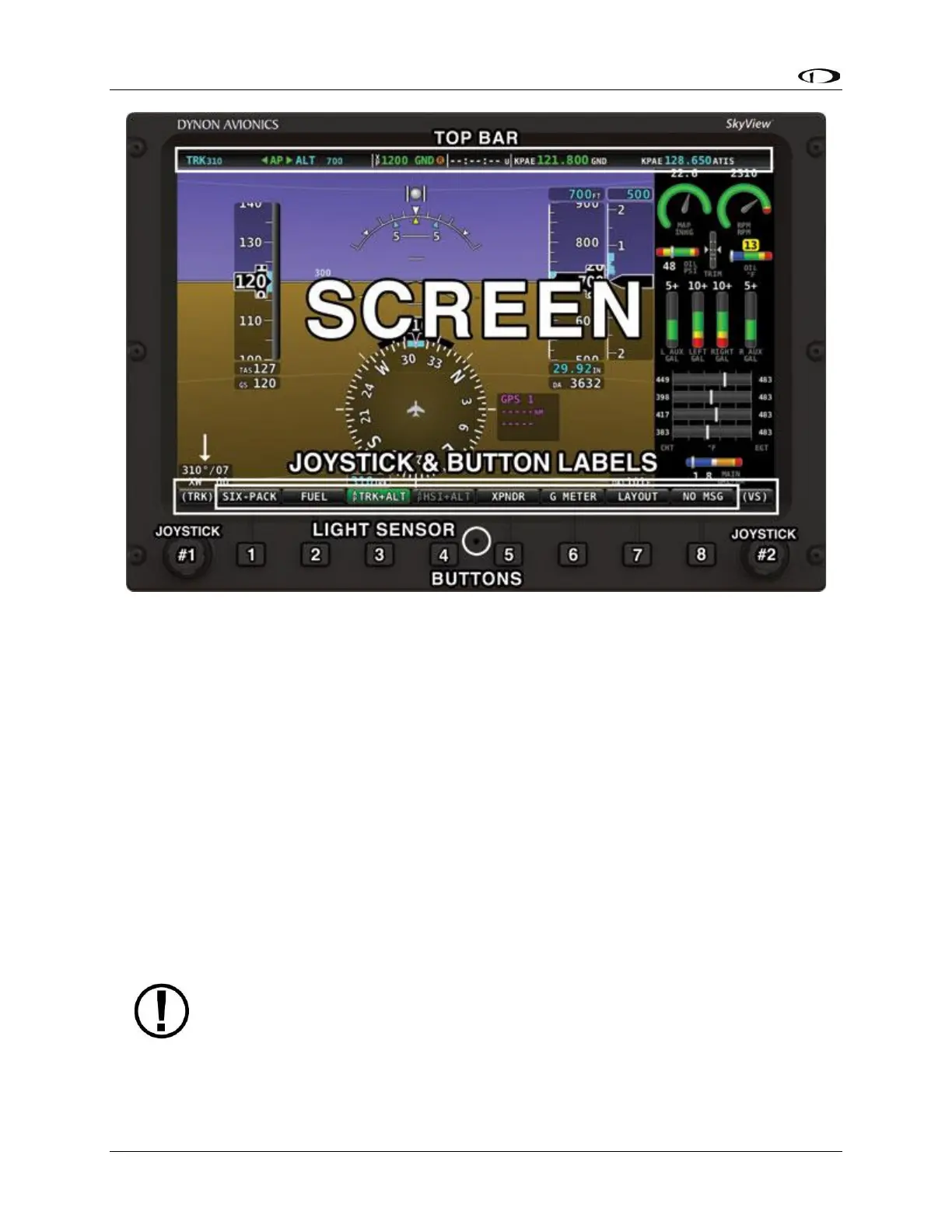
Figure 1 – SkyView SE Display Front Bezel Layout
Note the Top Bar, screen, joystick and button labels, light sensor, two joysticks and eight
buttons.
The Top Bar is user configurable and displays important textual information. The Top Bar will
display clock time or a timer (when running), autopilot status, battery status (when an issue
requiring attention is detected), transponder status, and COM Radio status. Reference the How
to Configure the Top Bar Section of this guide for details on how to configure the Top Bar.
The screen shows PFD and Engine data, configuration information, and system alerts. Its layout
is user configurable. See the Screen Layout Configuration Section for specific instructions on
how to configure the layout of your screen.
Joystick and button labels are also on the screen as seen in Figure 1. SkyView SE’s simplified
feature set and menu system assures that most menu buttons have a single dedicated function.
However, there is one button on the main menu – XPNDR – which accesses a sub-menu. Thus
the function of that button is contextual based on which submenu is displayed.



 To Next Page