PFD Operation
4-10 SkyView SE Pilot’s User Guide - Revision I
HSI
When a valid external VFR GPS navigation source is
connected to your SkyView SE system, its data can
be displayed on and around the heading indicator
in a standard HSI presentation. Refer to the SkyView
Classic / SE / HDX System Installation Guide for
details on how to connect and configure these data
sources. The following sections describe the HSI
display elements.
HSI Source
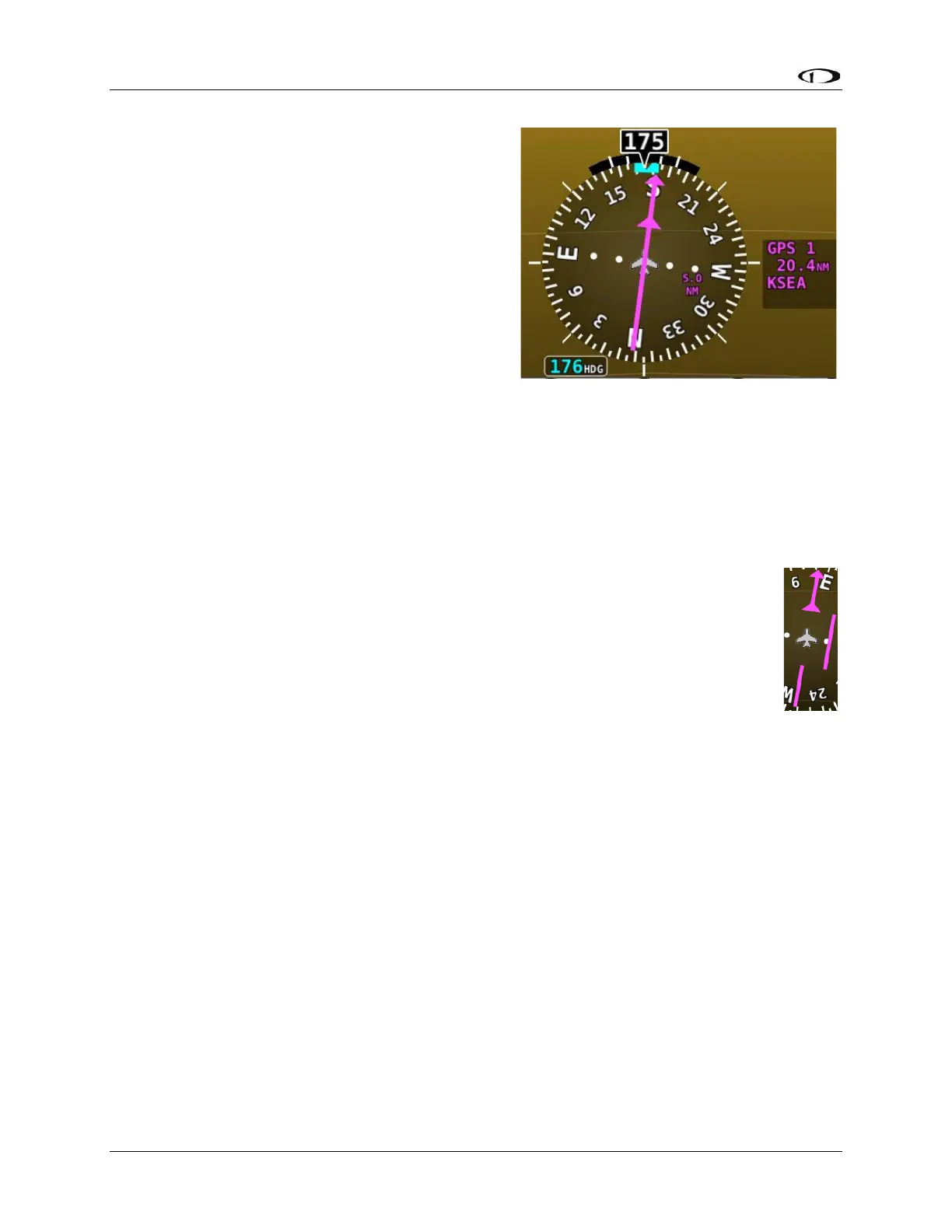
SkyView SE supports a single VFR GPS navigation
source in NMEA format. Anytime a GPS is being
used as an HSI source, all of the HSI data is colored magenta. When such as source is properly
configured, a textual info box is displayed to the right of the heading indicator describing the
data source “GPS 1”. If the navigator has an active waypoint defined, the info box will include
the waypoint identifier and the distance to the waypoint.
Course Needle and Course Deviation Indicator (CDI)
The course needle is a magenta line with an arrow at its end which points to the
course defined by the external GPS navigator.
The Course Deviation Indicator (CDI) is the middle section of the course needle. When
the aircraft is not precisely positioned on the indicated course, that middle bar will
slide left or right to indicate the location of the intended course relative to the
aircraft’s position. If the CDI bar is to the right of the course needle, the intended
course is to the right of the aircraft’s current position.
When following a GPS course, a full scale deflection of the bar represents 5 nautical miles of
deviation. When on course, the course indicator and the CDI make a solid line, making it easy to
see when there is little error in your aircraft's position. Unlike a CDI indicator found in basic
aircraft, the CDI needle on an HSI rotates with the heading indicator and course indicator. By
turning the aircraft towards the CDI needle you reduce your deviation.



 To Next Page