2388-MANUL-V10.00.00-UTP2 Operating Manual
Page 5 of 74
3.4 Self-Test
During power up, the UTP2
performs a self-test on TEV, ultrasonic and Cable PD using the built-in test sources.
The self-test is not a calibration check. During self-test, the ultrasonic sensor should be pointed away from
sources of noise.
If the self-test consistently fails, contact product-support@eatechnology.com
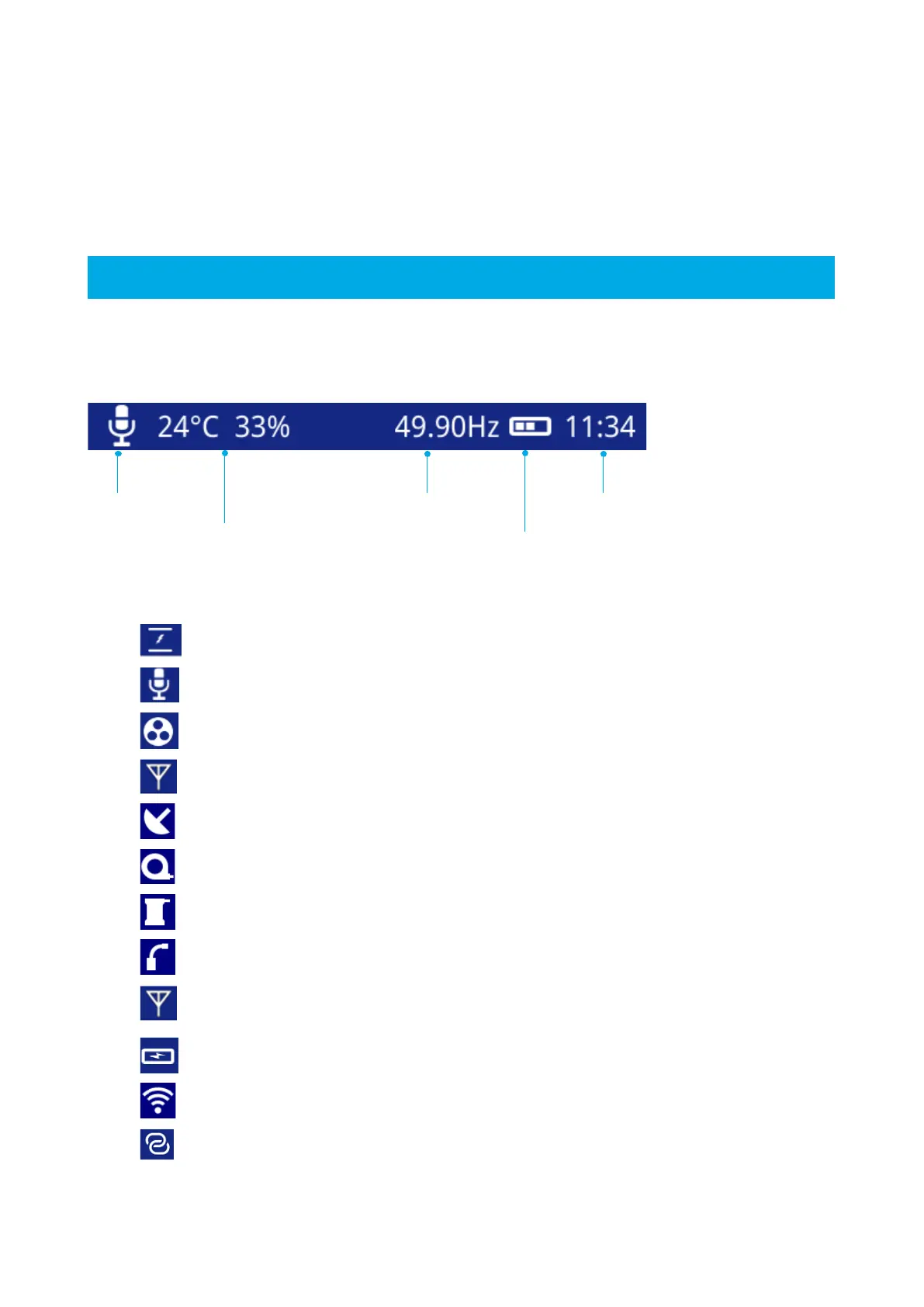
3.5 Notification Bar
Below are other icons that could appear on the notification bar:
This icon indicates that the current audio source is TEV
This icon indicates that the current audio source is Ultrasonic
This icon indicates that the current audio source is the HFCT
This icon indicates that the current audio source is the UHF (left of screen)
This icon shows when an UltraDish has been connected to the UTP2
This icon shows when a HFCT has been connected to the UTP2
This icon shows when an Ultrasonic Contact Probe has been connected to the UTP2
This icon shows when a Flexible Sensor has been connected to the UTP2
This icon shows when a UHF Receiver has been connected to the UTP2 (right of
screen)
This icon shows when the UTP2 is charging
This icon is used to show when a Wi-Fi connection has been established
This icon is used to show that HotSpot is enabled
Temperature &
Relative Humidity



 To Next Page