125
Section 7:
Advanced GPS Operations
Find Distance From Current
Position To Another Location
1. While on the Map Page press: MENU|↓ to FIND DISTANCE|ENT.
2. Center your cursor over the position you want to find the distance to.
A rubber band line appears, connecting your current position to the
cursor's location. The distance along that line will appear in a pop-up
box. The box also shows the bearing to the point you're measuring to.
3. Press
EXIT|EXIT to return to regular operation.
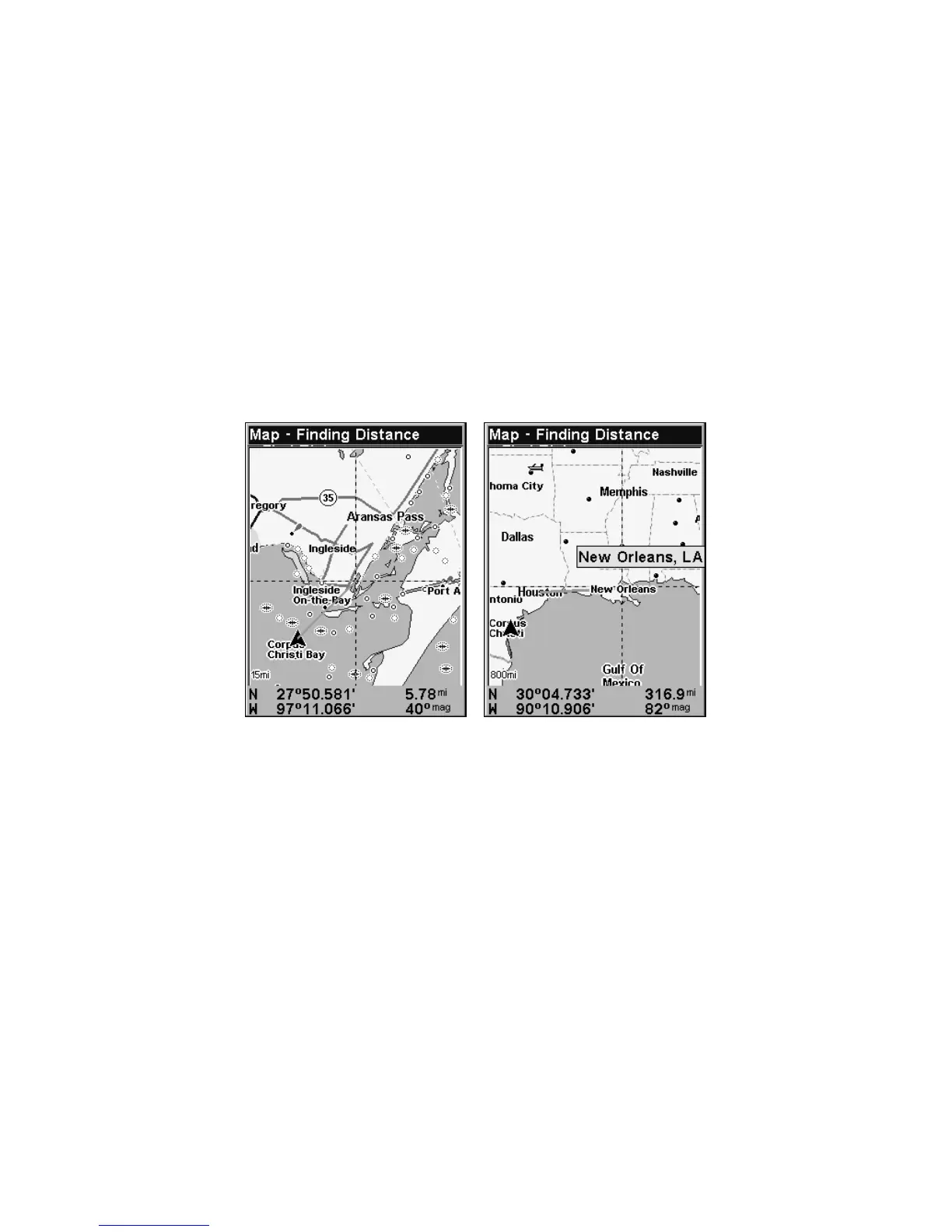
At left, the distance from the boat's current position to the cove is 5.78
miles. At right. the distance from Houston to New Orleans is 316.9 miles.
Find Distance From Point to Point
You can also measure distance between two other points on the map.
1. While on the Map Page press:
MENU|↓ to FIND DISTANCE|ENT.
2. Center your cursor over the first position. (A rubber band line ap-
pears, connecting your current position to the cursor's location.) Press
ENT to set the first point, and the rubber band line disappears.
3. Move the cursor to the second position. The rubber band line reap-
pears, connecting the first point you set to the cursor. The distance
along that line will appear in the pop-up box.
4. Press
EXIT to clear the command and return to the page screen.
(Press
EXIT once more to clear the cursor.)













 To Next Page