141
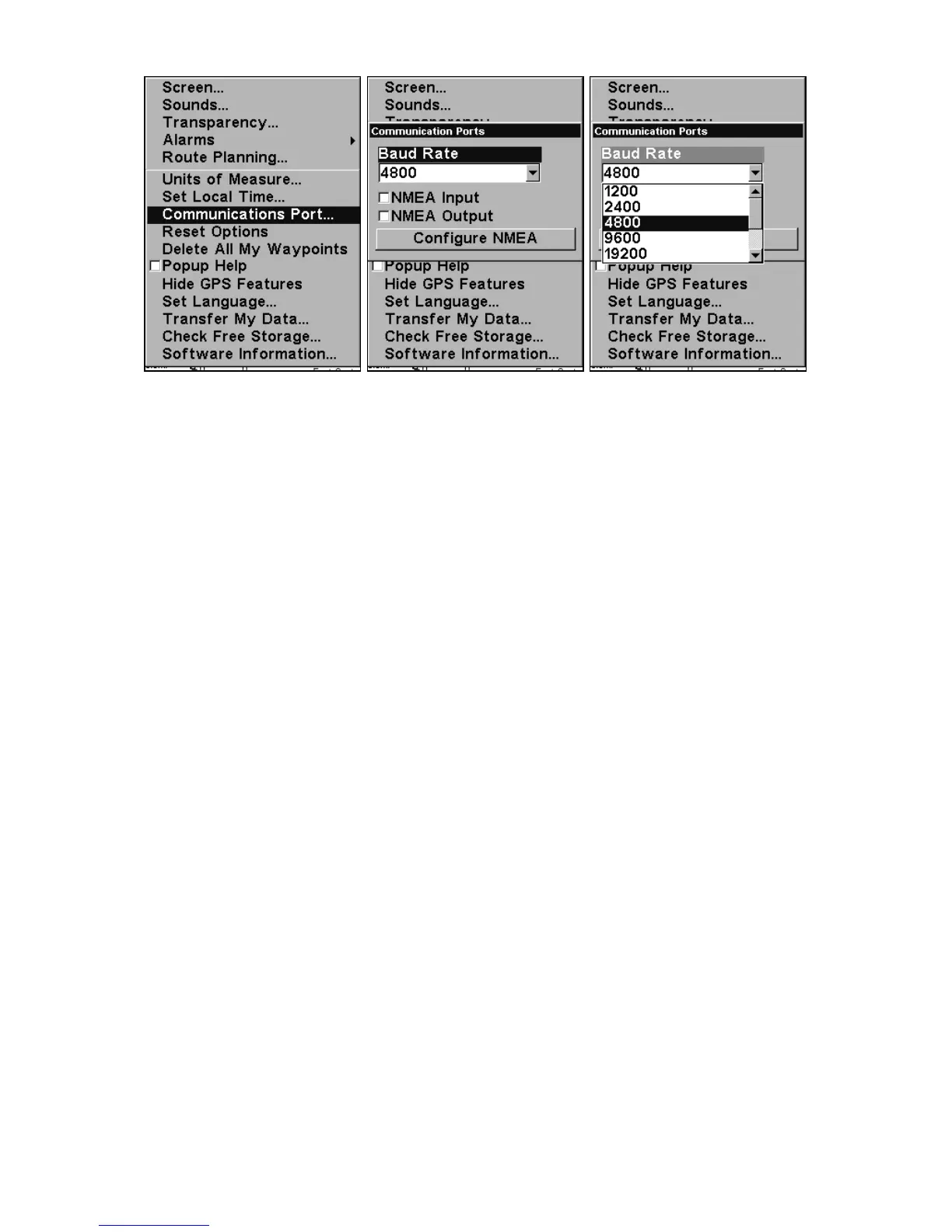
Menus for changing Com Port settings.
For assistance in configuring the unit to communicate with another
device, consult the factory; customer service phone numbers are in the
back of this manual. Also see the entry below for Configure NMEA. To
set Com Port Configuration:
1. Press
MENU|MENU|↓ to SYSTEM SETUP|ENT.
2. Press ↓ to
COMMUNICATIONS PORT|ENT.
Configure NMEA
You can configure the unit to use specific NMEA sentences.
1. Press
MENU|MENU|↓ to SYSTEM SETUP|ENT.
2. Press ↓ to
COMMUNICATIONS PORT|ENT|↓ to CONFIGURE NMEA|ENT.
3. A menu appears showing the prefixes of the available NMEA sen-
tences. A check mark next to a prefix means the prefix is in use. Use ↑
↓ → ← to select a prefix, then press
ENT to turn off the prefix. (Press
ENT again to check the box and turn a prefix on.)
NOTE:
The names of the NMEA sentences are abbreviated in this menu.
These are the functions of the various selectable prefixes:
• GLL transmits latitude and longitude of present position, time
of position fix, and status.
• RMC and RMB transmits navigation information messages.
• APB transmits autopilot information.
• GGA transmits time, position, and fix related data.













 To Next Page