72
NOTE:
Some data types can be displayed in only one font size. If that is the
case, the Data Size box will not be displayed for that data type.
Ping Speed & HyperScroll
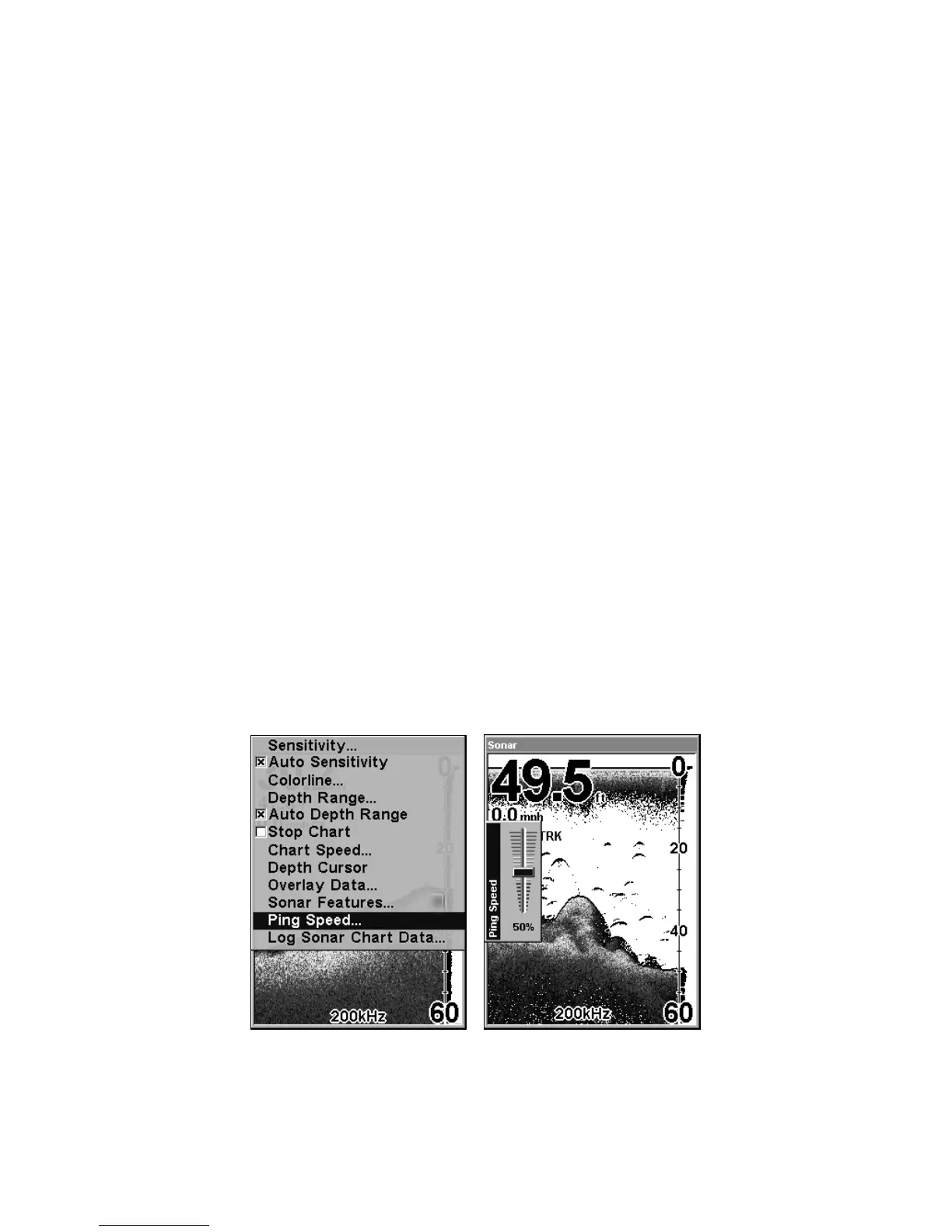
Ping Speed controls the rate at which the transmitter and transducer
broadcast sonar sound waves — pings — into the water. The unit has a
default ping speed of 50 percent. At normal boating speeds, this auto-
matically provides enough return echoes to refresh the screen and scroll
the chart at maximum chart speed.
However, when you are running at high speeds, or just want the fastest
possible screen update, you may want to use the HyperScroll feature.
When you change the Ping Speed to any setting greater than 50 per-
cent, the unit automatically enters HyperScroll mode.
These faster ping rates allow you to maintain a high-detail picture on
the screen, and the screen refresh rate and chart scroll speed can keep
pace with the boat as it moves quickly over the bottom terrain.
When using HyperScroll, you may also need to manually decrease the
sensitivity for optimum performance. Depending on water depth and
other conditions, HyperScroll may cause a second bottom echo to return
to the transducer during the next ping cycle, or sounding. This can result
in a large amount of clutter appearing on the screen. If this occurs, just
decrease the sensitivity to a level that eliminates the clutter. When you
turn HyperScroll off, you can return to your original sensitivity level.
At left, Sonar Menu with Ping Speed command selected.
Ping Speed Control Bar, right, at default setting.













 To Next Page