134
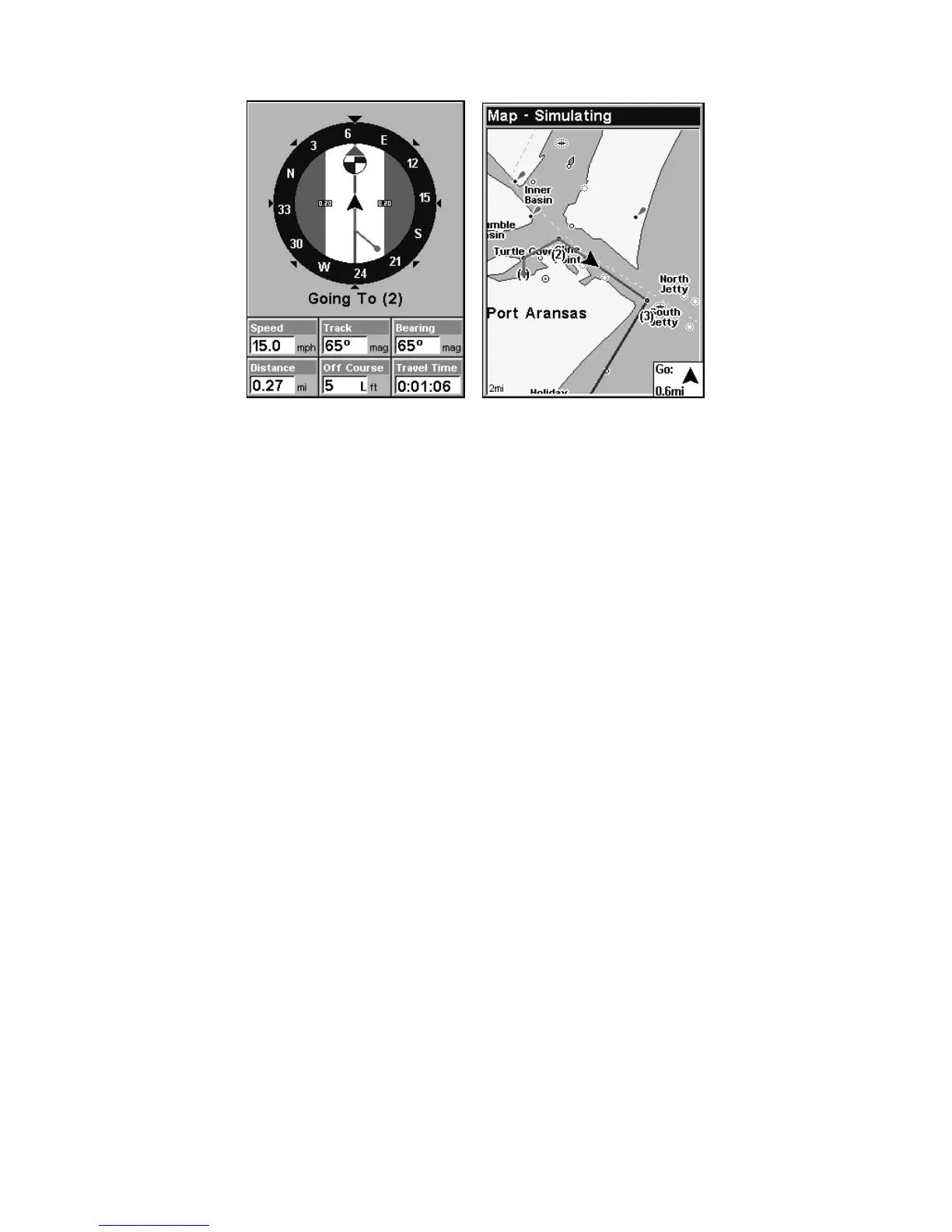
In Fig. 3 the traveler has turned northeast on his new course and is
heading straight for Wpt 2, which is 0.27 miles away. Fig. 4 shows route
navigation on the Map Page. In this figure, the traveler has reached Wpt
2 and is starting on the leg between Wpts 2 and 3.
Trails
Delete a Trail
This is the command used to erase or delete a trail:
Press
MENU|MENU|↓ to MY TRAILS|ENT|↓ to trail name|ENT|↓ to
DELETE TRAIL|ENT|← to YES|ENT.
Tip:
You can also delete all trails at once:
1. Press
MENU|MENU|↓ to MY TRAILS|ENT.
2. Press → to
DELETE ALL|ENT|← to YES|ENT.
Edit a Trail Name
To edit a trail name: press
MENU|MENU|↓ to MY TRAILS|ENT|↓ to trail
name|
ENT|ENT. Press ↑ or ↓ to change the first character, then press
→ to the next character and repeat until the name is correct. Press
ENT
then EXIT|EXIT|EXIT|EXIT to return to the previous page display.
Tip:
You can quickly call up the Edit Trail menu by selecting a trail on
the map with the cursor. Simply move the cursor over a trail and a
pop-up box appears. Press
WPT and the Edit Trail menu opens.
Figure 4.
Figure 3.













 To Next Page