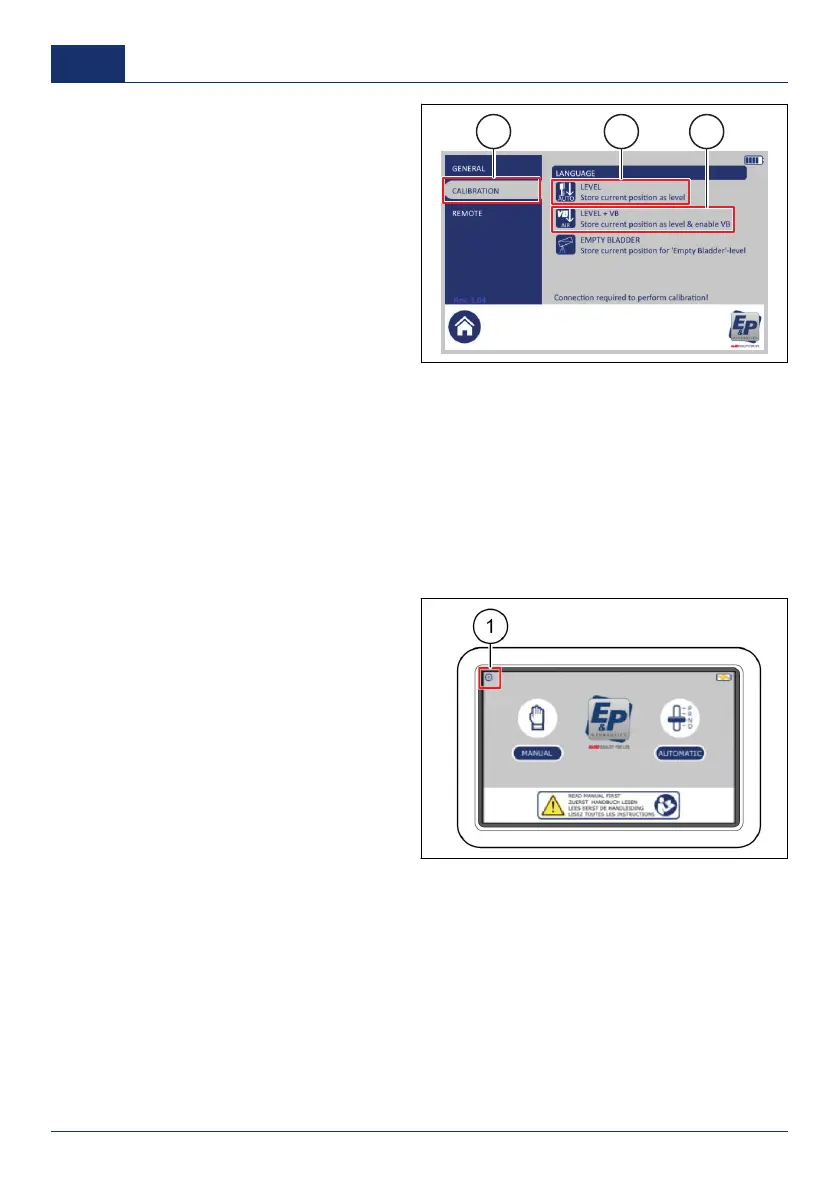
6. Push
CALIBRATION
(1).
7. Push
LEVEL
(2) or
LEVEL + VB
(3).
■ Push
LEVEL
(2) to save the new
calibration point if the vehicle does
not have a VB-air suspension set
installed.
■ Push
LEVEL + VB
(3) to save
the new calibration point if the
vehicle has a VB-air suspension
set installed and has a EP/VB
cable.
A pop-up box shows the text:
Store the
current position to be used as 'level'. This action cannot be reversed. Do you wish to proceed?
8. Push
YES
.
A pop-up box shows. When the procedure is done, the text
Calibration done
shows.
9. Push
OK
.
Calibrate the inclination position
1. Do the manual leveling procedure to put the vehicle in the necessary inclination position. Refer to
Manual leveling
.
2. On the touchscreen, push the home button to go back to the start screen.
3. Push the configuration button (1).
✓ A pop-up keypad shows.
4. Enter the personal access code and
push
OK
.
34 0001
US



 To Next Page