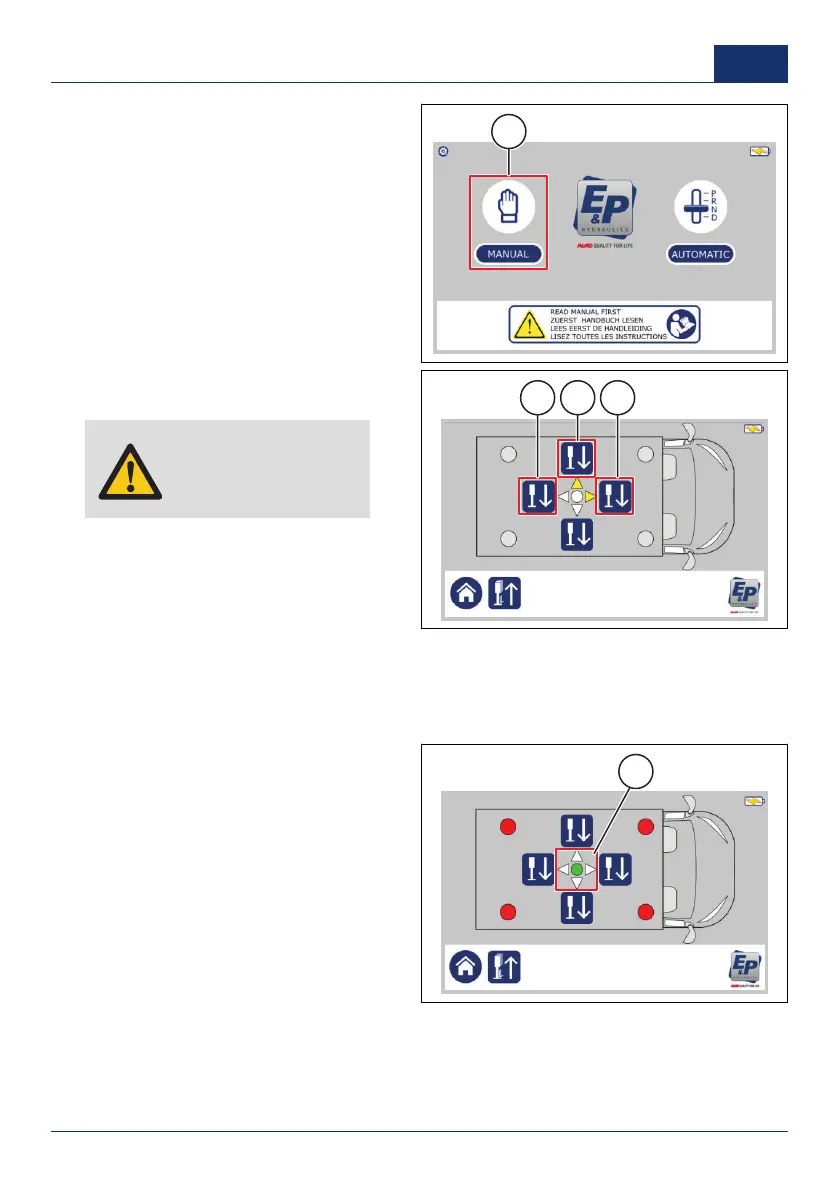
1. On the touchscreen, push
MANUAL
(1).
✓ A new screen shows. It depends
on the position of the vehicle if 1 or 2
arrows light up.
2. Push and hold the front side button (1)
until the front jacks touch the ground.
Caution: Always level
the vehicle at the front
side first.
3. Hold the button a while longer to
make sure that the vehicle is lifted
approximately 3 centimeters (1.2 inch)
higher on the front side.
4. Push and hold the rear side button (2)
until the rear jacks touch the ground.
5. Hold the button a while longer to make sure that the vehicle is lifted approximately 3 centimeters
(1.2 inch) higher on the rear side.
✓ One or two yellow arrows light up in the middle of the screen (3). The arrows show which sides
must be leveled. If the circle in the middle lights up green, the vehicle is level.
6. Use the level buttons on the sides
where the arrows are yellow.
■ If only one arrow is yellow, push
the level button on that side until
the leveling system automatically
stops.
■ If two arrows are yellow, take turns
between the two level buttons until
the leveling system automatically
stops. Do not level one side first.
✓ The vehicle is level when there are
no yellow arrows and the circle in the
middle is green (1).
0001 41
US



 To Next Page