86-87050-00 A02 - Page 19
2. Installation
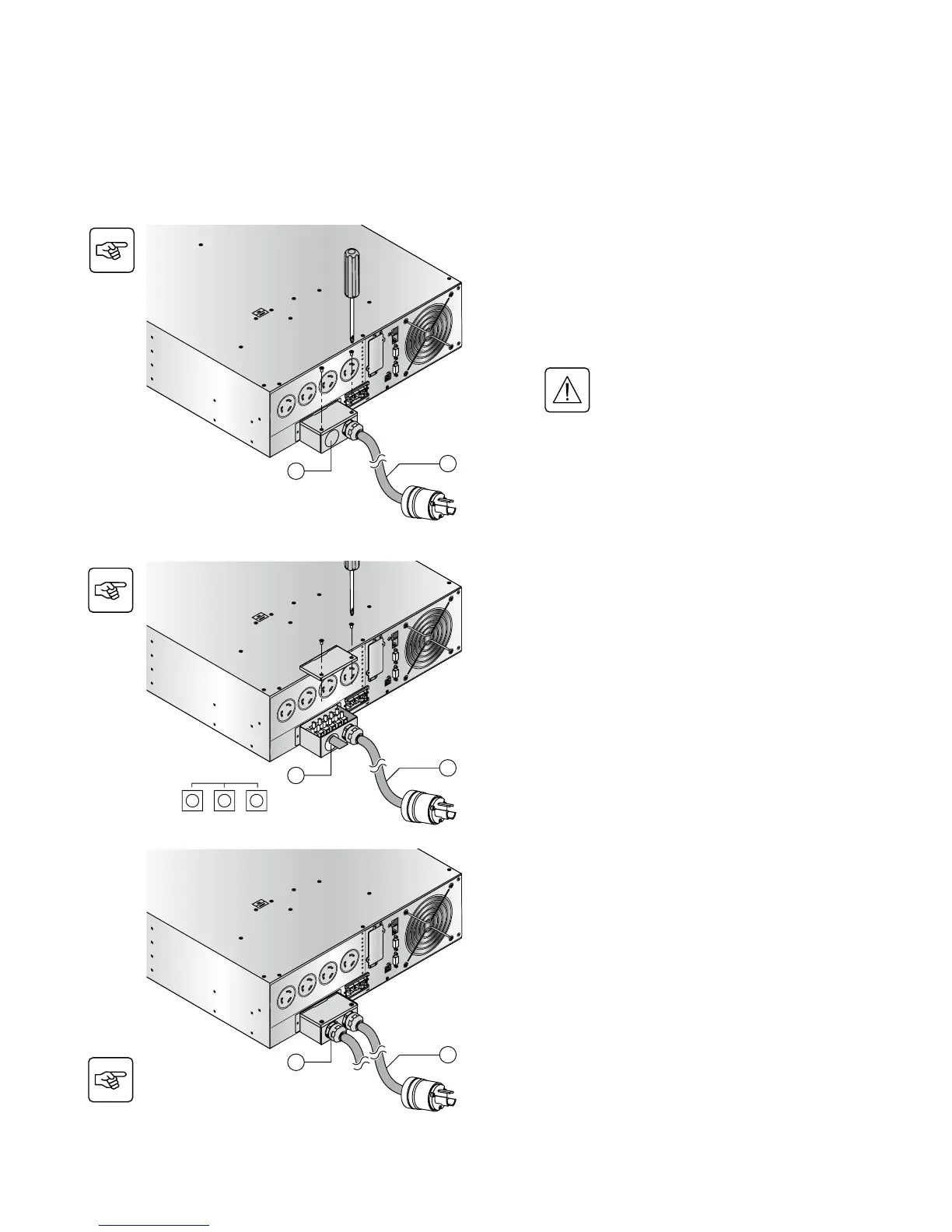
2.7 Hardwire Connection of Output Power Cable to UPS
w This type of connection must be carried out by qualified electrical personnel.
w Before carrying out any connection, check that the battery circuit breaker and the upstream protection device
(Normal AC source) is open «0» (off).
BATT. N
O.
200-250V~,
2
4A
RP
O
R
S-
232
CAUTION:
D
O
N
O
T
D
ISC
ON
N
E
C
T
B
AT
T
E
R
Y
CAB
L
E
U
N
DE
R
LOA
D
B
A
T
TE
R
Y
CO
N
N
E
C
TO
R
1
80
V
D
d
c
1
2
3
1. Remove the top of the terminal box cover
(2 screws) with the included screwdriver.
2. Insert the output cable/conduit (provided by
others) through the cable knockout (2).
3. Connect the outlet cable to the output terminal
block.
4. Tighten the cable/conduit flange and refit the
terminal box cover by means of the 2 screws.
Always connect the ground wire first.
BATT. NO.
200-250V~,
2
4A
RP
O
R
S-
232
CAUTION:
D
O
N
O
T
D
ISC
ON
N
E
C
T
B
AT
TE
R
Y
C
AB
L
E
U
N
DE
R
L
OA
D
B
A
T
TE
R
Y
CO
NN
E
C
TO
R
1
80
V
D
d
c
2 & 3
2
3
Output Terminal
L2(N)GND L1
Note: 10’ Input cable with L6-30P (3) comes
attached by EATON. Output cable/conduit (2) is not
included (provided by others).
BATT. N
O.
200-250V~,
2
4A
RP
O
R
S-
232
CAUTION:
D
O
N
O
T
D
ISC
ON
N
E
C
T
B
AT
TE
R
Y
CAB
L
E
U
N
DE
R
L
OA
D
B
A
T
TE
R
Y
CO
N
N
E
C
TO
R
1
80
V
D
d
c
4
2
3



 To Next Page