3. Operation
3.1 Initial Start-Up
To ensure that your system is configured in complete accordance with safety regulations and to benefit from the
manufacturer’s warranty, please contact Technical Support at www.eaton.com or call (800) 279-7776.
1. Check that the battery disconnect switch (60)
on top cover is connected (see section 2.2
Internal Battery Connection).
2. Set the upstream circuit breaker (not included)
to the on position.
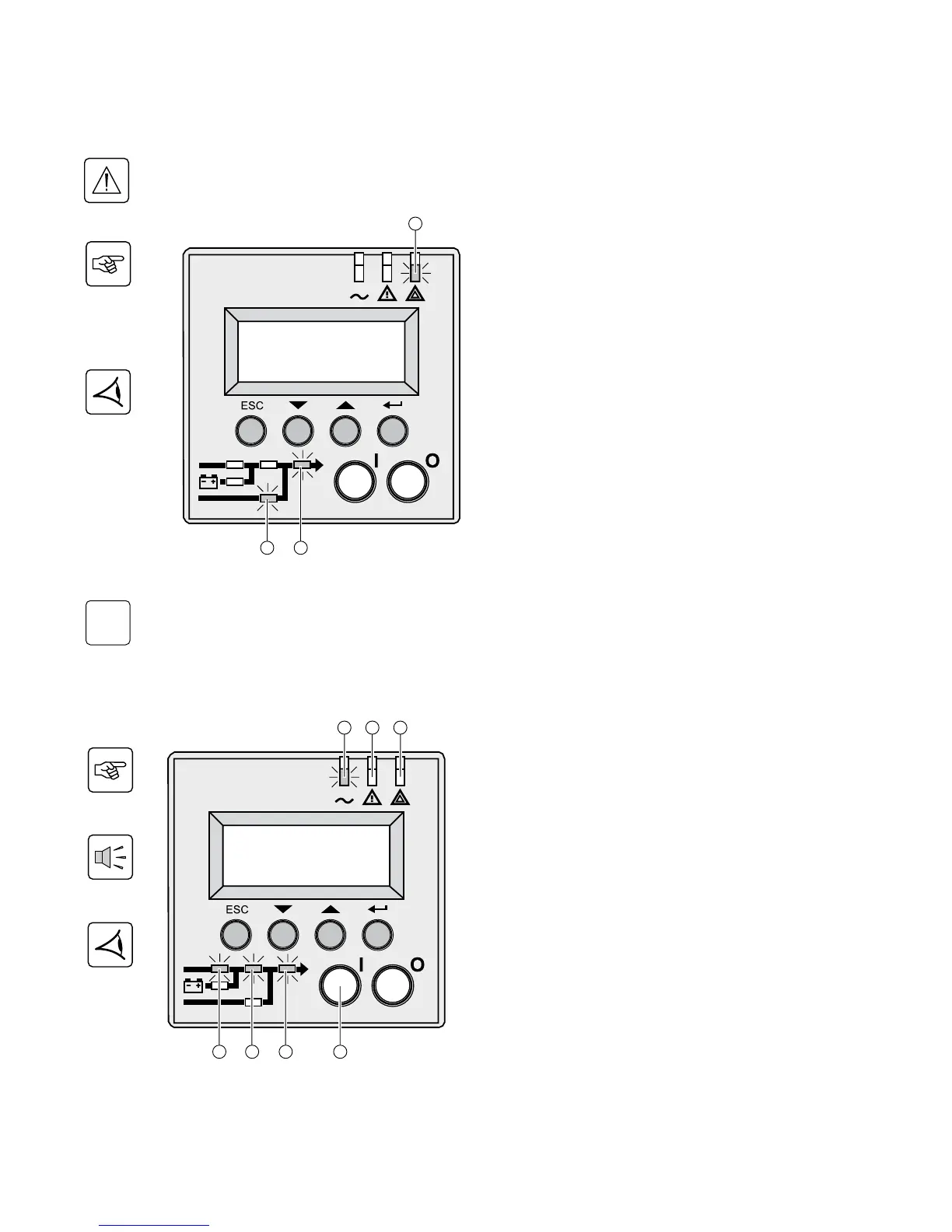
The equipment is powered via the Normal AC source,
but not protected by the UPS.
Batteries are recharging, an 8 hour recharge period is
necessary to get full backup time.
LED (22) is ON, LEDs (33) and (34) are green.
UPS Set-Up
If UPS personalization is desired, it is advised to enter the personalization mode at this time (see the 4.4
«Personalization» section).
3.2 Final Start-Up Sequence
3. Press and hold the «I» (on) button (29) for 3
seconds.
The buzzer beeps once, and after UPS internal test
sequence, the LED (20) is ON.
LEDs (30), (32), (34) are green.
The equipment is protected by the UPS.
If LED (21) or (22) is ON, an alarm has occurred (see
the «troubleshooting» section).
86-87050-00 A02 - Page 21



 To Next Page