EasyManua.ls Logo

Ecom j2kn pro - Instrument Adjustments and Settings; Sensor Re-Calibration Procedure; Gas Concentration Unit Selection

Ecom j2kn pro
44 pages
Print Icon
To Next Page IconTo Next Page
To Previous Page IconTo Previous Page
Loading...
Page 28
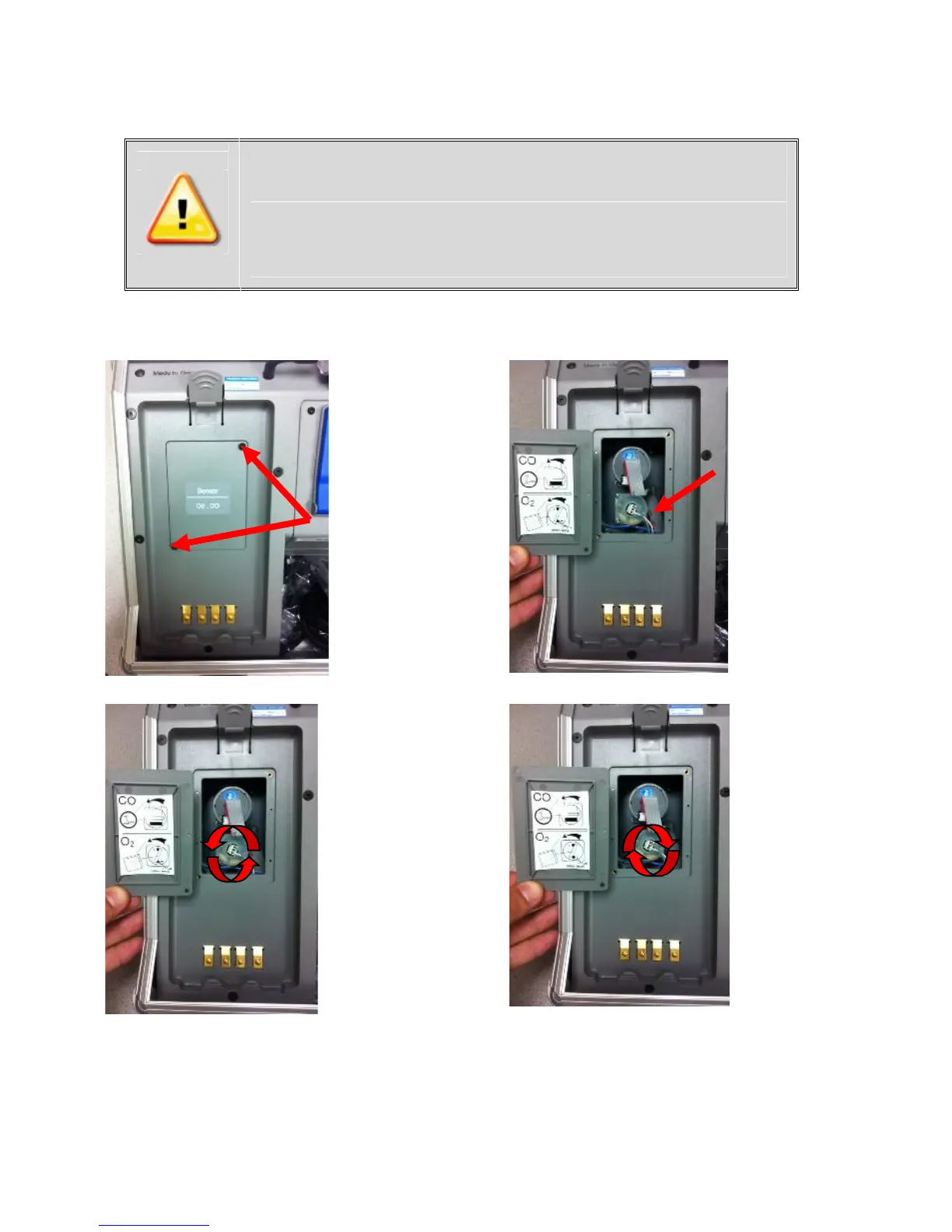
15. How to Change Sensors
15.1 How to Change O2 Sensor
Step 1:
Use a T-10
torx wrench
to remove
screws from
O2/CO cover
plate
Step 2:
The O2
sensor is
attached to
2 wires,
located
below the
CO sensor
Step 3:
Disconnect
the lead
wires and
unscrew
counter
clockwise
until loose,
then pull
directly out
Step 4:
Install new
O2 sensor
by screwing
clockwise
until locked
& reconnect
wires
Improper installation voids warranty!
Please mark connector when removing old
sensor and insert new sensor into correct
connector to prevent destruction of the
sensor and main board.
Step 5: Replace O2/CO cover plate and tighten screws with a T-10 torx
wrench
Step 6: Turn on analyzer and select Gas Analysis to start self-calibration
of O2 sensor to 20.9% in ambient air (must be in fresh air)

Other manuals for Ecom j2kn pro

Related product manuals