EasyManua.ls Logo

Ecom j2kn pro - Secondary Unit Configuration; Reference Oxygen (O2 ref) Input; Gas System Leakage Test

Ecom j2kn pro
44 pages
Print Icon
To Next Page IconTo Next Page
To Previous Page IconTo Previous Page
Loading...
Page 29
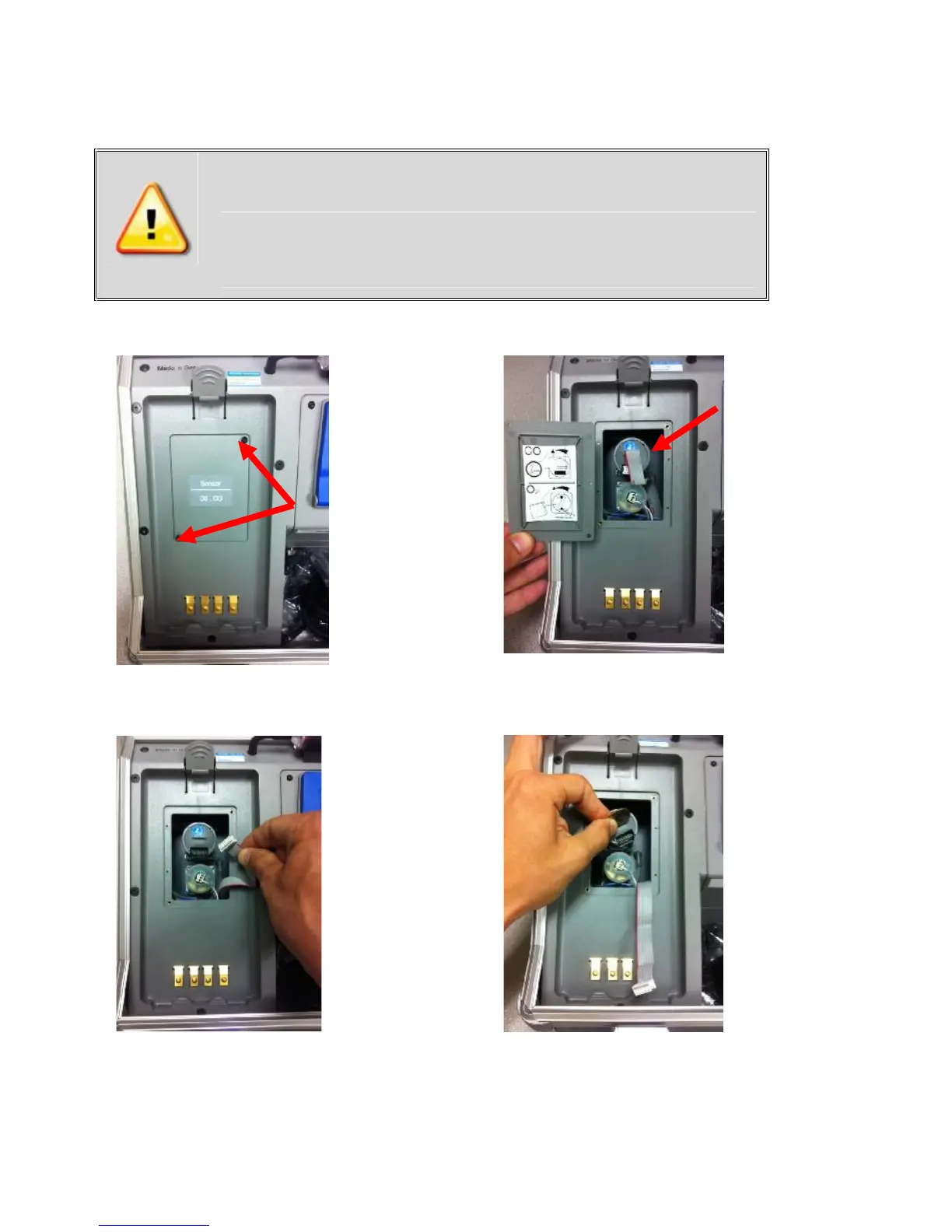
15.2 How to Change A5F CO Sensor
Step 1:
Use T-10 torx
wrench to
remove
screws from
O2/CO cover
plate
Step 2:
The A5F CO
sensor is in
gray
housing
attached to
a ribbon
cable
Step 3:
Disconnect
ribbon cable
from CO
sensor
Step 4:
Remove CO
sensor using
coin or
fingers
Turn 45
degrees
counter
clockwise
and pull
directly out
(continued on next page)
Improper installation voids warranty!
Please mark connector when removing old
sensor and insert new sensor into correct
connector to prevent destruction of the
sensor and main board.

Other manuals for Ecom j2kn pro

Related product manuals