EasyManua.ls Logo

Ecom j2kn pro - A5 F CO Sensor

Ecom j2kn pro
44 pages
Print Icon
To Next Page IconTo Next Page
To Previous Page IconTo Previous Page
Loading...
Page 30
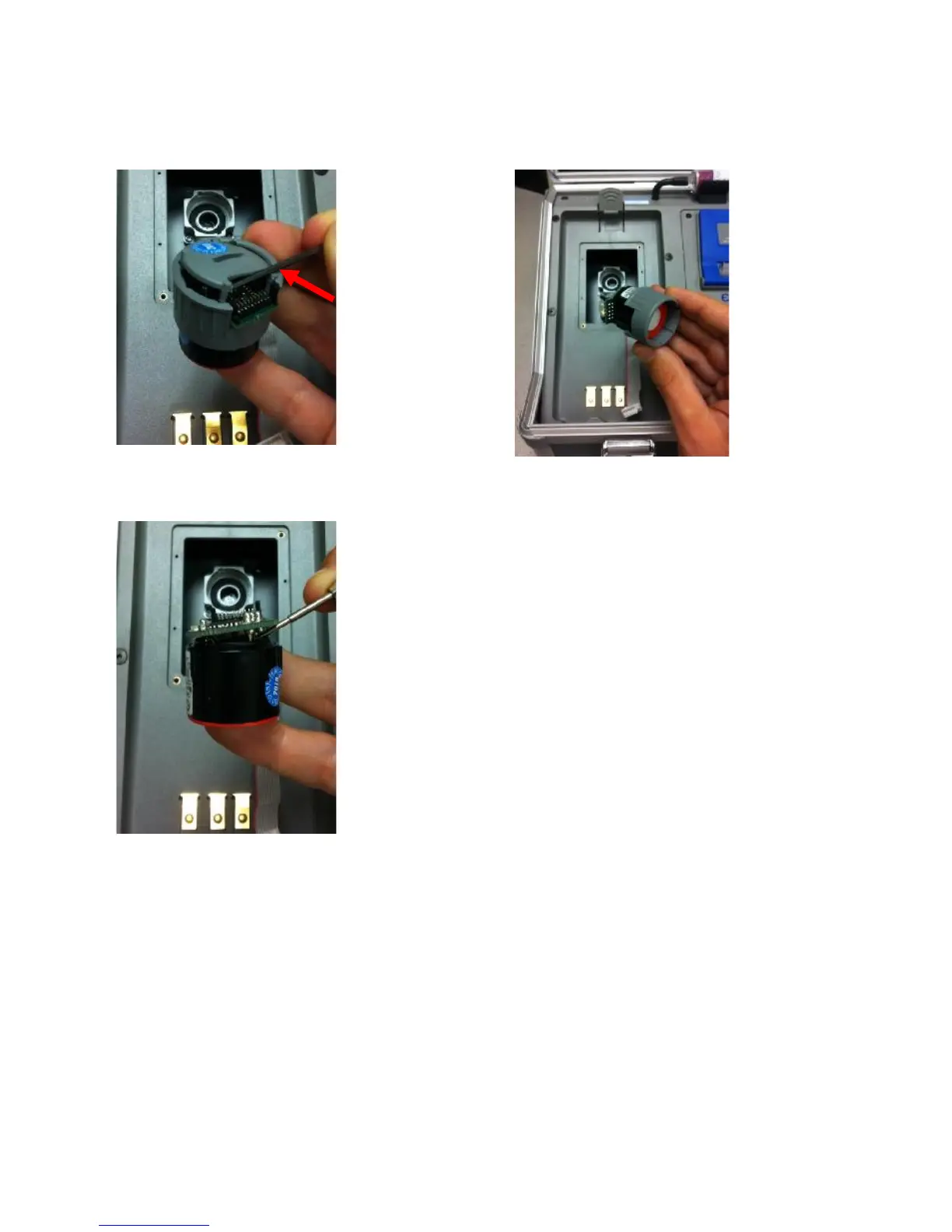
15.2 How to Change A5F CO Sensor (continued)
Step 5:
Pop open the
gray cap
using a small
screwdriver
Use the side
of the hous-
ing as a
leverage
point
Step 6:
After the
cap is
removed,
slide the
sensor out
of the
housing as
shown here
Step 7:
Remove the
board from
the sensor
using a small
screwdriver
Warning! PTC
embedded in glue
Pry from beneath the
dried glue so the PTC
does not separate from
the board
Failure to do so may
destroy PTC
Step 8: Place board onto new sensor
Step 9: Insert new sensor into gray housing and replace cap by
snapping into place
Step 10: Insert new sensor into analyzer, turn 45 degrees clockwise
to lock into place and replace ribbon cable
Step 11: Replace O2/CO cover plate and tighten screws with T-10
torx wrench
Step 12: Calibrate your new CO sensor using certified calibration gas

Other manuals for Ecom j2kn pro

Related product manuals