EasyManua.ls Logo

Ecom j2kn pro - Instrument Control and Status Monitoring

Ecom j2kn pro
44 pages
Print Icon
To Next Page IconTo Next Page
To Previous Page IconTo Previous Page
Loading...
Page 33
15.4 How to Change NO, NO2, SO2, and High CO
Sensors (continued)
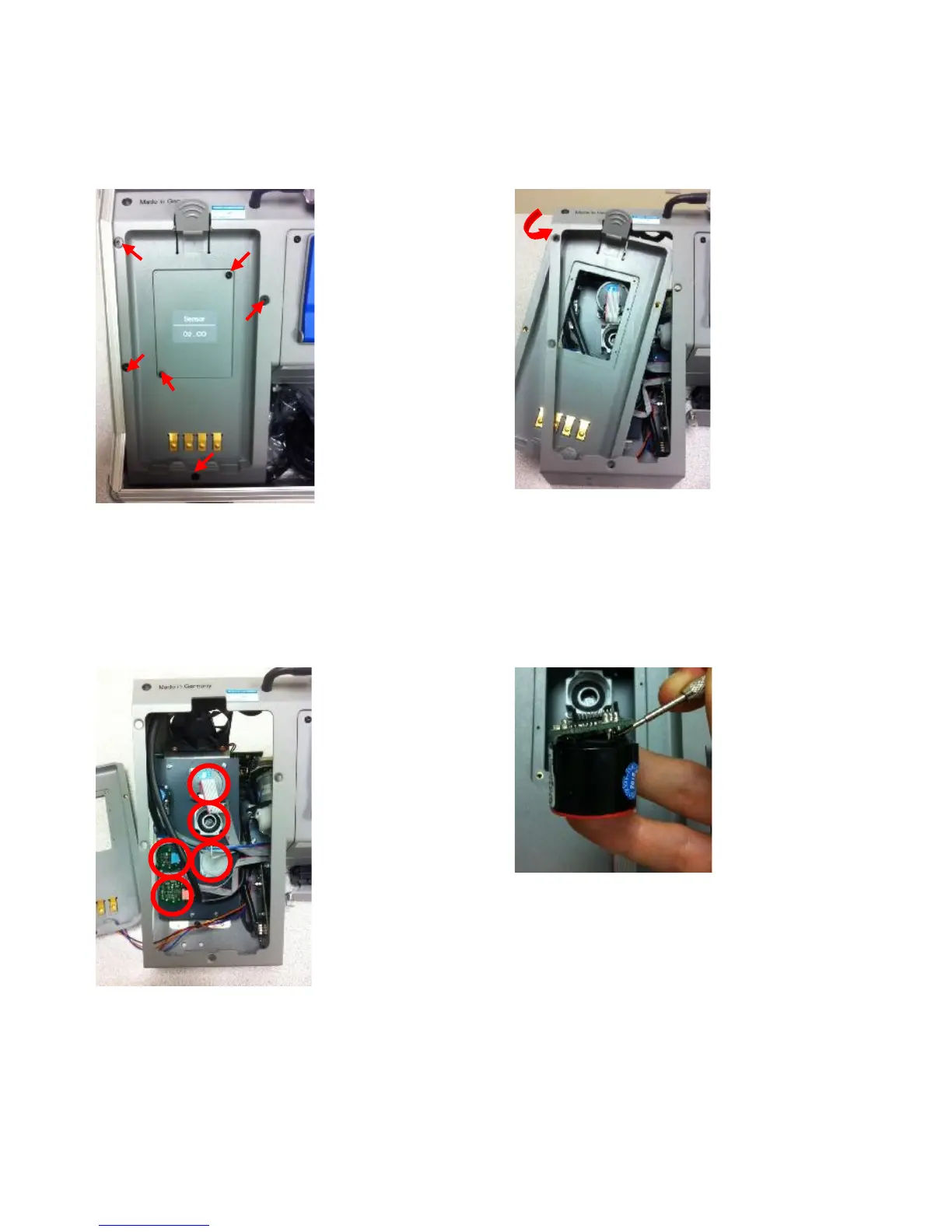
Step 5:
Use T-10 torx
wrench to
remove screws
shown here
Remove O2/CO
cover plate
Remove O2
sensor by
disconnecting
lead wires and
unscrewing
counter
clockwise
If necessary, break
wire tie mounted
in upper left corner
of base unit (see
arrow)
Step 6:
Remove
cradle as
shown here
(notice O2
sensor
removed)
Do not force
cradle—it
should swing
out without
too much
force
Step 7:
View of the
uncovered
sensor
manifold
To change the
sensor, remove
ribbon cable,
turn 45 deg-
rees counter
clockwise, and
pull directly out
Pry from beneath
the dried glue so
the PTC does not
separate from the
board—failure to
do so may destroy
PTC
Step 8:
Remove the
board from
the sensor
using a small
screwdriver
Warning:
PTC
embedded
in glue!
(continued on next page)

Other manuals for Ecom j2kn pro

Related product manuals