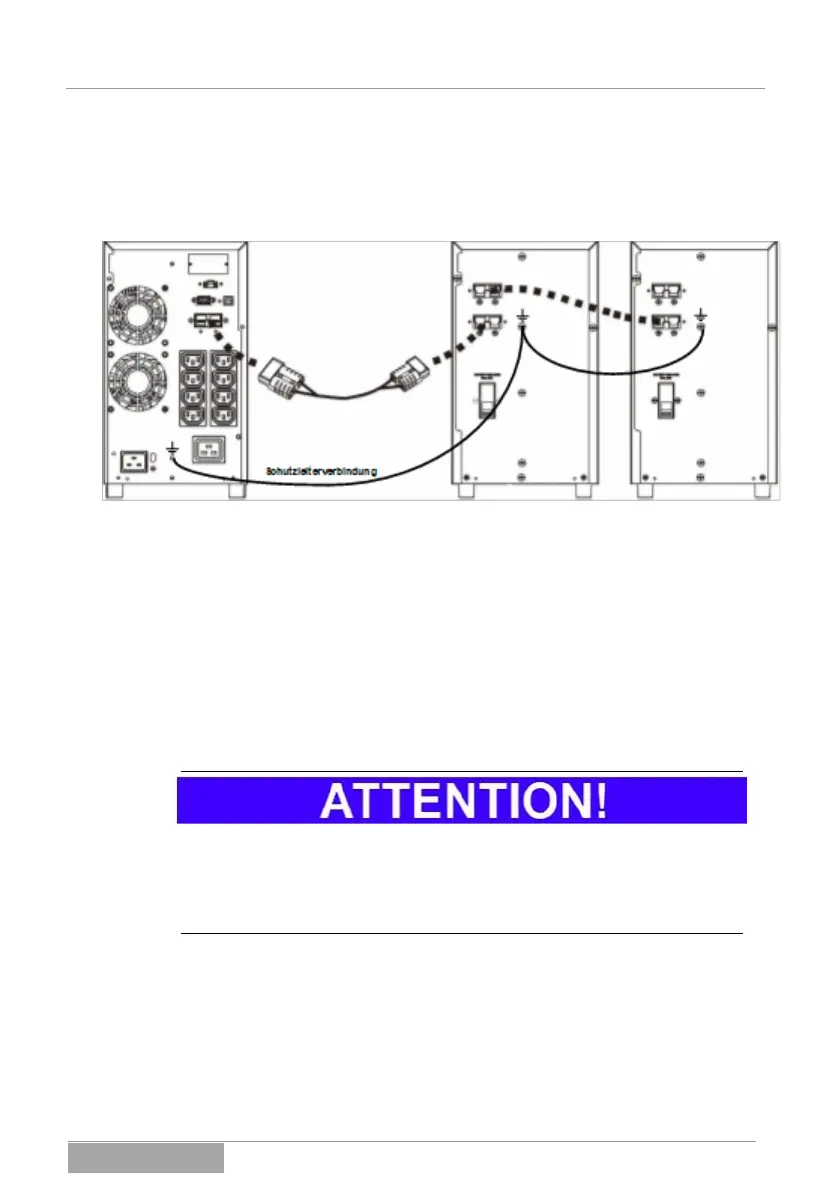
• Connect the battery bank cable with the plug-in connector intended
for this to the UPS and the battery bank according to the following fig-
ure. In doing so, please remove the covers of the connector plugs on
the UPS and the battery bank.
Fig. 5-4 Connection of the UPS (left) to the external battery bank(s).
The device arrangement can be supplemented by an additional battery bank at
any time. For this, connect the respective battery banks with each other:
• Couple the available socket on the first battery bank (BATTERY EX-
TENSION) with the battery bank output (UPS) of the second battery
bank.
With this, the connection work for the connection of one or more external battery
banks has been completed.
If the UPS has been coupled with the battery bank according to the instructions
described above, a reaction of the UPS should not occur. Neither a display in
the operating field occurs nor is the UPS active.
Also only use devices listed in the accessories as an external battery bank.
Products from other manufacturers are not permitted.
5.1.6 Extension of the system (INTELLIGENT SLOT)
The UPS device can be functionally extended with an adapter card at any time.
This includes the coupling to a network (SNMP) or the signal exchange to a su-
perordinate control system (DRY CONTACT) via a relay card. Please see here
for additional information 15 Optional accessories.



 To Next Page