9. Troubleshooting
Over the course of time, failures or malfunctions of the UPS, accumulators or
their surroundings can arise. In the event the UPS device is not working proper-
ly, please first check the current operation information in the display. Then at-
tempt to identify the problem by means of the following information:
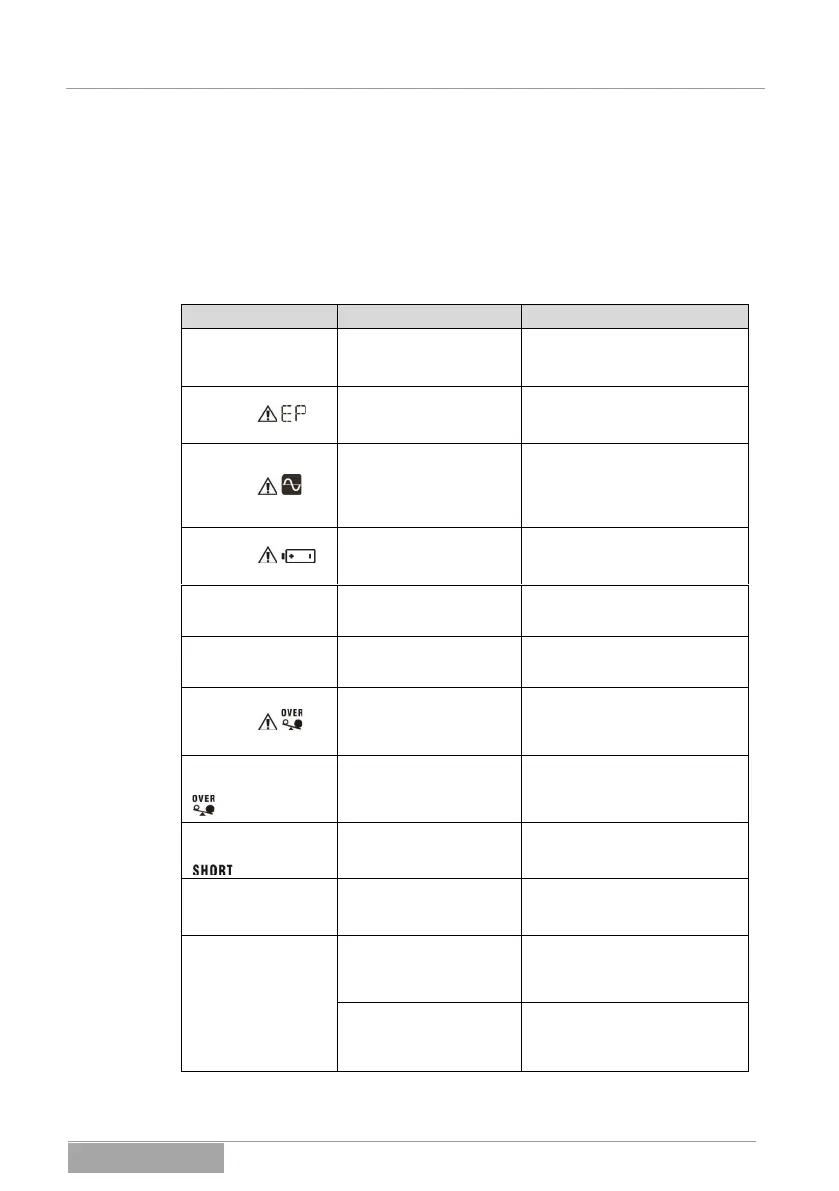
No display on the
UPS although the
network is present.
The power supply or the
UPS input is not properly
connected.
Check the network connection in
the wall socket or the fixed
connection at the UPS input.
The warning
indicator is
blinking.
The emergency dropping
(UPS output) is active
(EPO).
Remove the EPO triggering and
restart the system.
The warning
indicator is
blinking.
Phase and neutral con-
ductors (UPS input) are
reversed.
Rotate the connector plug
(Schuko) in the wall socket by
180°. In the case of a fixed
connection, exchange the phase
and neutral conductors.
The warning
indicator
is blinking.
The internal or external
battery bank is not
properly connected.
Check the connection of the
internal and/or external battery
bank.
The error code 27
appears.
The battery bank voltage
is too high or the charging
unit is defective.
Contact customer service.
The error code 28
appears.
The battery bank voltage
is too low or the charging
unit is defective.
Contact customer service.
The warning
indicator is
blinking.
The UPS output is over-
loaded. Depending on the
overload, the loads are
supplied by the bypass.
Remove the high load on the
UPS output.
The error code 43
and the symbol
appear.
The UPS switches off
automatically due to
serious overload at the
output.
Remove the very high load at
the output and restart the UPS.
The error code 14
and the symbol
appear.
The UPS switches off
automatically due to the
short circuit at the output.
Resolve the short circuit at the
UPS output and restart the UPS.
The error codes
01, 02, 03, 11, 12,
13, 41, 45 appear.
The UPS indicates an
internal error.
Contact customer service.
The autonomous
time is shorter
than expected.
The battery bank is not
fully charged.
Charge the battery bank com-
pletely regarding the capacity
and the charge current. Check
the autonomous time again.
The batteries in the
battery bank are degen-
erate or defective.
Contact customer service to
replace the battery bank or the
batteries.



 To Next Page