6.2 Setting the operation parameters (SETTINGS)
In general, the UPS must be in standby mode (STANDBY) in order to be able to
switch to the setting mode from there.
Generally, ensure that a battery bank, either internal or external, is connected to
the UPS and ready for operation during the setting work.
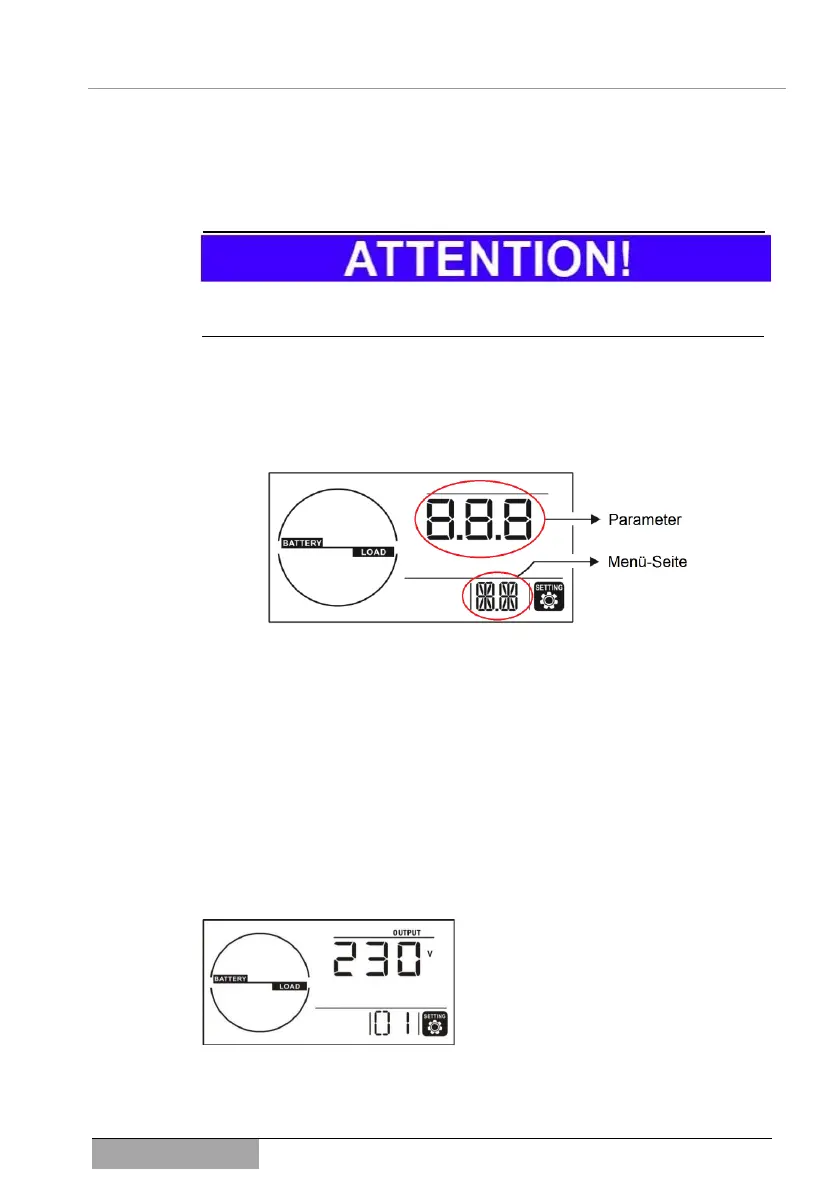
The setting mode can only be reached by a prolonged activation of the SELECT
button (longer than 3 seconds). The following display or the SETTING symbol
appears. The lower number sequence indicates the current menu page and the
upper number sequence indicates the corressponding parameters or value.
Fig. 6-1 Display of the setting mode of the UPS.
In order to be able to navigate within the setting mode or to change a parame-
ter, use the keypad according to the instructions under 3.3.1 The operating
panel of the UPS.
6.2.1 Settings of the UPS
✓ The device is in the setting mode (6.2).
Menu page 1: UPS output voltage
The output voltage can be set here. The
values available are: 200/208/220/230/240
VAC, whereby 230 VAC is determined as
the standard setting.



 To Next Page