ELAN HC6/HC12 INSTALLATION MANUAL
© ELAN 2010 | All rights reserved.
Page 14
Applications
This section describes typical applications using the HC6/HC12 for control. These are all
basic in nature and should be used for guideline purposes only. Each application can be
augmented as needed for individual circumstances. This section is for overall design
purposes.
Please see Chapter 3: HC6/HC12 Connections for specific wiring configurations.
HC6 Controlling an ELAN M86A
The M86A Multi-Room Audio Controller is specifically designed to be controlled using the
HC6 or HC12 System Controller.
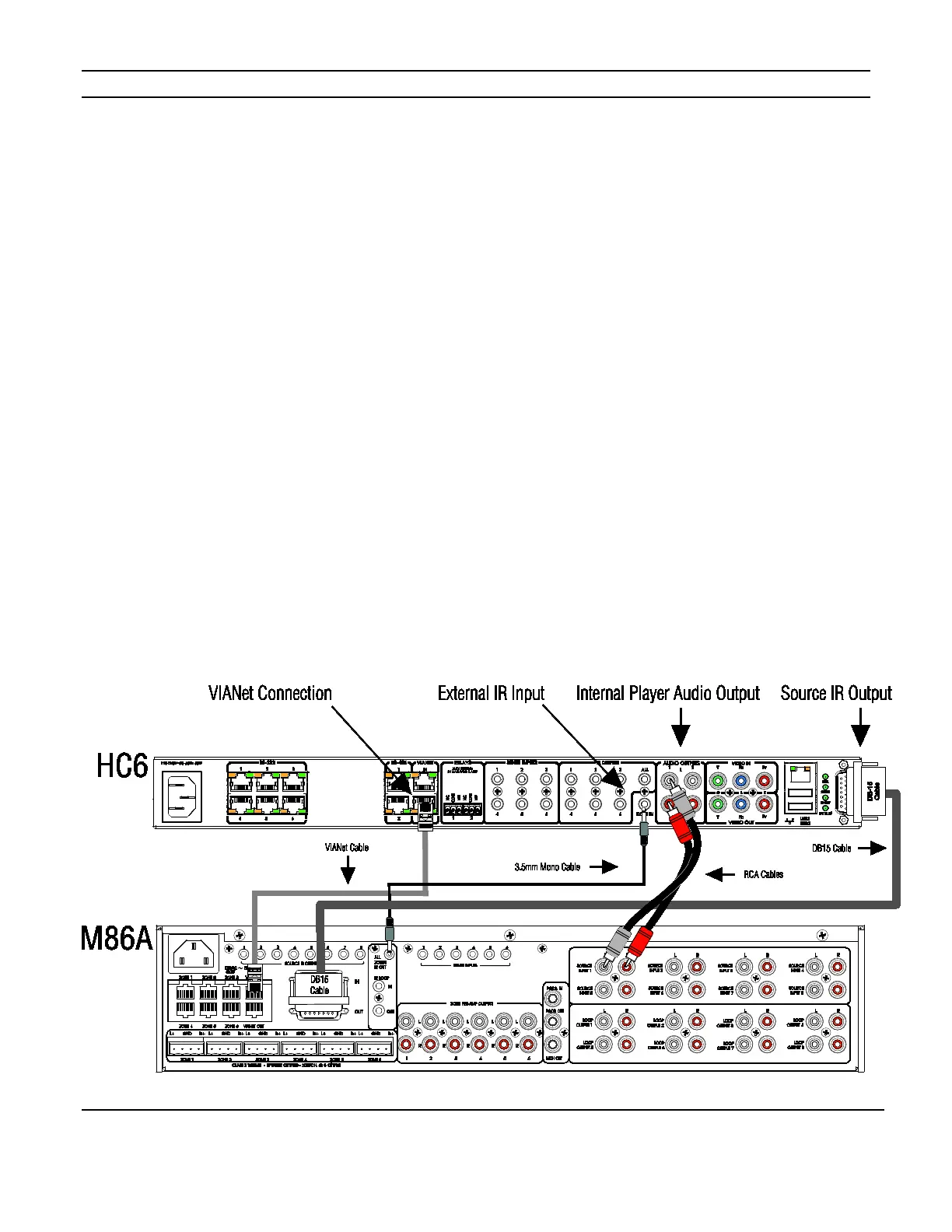
Connections include IR Output, External IR Input, and Internal Player line level audio. The
HC6 uses the VIANet connection to control the M86A. See Figure 2-1 for connections
between the HC6 and M86A. HC12 connections are identical.
In the ELAN configuration software, program the HC6 to control the M86A. See the
Integration Notes at www.elanhomesystems.com/dealer.
The M86A manual covers additional connections for sources, source IR outputs, speakers
and other devices.
Figure 2-1: HC6 / M86A Connections


 To Next Page