ELAN HC6/HC12 INSTALLATION MANUAL
© ELAN 2010 | All rights reserved.
Page 41
PPWM Precision Panel (Continued)
IR Outputs
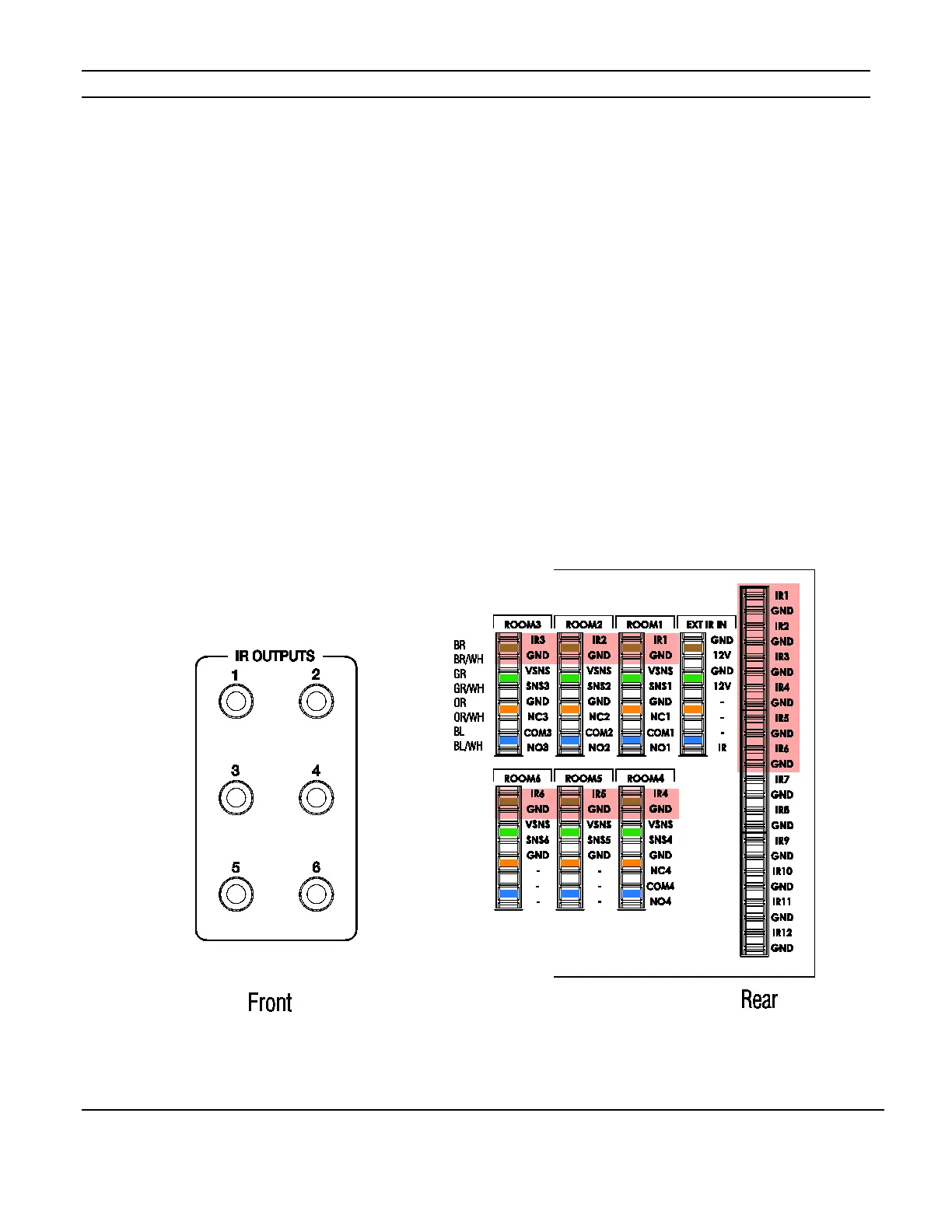
These connections route IR to the first six IR punch-downs on the reverse of the PPWM
and to the “Room” IR punch-downs. This allows IR to be sent to two emitters in a room.
IR “1” sends IR to Room 1, IR “2” sends IR to Room 2, etc. The IR Output ports of the
PPWM connect to the six IR Output ports of the System Controller using mono 3.5mm
cables. See Figure 5-4 below.
Use Cat5 to extend the IR signals to emitters connected to PPRM panels located in zones.
When using the 3.5mm connections, DO NOT connect the IR Link connection. This
could cause unintended duplication of IR commands.
Figure 5-4: 3.5mm IR Connections



 To Next Page