ELAN HC6/HC12 INSTALLATION MANUAL
© ELAN 2010 | All rights reserved.
Page 19
HC12 Controlling a Sunfire TGR-401 Receiver
The HC6/HC12 can be configured to control a number of 3
rd
party A/V receivers using serial
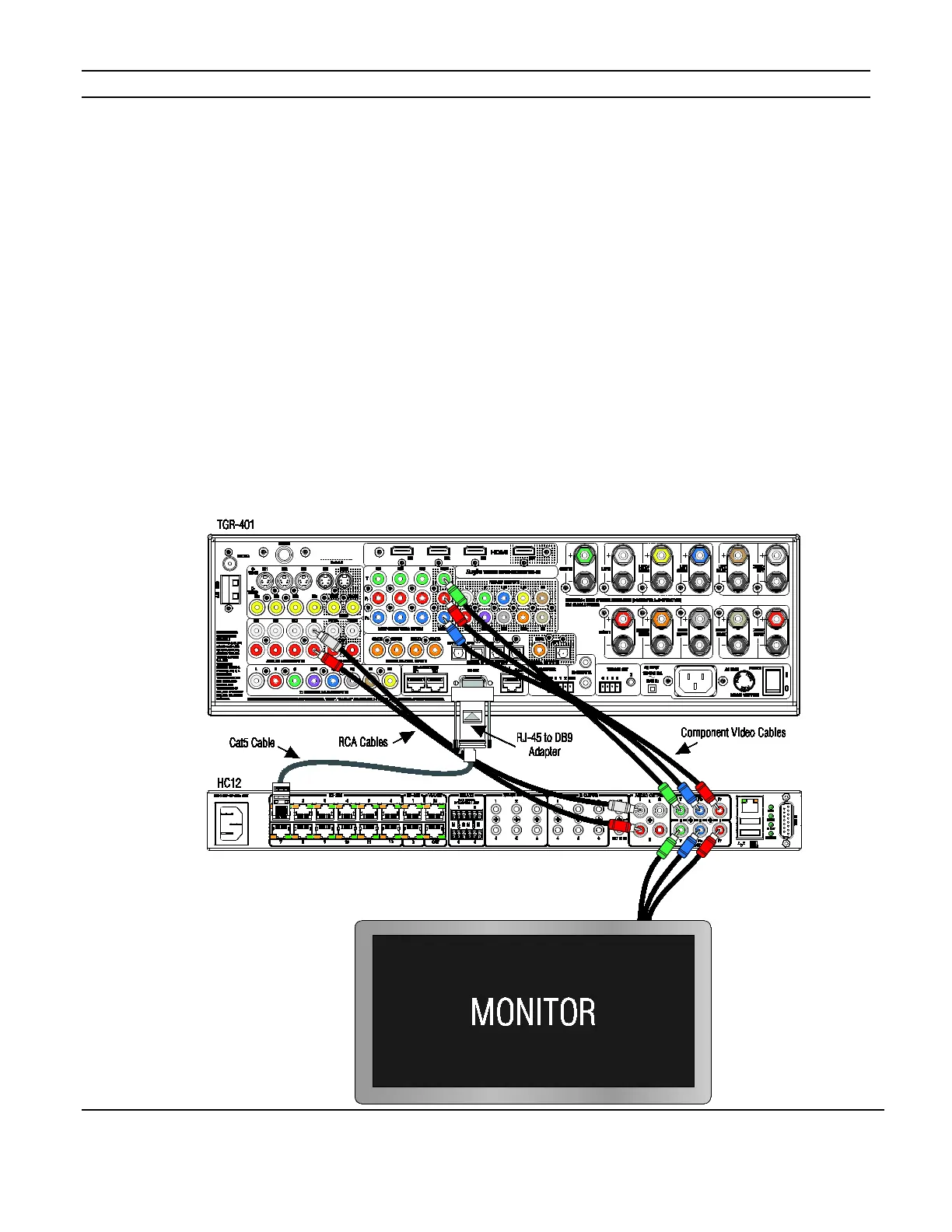
or IR commands. Figure 2-5 shows an HC12 controlling a Sunfire TGR-401 with serial
commands. The Internal Player is being used as a source. The component video out of
the TGR-401 is connected to the video input of the HC12 and the component video output
of the HC12 is connected to an input on the monitor. This allows source video, the
TGR-401’s On Screen Display (OSD) and the HC12’s OSD to be viewed on the monitor
without the need to switch inputs on the monitor. Comm port #1 of the HC12 is connected
to the RS-232 input of the TGR-401 using a DB9-RJ45 adapter.
In the ELAN configuration software, program the HC12 to control the TGR-401. See the
Integration Notes at www.elanhomesystems.com/dealer.
The TGR-401 manual covers additional connections for sources, speakers and other
devices.
Figure 2-5:HC12 / Receiver Connections


 To Next Page