ELAN HC6/HC12 INSTALLATION MANUAL
© ELAN 2010 | All rights reserved.
Page 45
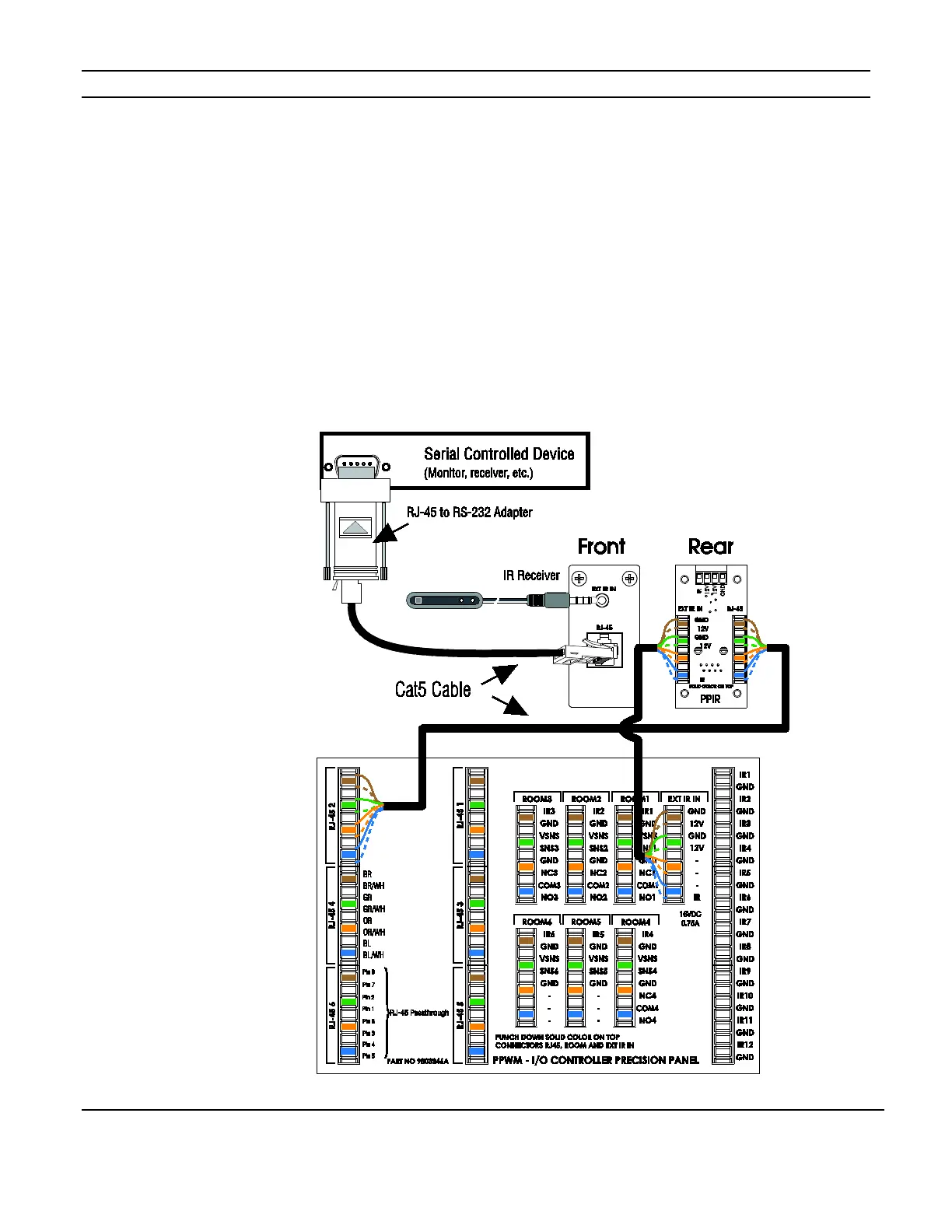
PPIR Precision Panel
The PPIR provides a connection point for IR receivers located in a zone. The RJ-45
connection can be used for zone located serial controlled devices, a network connection, or
other pass-through as needed.
Use Cat5 to connect the “Ext IR IN” punch-down on the rear of the PPIR to the EXT IR IN
connection on the reverse of the PPWM. Use Cat5 from the “RJ-45” punch-down of the
PPIR to an RJ-45 connection on the reverse of the PPWM. See Figure 5-8.
Optionally, a PPIR may be connected to a PPVN located at the head end as shown in Figure
5-12 on page 49.
Figure 5-8: PPIR Connection



 To Next Page